Raspberry Pi Zero 2 W
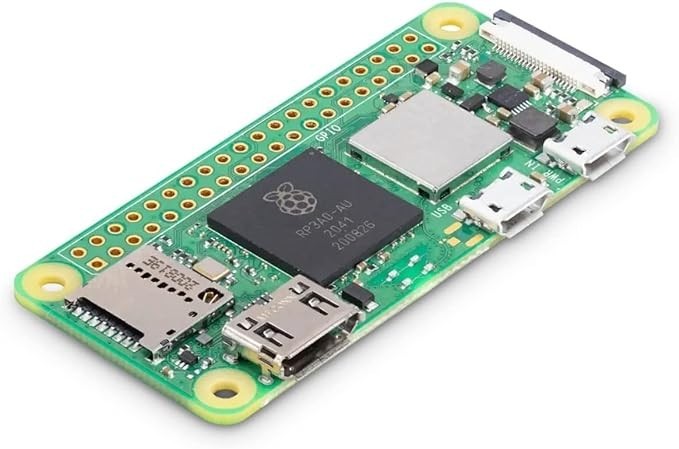
The Raspberry Pi Zero 2 W is a quad-core ARM Cortex-A53 Linux computer the size of a stick of gum, with WiFi, Bluetooth, a camera connector, and HDMI output for around fifteen dollars. It runs the same Raspberry Pi OS as the Pi 5, making it the smallest and cheapest way to run a full Linux stack.
Best ultra-cheap Linux board for headless services, skip if you need USB ports, Ethernet, or significant compute power.
Where to Buy
Pros
- Quad-core Cortex-A53 at 1GHz runs full Linux at a fraction of the Pi 5's price
- 65 x 30mm footprint — smallest Linux computer with WiFi in this comparison
- CSI camera connector for surveillance, timelapse, and machine vision projects
- 40-pin GPIO header — same pinout as full-size Raspberry Pi
Cons
- Only 512MB RAM — barely enough for modern Linux, no room for heavy applications
- Micro-USB for data and power — no USB-A ports, no USB-C
- WiFi 802.11 b/g/n (2.4GHz only) and BLE 4.2 — outdated wireless
- Single-core performance limits at 1GHz feel sluggish for interactive use
The $15 Linux Computer
The Zero 2 W runs the same Raspberry Pi OS (Debian Linux) as the Pi 5 — same apt packages, same Python, same systemd services. The difference is raw performance: the Cortex-A53 at 1GHz is roughly 5x slower than the Pi 5's Cortex-A76 at 2.4GHz, and 512MB RAM limits what you can run simultaneously.
For single-purpose headless servers — Pi-hole, WireGuard VPN, MQTT broker, or a simple web server — the Zero 2 W handles the job at a fraction of the cost and size of a full Pi 5. The constraints force simplicity, which is often a feature. The 65x30mm footprint fits inside project enclosures, behind monitors, or inside wall-mounted cases where a full Pi 5 physically cannot go. Power draw at idle is under 0.4W, compared to the Pi 5's 2-3W idle, making the Zero 2 W viable for always-on deployments where electricity cost and heat generation matter.
Ultra-Compact Projects: Where the Zero 2 W Shines
The Zero 2 W's 65x30mm footprint — roughly the size of a matchbox — unlocks project categories that no other Linux SBC can physically fit. A Pi-hole DNS sinkhole tucked behind a TV. A retro gaming handheld built into a 3D-printed Game Boy case with a 3.5-inch display and a LiPo battery. A security camera module hidden inside a birdhouse with a Pi Camera Module V2 on the CSI connector. A drone flight controller running MAVLink alongside a Raspberry Pi Camera for FPV streaming, where every gram of payload matters and the Zero 2 W's 10-gram weight (bare board) keeps the aircraft agile.
The 512MB RAM boundary defines what works and what does not. Pi-hole (80-120MB), motionEye (150-200MB), WireGuard VPN (50MB), Mosquitto MQTT broker (20MB), and lightweight Flask or Node.js dashboards (50-100MB) all run comfortably within the budget. Home Assistant (500MB+), Docker with multiple containers, Nextcloud, and any desktop environment exceed the 512MB ceiling and force the system into swap on the microSD card, which degrades performance to the point of unusability. The rule is simple: one service per Zero 2 W, headless, accessed over SSH or a minimal web interface.
Power consumption is the Zero 2 W's hidden superpower for battery-operated builds. The board draws approximately 0.4W at idle and 1.2W under full quad-core load — compared to the Pi 5's 2-3W idle and 8-12W under stress. A 10,000mAh USB power bank at 5V delivers roughly 50Wh, which sustains the Zero 2 W for 40-100 hours depending on CPU utilization. This makes solar-powered deployments practical with panels as small as 2-3W. Wildlife camera traps, remote weather stations, and off-grid sensor gateways all benefit from a Linux stack that sips power at levels approaching microcontroller territory. The trade-off is clear: you sacrifice the Pi 5's performance for a form factor and power profile that enable projects the Pi 5 physically cannot serve.
Pi-hole and Headless Server Performance
The Zero 2 W is the most popular Pi-hole deployment target for good reason. Pi-hole's DNS sinkhole uses roughly 80-120MB of RAM including the OS, leaving 350-400MB free on the Zero 2 W's 512MB. DNS query latency averages 2-5ms, well within acceptable limits for whole-home ad blocking. The quad-core Cortex-A53 handles the gravity list updates and FTLDNS query processing without noticeable lag even on networks with 20+ devices.
Beyond Pi-hole, the Zero 2 W handles WireGuard VPN (50-80MB RAM, AES-NI absent but ChaCha20 runs adequately at 30-40Mbps throughput), MQTT brokers like Mosquitto (under 20MB RAM for typical IoT message volumes), and lightweight web servers with Flask or Node.js for single-page dashboards. The pattern that works: one service per Zero 2 W, headless, configured via SSH. Attempting to run two or more RAM-hungry services simultaneously pushes into swap, and swapping to a microSD card degrades performance catastrophically. For multi-service deployments, the Pi 5 with 4-8GB RAM is the correct tool.
Thermal Throttling and GPIO Projects
The Zero 2 W's BCM2710A1 SoC (the same silicon as the Pi 3B, repackaged into a smaller die) runs warm under sustained load. Without any heatsink, the CPU throttles from 1GHz to 600MHz within 10-15 minutes of continuous multi-core stress. A small adhesive copper heatsink ($2) reduces throttling significantly, and the Pimoroni Heatsink Case eliminates it entirely for most workloads. For headless server use where CPU usage rarely exceeds 20%, throttling is a non-issue. For compute-intensive tasks like video transcoding or compilation, plan for thermal management.
The 40-pin GPIO header shares the same pinout as the full-size Pi 5, which means HATs and pHATs designed for the Zero form factor work directly. The GPIO is 3.3V logic, compatible with most modern sensors and displays. Common GPIO projects include driving WS2812B LED strips via PWM, reading DHT22 temperature and humidity sensors, controlling relay modules for home automation, and interfacing with OLED displays over I2C. The SPI and I2C buses run at the same speeds as the Pi 5, so peripheral compatibility is excellent. The main GPIO limitation is the Zero 2 W's lack of a standard-size USB-A port — USB peripherals require a Micro-USB OTG adapter, adding bulk and fragility to projects that need USB devices like Zigbee coordinators or RTL-SDR dongles.
Common Gotchas
512MB RAM is the hard ceiling for what this board can do. Running a desktop GUI is technically possible but painfully slow. The Zero 2 W shines as a headless server (PiHole, VPN endpoint, camera) or a lightweight GUI application (retro gaming, kiosk). Don't expect to open a web browser.
The mini-HDMI and micro-USB ports require adapters to connect standard cables. Budget $5-8 for a mini-HDMI to HDMI adapter and a micro-USB OTG adapter. These are easy to lose — buy spares.
WiFi range is poor compared to the Pi 4/5. The Zero 2 W's chip antenna provides adequate signal for same-room use but struggles through multiple walls. For distant installations (garage, shed), consider a USB WiFi adapter with a better antenna — but the single micro-USB port means you need a USB hub.
GPIO header pins are NOT pre-soldered. You need to solder a 40-pin header yourself (or buy the pre-soldered "WH" variant for $2-3 more). This surprises beginners who expect to plug in HATs immediately.
Full Specifications
Processor
| Specification | Value |
|---|---|
| Architecture | ARM Cortex-A53 [1] |
| CPU Cores | 4 [1] |
| Clock Speed | 1000 MHz [1] |
Memory
| Specification | Value |
|---|---|
| Flash | 0 MB [1] |
| SRAM | 0 KB [1] |
| ram_gb | 0.512 GB [1] |
| ram_type | LPDDR2 [1] |
| storage | MicroSD [1] |
Connectivity
| Specification | Value |
|---|---|
| WiFi | 802.11 b/g/n [1] |
| Bluetooth | 4.2 [1] |
I/O & Interfaces
| Specification | Value |
|---|---|
| GPIO Pins | 40 [2] |
| USB | Micro-USB OTG + Micro-USB (power) [2] |
| display_output | Mini-HDMI (1080p) [2] |
| Camera Interface | MIPI CSI-2 [2] |
Power
| Specification | Value |
|---|---|
| Input Voltage | 5 V [1] |
| power_draw | 0.4-1.5 W [1] |
Physical
| Specification | Value |
|---|---|
| Dimensions | 65 x 30 mm [2] |
| Form Factor | Raspberry Pi Zero (compact) [2] |
Who Should Buy This
Pi-hole uses under 100MB RAM. The Zero 2 W runs it perfectly. WiFi connects to your network. Headless setup means you never plug in a monitor. Costs less than a year of ad-blocker subscriptions.
CSI camera connector for a Pi Camera Module. WiFi streams video. 65x30mm fits in tiny enclosures. Quad-core handles motion detection and recording simultaneously.
512MB RAM is insufficient for Home Assistant with more than a handful of integrations. The Pi 5 (4GB) handles this properly with room to grow.
Better alternative: Raspberry Pi 5 (4GB)
Ecosystem & Community
Runs the same Raspberry Pi OS and community projects as the full-size Pi. Pi-hole, RetroPie, motionEye, and WireGuard all have dedicated Zero 2 W guides. The tiny form factor has spawned a dedicated accessory ecosystem of cases, HATs, and camera mounts designed for the 65x30mm footprint.
Compatible Software
What to Build First
Block ads and trackers for every device on your home network with a tiny Zero 2 W running Pi-hole. Set-and-forget DNS sinkhole that costs less than a month of premium ad blocker subscriptions.
View tutorial →Must-Have Accessories
Tutorials & Resources
- Pi-hole Installation GuideOfficial installation guide — works perfectly on the Zero 2 Wtutorial
- RaspberryTips Zero 2 W GuideSetup walkthrough, project ideas, and performance tips for the Zero 2 Wtutorial
- Raspberry Pi Zero 2 W ReviewPerformance benchmarks, thermal testing, and comparison to original Zero Wreview
Frequently Asked Questions
Raspberry Pi Zero 2 W vs Pico W: what is the difference?
The Zero 2 W runs Linux (quad-core Cortex-A53, 512MB RAM, full OS). The Pico W is a microcontroller (dual-core Cortex-M0+, 264KB SRAM, bare-metal or MicroPython). Use the Zero for tasks needing Linux packages; use the Pico for low-power embedded control.
Can the Zero 2 W run Docker?
Technically yes, but 512MB RAM makes it impractical. A single container might work for a lightweight service, but multi-container deployments will swap constantly. Use the Pi 5 (4GB+) for Docker.
Is 512MB enough for anything useful?
Yes — for single-purpose headless servers. Pi-hole uses ~100MB, WireGuard uses ~50MB, a basic web server uses ~100MB. The problem is running multiple services simultaneously or using a desktop GUI, which alone consumes 300MB+.
Why Micro-USB instead of USB-C?
The Zero 2 W was designed for cost minimization. Micro-USB is cheaper than USB-C. The trade-off is fewer accessories and no USB-C PD. Power via the Micro-USB power port; data via the Micro-USB OTG port (requires an OTG adapter for USB devices).
Can I use the Zero 2 W as a retro gaming console?
Yes. RetroPie runs on the Zero 2 W for NES, SNES, Game Boy, and early PlayStation emulation. The quad-core handles these systems adequately. N64 and newer systems will struggle with the limited CPU and RAM.
Compared In
Raspberry Pi Zero 2 W appears in 3 buying guides on PAM Finds. These weigh it directly against the alternatives.