Ledger Nano S Plus
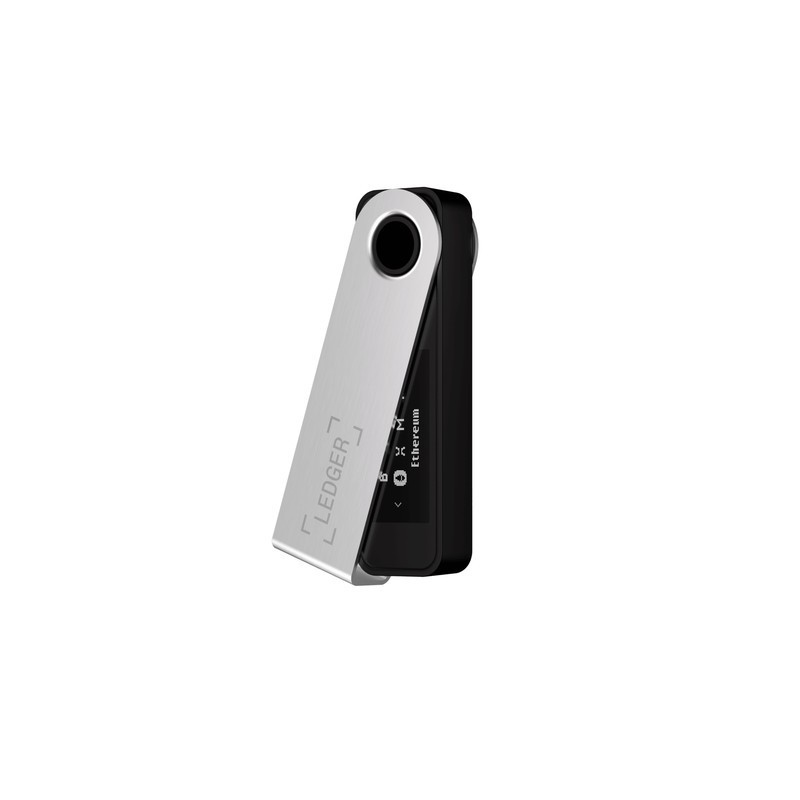
The Ledger Nano S Plus is Ledger's entry-level hardware wallet with a CC EAL6+ certified secure element, USB-C, OLED display, and support for 5,500+ cryptocurrencies across 50+ blockchains. It provides cold storage security without Bluetooth or batteries — a simple plug-and-sign device that keeps private keys offline.
Best budget hardware wallet for USB-only cold storage, skip if you need Bluetooth for mobile signing.
Where to Buy
Pros
- CC EAL6+ secure element (ST33K1M5) — highest security certification in consumer hardware wallets
- 5,500+ supported cryptocurrencies including Bitcoin, Ethereum, Solana, and all major tokens
- USB-C connection — modern and reversible
- Up to 100 apps installed simultaneously — manage many chains without swapping
- 21g and 62mm — smallest and lightest Ledger device
Cons
- No Bluetooth — requires USB cable for every transaction
- Small 128x64 OLED display makes verifying long addresses difficult
- Two physical buttons are less intuitive than touchscreen alternatives
- Cannot sign transactions on mobile without Bluetooth
Security Architecture
The ST33K1M5 secure element stores private keys in tamper-resistant hardware with CC EAL6+ certification — the same security standard used in passports and government ID cards. Private keys are generated on the device and never leave the secure element. Transaction signing happens inside the chip; the host computer only sees the signed transaction. The secure element is designed to resist physical attacks including voltage glitching, laser fault injection, and side-channel analysis that could extract secrets from a general-purpose microcontroller.
Ledger's custom BOLOS operating system runs on the secure element, isolating each cryptocurrency app from the others. A compromised Bitcoin app cannot access your Ethereum keys. Each app runs in its own sandbox with strictly controlled access to the secure element's key storage. This architecture is the core advantage of hardware wallets over software wallets — even a compromised computer cannot extract your keys. The host machine sends unsigned transaction data to the device, the user verifies the details on the OLED screen, and only the signed transaction leaves the secure element.
The 100-app capacity is a practical advantage over the original Nano S, which supported only 3-5 apps simultaneously. With the Nano S Plus, you can install Bitcoin, Ethereum, Solana, Cardano, Polkadot, and dozens more chains without constantly swapping apps. Each app consumes roughly 1-4KB of the secure element's storage, and removing an app never deletes the associated keys — reinstalling it later recovers access to your funds on that chain automatically.
The USB-Only Trade-off
No Bluetooth eliminates an entire wireless attack surface. Every Bluetooth device has a pairing vulnerability window and potential for relay attacks. The Bluetooth Low Energy protocol has seen multiple CVEs over the years, including KNOB (Key Negotiation of Bluetooth) and BIAS (Bluetooth Impersonation AttackS). By being USB-only, the Nano S Plus can only be compromised through physical access or a compromised USB connection — both significantly harder to execute remotely. Security researchers often recommend the Nano S Plus over the Nano X specifically because of this reduced attack surface.
The trade-off is convenience. Every transaction requires plugging in the USB-C cable, navigating with two physical buttons on the tiny OLED, and confirming on the device. For daily traders, this friction adds up. For long-term holders who transact monthly, it is a non-issue. Some Android phones support USB-C OTG connections, which allows direct wired signing from a phone — but iOS devices cannot connect, making the Nano X with Bluetooth the only Ledger option for iPhone users.
The seed backup question is critical regardless of which Ledger you choose, but it deserves emphasis here because the Nano S Plus is often a first hardware wallet. Your 24-word recovery phrase is the master key to all your funds — not the device itself. Write it on the included recovery sheet, then upgrade to a steel seed backup plate rated for fire and flood. Never store your seed digitally (no photos, no cloud drives, no password managers). If you lose the device but have the seed, you recover everything on a new Ledger. If someone gets the seed, they take everything regardless of your PIN.
The Rational Budget Choice
The Ledger Nano S Plus shares every security-critical component with Ledger's more expensive devices. The ST33K1M5 secure element with CC EAL6+ certification is identical across the Nano S Plus, Nano X, and Flex — the same chip, the same tamper resistance, the same side-channel attack protections. The BOLOS operating system running on that secure element is the same codebase. The 5,500+ supported cryptocurrencies across 50+ blockchains are identical. The Ledger Live desktop app provides the same portfolio management, staking, swaps, and NFT features regardless of which device is connected. You are not getting inferior security at a lower price — you are getting identical security with fewer connectivity options.
What you give up compared to the Nano X is precisely two things: Bluetooth 5.0 and a 100mAh lithium battery. No Bluetooth means no wireless connection to phones — every transaction requires plugging in a USB-C cable to a computer. No battery means the device draws power from USB — there is nothing to charge, nothing to degrade over 2-3 years of charge cycles, and nothing that will eventually require replacement or reduce the device to USB-only operation anyway (which is what happens to aging Nano X batteries). The Nano S Plus you buy today will function identically in a decade, assuming USB-C ports still exist.
The desktop-only workflow — plug in USB-C, open Ledger Live, review transaction on the OLED, press two buttons to confirm, unplug — is actually preferable for security purists. Every wireless protocol introduces attack surface. Bluetooth has accumulated dozens of CVEs over the years, including KNOB, BIAS, BLURtooth, and BrakTooth. While Ledger's secure element architecture means these vulnerabilities cannot extract private keys, a zero-wireless device eliminates even the theoretical risk. For users who hold Bitcoin and Ethereum as long-term stores of value and transact weekly or less, the Nano S Plus delivers the same protection as a device costing twice as much, with the added benefit of zero wireless attack vectors and zero battery maintenance.
Nano S Plus vs Nano X: When Bluetooth Matters
The decision between Nano S Plus and Nano X comes down to one question: do you need to sign transactions from your phone? If yes, the Nano X's Bluetooth 5.0 is the only way to connect to Ledger Live on iOS and most Android phones. If you only sign from a desktop or laptop, the Nano S Plus delivers identical security for significantly less money.
Both devices use the same ST33K1M5 secure element with CC EAL6+ certification. Both support the same 5,500+ cryptocurrencies across 50+ blockchains. Both run the same BOLOS operating system and use the same Ledger Live app for portfolio management. The Nano X adds a 100mAh lithium battery for wireless operation, which means it has a component that degrades over time — after 2-3 years of regular charging cycles, battery capacity drops noticeably. The Nano S Plus, having no battery, will function identically in 10 years as it does today.
For users holding Bitcoin as a long-term store of value with infrequent transactions, the Nano S Plus is the rational choice. For active DeFi participants who approve token swaps and liquidity positions from their phone throughout the day, the Nano X's Bluetooth saves meaningful time. Both remain far more secure than any software wallet or exchange custody arrangement.
Common Gotchas
No Bluetooth means no iPhone compatibility. iOS does not support USB OTG connections for Ledger devices. If your primary phone is an iPhone and you want to manage crypto on mobile, you need the Nano X (Bluetooth) or Ledger Flex (Bluetooth + NFC). The Nano S Plus is desktop/laptop only.
The USB-C port is physically recessed, and some USB-C cables with thick connectors don't seat properly. This causes intermittent "device not recognized" errors. The included cable works; if using your own, test with a cable that has a slim connector housing.
Storage for third-party apps is limited to roughly 1.5MB, enough for 3-5 blockchain apps simultaneously. If you use 10+ different chains, you'll need to uninstall and reinstall apps when switching between chains. Your funds and accounts remain safe — only the app is removed, not the keys.
Ledger Live's exchange/swap features route through third-party providers (Changelly, Paraswap) and sometimes offer worse rates than using the exchanges directly. For large swaps, compare rates on the exchange before swapping in Ledger Live.
Full Specifications
Processor
| Specification | Value |
|---|---|
| security_chip | ST33K1M5 (CC EAL6+) [1] |
| certification | CC EAL6+ [1] |
Memory
| Specification | Value |
|---|---|
| storage_apps | Up to 100 apps [1] |
| supported_coins | 5,500+ [1] |
| supported_chains | 50+ blockchains [1] |
Connectivity
| Specification | Value |
|---|---|
| connectivity | USB-C [1] |
| bluetooth | No [1] |
| nfc | No [1] |
I/O & Interfaces
| Specification | Value |
|---|---|
| Display | 128x64 OLED [1] |
| Touch | No (2 physical buttons) [1] |
| USB | USB-C [1] |
Power
| Specification | Value |
|---|---|
| battery | No (USB-powered) [1] |
Physical
| Specification | Value |
|---|---|
| Dimensions | 62.39 x 17.40 x 8.24 mm [1] |
| weight_g | 21 g [1] |
| Form Factor | USB stick [1] |
Who Should Buy This
USB-C plugs into your computer. Ledger Live desktop app manages everything. No Bluetooth means one less wireless attack vector. 5,500+ coins cover virtually any portfolio.
No Bluetooth means you cannot sign transactions from a phone app. The Ledger Nano X adds Bluetooth for mobile Ledger Live. The Trezor Safe 5 adds NFC for tap-to-sign.
Better alternative: Ledger Nano X
No Bluetooth, no NFC, no battery, no wireless radio of any kind. The only data path is USB-C. Fewer attack surfaces than any wireless-enabled wallet. The secure element is CC EAL6+ certified.
Ecosystem & Community
Ledger's ecosystem centers on Ledger Live (desktop + mobile app) for portfolio management and the Ledger Developer Portal for third-party app integration. Over 200 wallet apps, integration with MetaMask, Rabby, and all major DeFi protocols. r/ledgerwallet provides community support.
Compatible Software
What to Build First
Set up the Nano S Plus, generate your 24-word seed phrase, write it on the included recovery sheet, receive your first Bitcoin transaction, and verify the address on the device display. Then upgrade to a steel seed backup for fire/water protection.
View tutorial →Must-Have Accessories
Video Reviews & Tutorials
Tutorials & Resources
- Ledger AcademyComprehensive crypto security education from basics to advanced DeFidocs
- Nano S Plus Setup GuideOfficial step-by-step setup tutorial with security best practicestutorial
- Ledger LiveOpen-source portfolio management app for all Ledger devicesgithub
Frequently Asked Questions
Ledger Nano S Plus vs Nano X: what is the difference?
The Nano X adds Bluetooth 5.0, a 100mAh battery for wireless operation, and a slightly larger physical size. The Nano S Plus is USB-C only with no battery. Both use the same ST33K1M5 secure element and support the same 5,500+ coins.
Is the Nano S Plus secure enough for large holdings?
Yes. The CC EAL6+ secure element is the same chip used in the Nano X and Ledger Flex. The security architecture is identical. The only difference is the lack of Bluetooth, which some consider a security advantage.
How many cryptocurrencies can the Nano S Plus hold?
Up to 100 apps simultaneously, each supporting one or more blockchains. With 5,500+ supported assets across 50+ chains, virtually any cryptocurrency portfolio can be managed. Apps can be added and removed without affecting stored keys.
Can I use the Nano S Plus with my phone?
Not wirelessly. The Nano S Plus requires a USB-C connection. Some Android phones support USB-C OTG for direct connection, but iOS devices cannot connect. For mobile use, the Nano X with Bluetooth is required.
What happens if I lose my Ledger Nano S Plus?
Your funds are safe. The device is PIN-protected (3 wrong attempts triggers a wipe). Your 24-word recovery phrase, written down during setup, can restore all accounts to a new Ledger device or any compatible wallet.
Compared In
Ledger Nano S Plus appears in 5 buying guides on PAM Finds. These weigh it directly against the alternatives.