Ledger Nano X
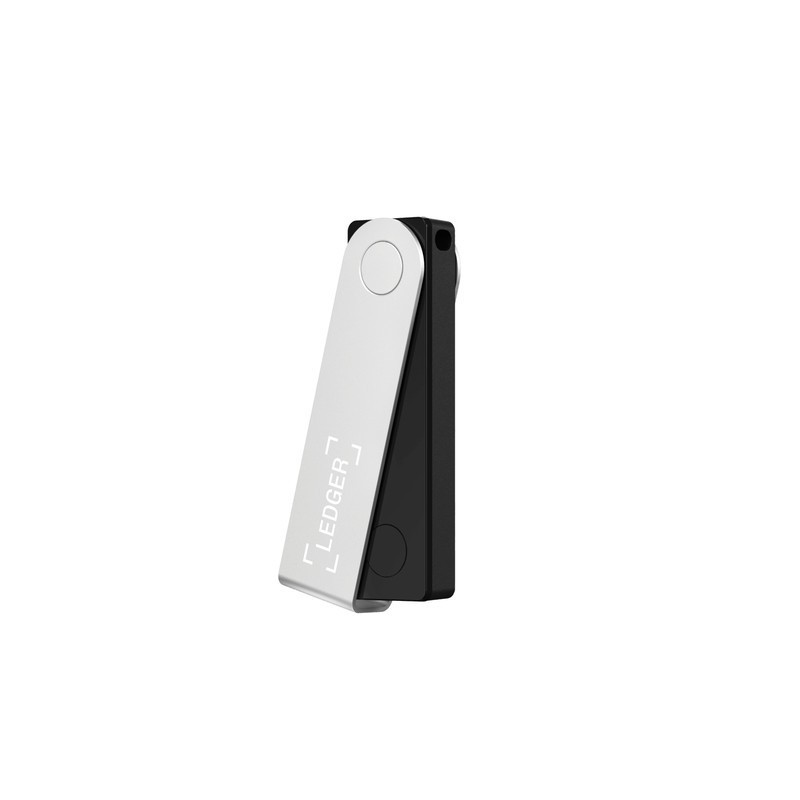
The Ledger Nano X adds Bluetooth 5.0 and a 100mAh battery to Ledger's proven CC EAL6+ secure element platform, enabling wireless transaction signing from mobile phones via the Ledger Live app. It is the most popular Ledger device, balancing security with the convenience of mobile crypto management.
Best hardware wallet for mobile crypto management, skip if you prefer USB-only security or want a touchscreen.
Where to Buy
Pros
- Bluetooth 5.0 enables mobile signing via Ledger Live on iOS and Android
- Same CC EAL6+ secure element (ST33K1M5) as all Ledger devices
- 100mAh battery for 8 hours of wireless operation
- 5,500+ supported cryptocurrencies across 50+ blockchains
- USB-C for desktop use when Bluetooth is not desired
Cons
- Bluetooth adds a theoretical wireless attack surface (mitigated by secure element)
- 128x64 OLED display is small for verifying transaction details
- Two physical buttons — no touchscreen like the Flex or Trezor Safe 5
- Battery degrades over time — eventually requires USB-C for all use
Mobile Signing via Bluetooth
The Nano X's Bluetooth 5.0 connection to the Ledger Live mobile app is its primary differentiator. You can check balances, initiate transactions, and approve them by pressing the physical buttons on the Nano X — all without a USB cable. The secure element ensures that private keys never leave the device over Bluetooth; only signed transactions are transmitted. This makes the Nano X the only Ledger device that works with iPhones, since iOS does not support USB OTG connections for hardware wallets.
Ledger's Bluetooth implementation uses encrypted pairing with the Ledger Live app. The secure element handles cryptographic operations independently of the Bluetooth channel. Even if the Bluetooth connection were compromised, an attacker would see only signed transaction data — they cannot extract private keys or forge signatures. The Bluetooth stack communicates with the application processor, not the secure element directly. An attacker intercepting Bluetooth traffic sees the same data your computer would see over USB — unsigned transaction proposals going in, signed transactions coming out, with no exposure of key material at any point in the process.
The mobile experience in Ledger Live is genuinely polished. Portfolio overview, real-time price tracking, token swaps via Paraswap integration, staking for supported chains (Ethereum, Solana, Cosmos, Polkadot), and NFT gallery all work over Bluetooth. You can review and approve a DeFi transaction while standing in line at a coffee shop — the Nano X stays in your pocket, you approve on the device's two buttons by feel. For users who interact with DeFi protocols multiple times per day, the wireless convenience adds up to hours saved per week compared to the plug-and-unplug workflow of the Nano S Plus.
Battery Life and Charging
The 100mAh lithium-polymer battery provides approximately 8 hours of active Bluetooth use — enough for a full day of intermittent signing and portfolio checks. Standby time extends to several weeks with Bluetooth in sleep mode. Charging via USB-C takes roughly 2 hours from empty to full. During charging, the device remains fully functional for USB-C signing, so you never need to wait.
Battery degradation is the Nano X's one consumable component. After 300-500 charge cycles (roughly 2-3 years of daily charging), capacity drops noticeably. Ledger has acknowledged this and offers battery replacement through their support program, but it requires shipping the device. The Nano S Plus, having no battery, avoids this concern entirely. For users who primarily sign from a desktop and only occasionally need mobile signing, keeping Bluetooth off (which dramatically extends battery life) and enabling it only for mobile sessions is a practical compromise.
For travel, the Nano X is the clear winner in the Ledger lineup. It is the only Ledger device that provides complete functionality away from a computer — check balances, receive funds, and sign transactions entirely from your phone. International travelers who need to manage crypto across time zones without carrying a laptop find the Bluetooth capability invaluable. The device fits on a keychain and powers on instantly when you need to sign.
iOS Compatibility: The iPhone Factor
The Ledger Nano X is the only Ledger device that works with iPhones, and this single fact drives a significant portion of its sales. iOS does not support USB OTG (On-The-Go) connections for hardware wallet devices — plugging a Nano S Plus into an iPhone via a Lightning-to-USB-C or USB-C adapter does not establish a data connection for Ledger Live. Apple restricts USB accessory communication to MFi-certified devices, and no hardware wallet manufacturer has pursued MFi certification. Bluetooth is the only wireless path, and among current Ledger devices, only the Nano X has Bluetooth 5.0. The Ledger Flex also has Bluetooth 5.2, but at a significantly higher price point.
The Bluetooth pairing process uses Ledger's encrypted communication protocol. When you first connect the Nano X to Ledger Live on iOS, the app generates a unique pairing key displayed on both the phone screen and the Nano X's OLED. You verify the codes match and confirm on the device. All subsequent communication is encrypted with this pairing key. The secure element handles all cryptographic operations independently — private keys never transit the Bluetooth channel. What travels over Bluetooth is unsigned transaction data (from phone to device) and signed transaction data (from device to phone). Even a compromised Bluetooth connection cannot extract keys or forge signatures.
Ledger Live on iOS provides the full portfolio management experience: real-time balance tracking across all installed chains, transaction history with fiat value at time of transaction, built-in token swaps via Paraswap and Changelly, staking for Ethereum (via Lido and Kiln), Solana, Cosmos, Polkadot, and Tezos, NFT gallery with collection browsing, and a DApp browser for interacting with DeFi protocols directly from the app. For iPhone-primary users — which represents roughly 55% of the US smartphone market — the Nano X is effectively the default Ledger choice. The Nano S Plus works only when you are at a desktop or laptop, which for many users means their crypto is inaccessible during most of their waking hours.
Nano X vs Nano S Plus vs Flex
The three current Ledger devices share the same ST33K1M5 secure element and support the same 5,500+ assets. The differences are interface and connectivity: the Nano S Plus is USB-only at the lowest price. The Nano X adds Bluetooth and battery at mid-range price. The Flex adds a 2.84-inch E-Ink touchscreen, Bluetooth 5.2, NFC, and a card-sized form factor at premium price.
For most users, the Nano X hits the sweet spot — mobile signing capability without the premium of the Flex's touchscreen. The Nano S Plus is the rational budget choice for desktop-only users. The Flex is for those who want the best possible verification experience and are willing to pay for it. The Ledger Live app ecosystem is identical across all three devices, so your software experience does not change if you upgrade later — only the hardware interaction model changes.
Coin support breadth is identical across the lineup at 5,500+ cryptocurrencies across 50+ blockchains, covering every major chain (Bitcoin, Ethereum, Solana, Cardano, Polkadot, Avalanche, Cosmos, Algorand, Tezos, and dozens more) plus all ERC-20, SPL, and other standard tokens. Third-party app developers build against the Ledger SDK, and every app certified for one Ledger device works on all three. If you start with a Nano X and upgrade to a Flex later, restore from your 24-word seed and every account, every token, every chain is immediately accessible.
Common Gotchas
Battery degradation is real — after 2-3 years of daily charging, the 100mAh battery holds noticeably less charge. Eventually the Nano X becomes USB-C-only, functionally identical to the Nano S Plus. Ledger offers battery replacement via their support program, but it requires shipping the device.
Bluetooth pairing on Android can be flaky — some users report needing to re-pair after Android OS updates. The workaround is to delete the Bluetooth pairing on both the Nano X and the phone, then re-pair from scratch. iOS pairing is more stable.
The Ledger Recover controversy (2023) revealed that firmware updates COULD potentially extract seed phrases from the secure element for cloud backup. While Ledger Recover is optional and opt-in, the fact that the firmware has this capability concerned the open-source community. Trezor's open-source firmware cannot hide such features. This is the single biggest trust issue cited on r/cryptocurrency.
The 128x64 OLED display is genuinely small for verifying long contract addresses and DeFi transaction details. You end up scrolling through 20+ screens to verify a complex smart contract interaction. The Ledger Flex with its 2.84-inch E-Ink display solves this at a premium.
Full Specifications
Processor
| Specification | Value |
|---|---|
| security_chip | ST33K1M5 (CC EAL6+) [1] |
| certification | CC EAL6+ [1] |
Memory
| Specification | Value |
|---|---|
| storage_apps | Up to 100 apps [1] |
| supported_coins | 5,500+ [1] |
| supported_chains | 50+ blockchains [1] |
Connectivity
| Specification | Value |
|---|---|
| connectivity | USB-C + Bluetooth [1] |
| bluetooth | Bluetooth 5.0 [1] |
| nfc | No [1] |
I/O & Interfaces
| Specification | Value |
|---|---|
| Display | 128x64 OLED [1] |
| Touch | No (2 physical buttons) [1] |
| USB | USB-C [1] |
Power
| Specification | Value |
|---|---|
| battery | 100 mAh Li-Ion (8 hours) [1] |
Physical
| Specification | Value |
|---|---|
| Dimensions | 72 x 18.6 x 11.75 mm [1] |
| weight_g | 34 g [1] |
| Form Factor | USB stick (wireless) [1] |
Who Should Buy This
Bluetooth for phone signing, USB-C for laptop. Ledger Live works on both platforms with the same device. 8-hour battery covers a day of mobile use.
The Nano S Plus does the same job for less money. If you only plug in once a month to check balances, Bluetooth adds cost without benefit.
Better alternative: Ledger Nano S Plus
The Ledger Flex has a 2.84-inch E-Ink touchscreen, Bluetooth 5.2, and NFC for a premium experience. If budget allows, the Flex is the better device.
Better alternative: Ledger Flex
Ecosystem & Community
The Nano X works with Ledger Live (millions of users across iOS, Android, and desktop) and third-party wallets like Sparrow, with a 100K+ Reddit community for support.
Compatible Software
What to Build First
Initialize the Nano X, generate a 24-word recovery phrase, back it up on a steel plate, install the Bitcoin app via Ledger Live, and receive your first BTC transaction. The complete cold storage setup takes about 30 minutes and secures your keys offline from day one.
View tutorial →Must-Have Accessories
Video Reviews & Tutorials
Tutorials & Resources
- Ledger AcademyOfficial educational resource covering crypto security fundamentals, wallet setup, DeFi, and self-custody best practicestutorial
Frequently Asked Questions
Is Bluetooth on the Nano X a security risk?
The risk is minimal. Private keys never leave the secure element. Bluetooth transmits only signed transactions and public data. The secure element performs all cryptographic operations independently. However, if you want zero wireless attack surface, the Nano S Plus is USB-only.
How long does the Nano X battery last?
Approximately 8 hours of active Bluetooth use. Standby time is several weeks. The battery charges via USB-C. Over time (2-3 years), battery capacity degrades but the device always works via USB-C.
Can the Nano X connect to iPhone?
Yes, via Bluetooth. Ledger Live for iOS supports the Nano X over Bluetooth. The Nano S Plus cannot connect to iPhones as it requires USB-C and iOS does not support USB-C OTG for Ledger.
Ledger Nano X vs Trezor Safe 3: which is better?
The Nano X has Bluetooth for mobile use. The Trezor Safe 3 is USB-only but has fully open-source firmware and supports 9,000+ coins (vs 5,500+). Choose the Nano X for mobile signing; choose the Trezor for open-source verification and broader coin support.
Can I use the Nano X without Bluetooth?
Yes. It works exactly like the Nano S Plus via USB-C. You can disable Bluetooth in settings if you want USB-only operation. Many users keep Bluetooth off by default and enable it only for mobile sessions.
Compared In
Ledger Nano X appears in 6 buying guides on PAM Finds. These weigh it directly against the alternatives.