BIGTREETECH CB1
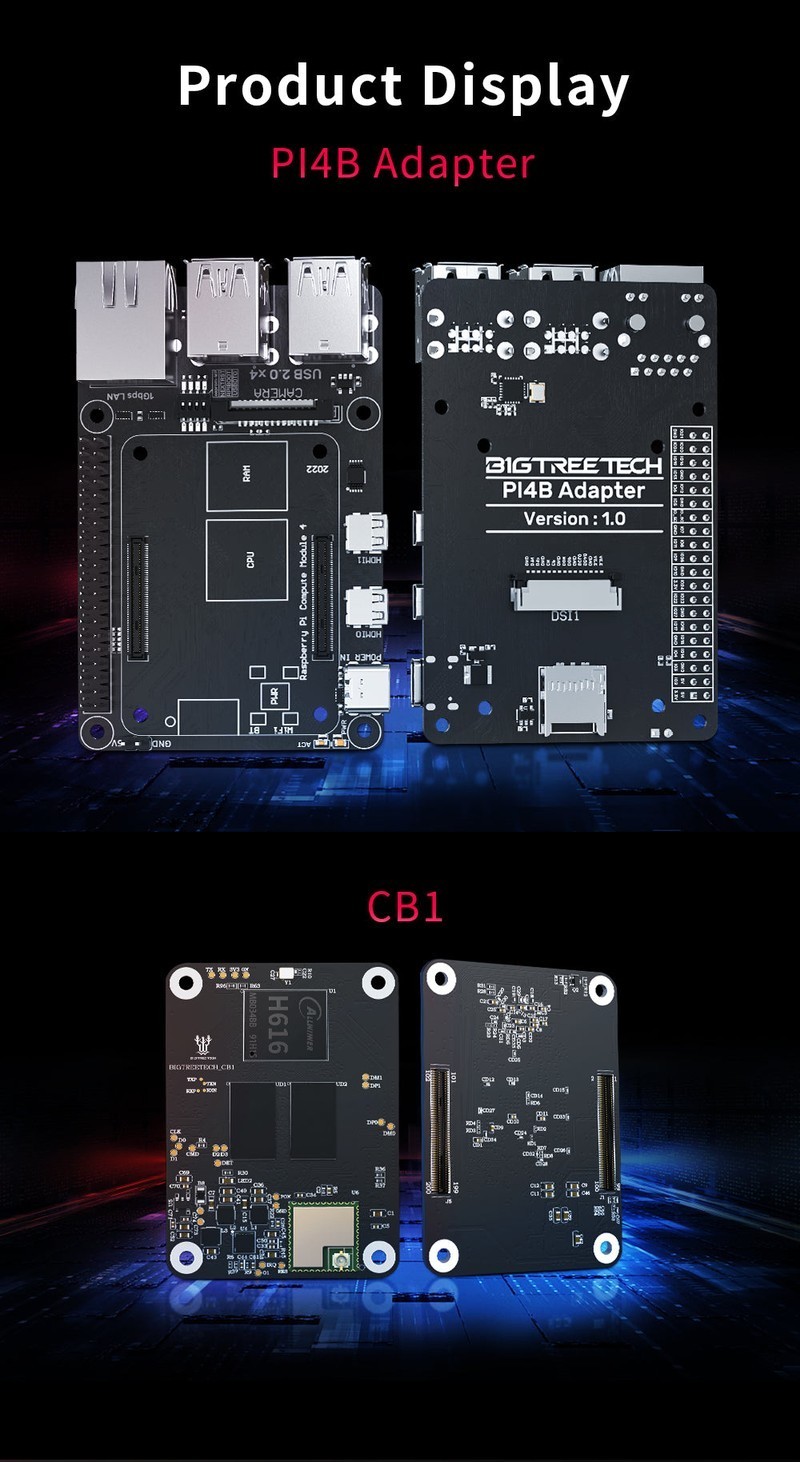
The BTT CB1 is the cheapest Klipper host board available, pairing an Allwinner H616 quad-core Cortex-A53 at 1.5GHz with 1GB RAM in the Raspberry Pi CM4 form factor. At $35, it plugs directly into the BTT Manta M8P's SBC socket to run MainsailOS, eliminating the need for a separate Raspberry Pi.
The cheapest path to a Klipper host — perfect for Manta M8P pairing, limited by 1GB RAM.
Where to Buy
Pros
- CM4-compatible form factor plugs directly into BTT Manta M8P or M5P SBC socket
- At $35, it costs half the price of a Raspberry Pi 4 2GB
- Quad-core Cortex-A53 at 1.5GHz runs Klipper, Mainsail, and KlipperScreen simultaneously
- BTT provides a ready-to-flash MainsailOS image with pre-configured Klipper
Cons
- 1GB RAM limits concurrent processes — avoid running OctoPrint alongside Klipper
- No Gigabit Ethernet — 100Mbit Fast Ethernet only
- WiFi via external USB dongle — no onboard wireless
- Only works in CM4-socket boards — no standalone use without a carrier board
Performance for Klipper
The Allwinner H616's four Cortex-A53 cores at 1.5GHz provide enough processing power for Klipper's host-side workload. Klipper offloads real-time motion planning to the MCU (like the Manta M8P's STM32H723), so the host primarily handles the web interface rendering, G-code parsing, macro execution, and input shaping analysis. For these tasks, the H616 is more than adequate — Mainsail pages load in under 2 seconds, and input shaper analysis completes in 10-15 seconds.
1GB of RAM is the minimum viable for a Klipper host. Running Mainsail or Fluidd as the web frontend, Moonraker as the API layer, and Klipper itself consumes approximately 600-700MB. This leaves 300-400MB free, which is sufficient for normal operation but tight if you add webcam streaming (crowsnest uses 100-200MB), timelapse plugins, or attempt to run OctoPrint alongside Klipper. The CB1 does not have swap space configured by default on BTT's MainsailOS image — adding a swap file to the microSD card can prevent out-of-memory crashes but will slow the system when swap is actively used.
For the core Klipper workflow — uploading G-code, starting prints, monitoring temperature, and running macros — the CB1 performs identically to a Raspberry Pi 4 2GB. You will only notice the difference when multitasking beyond Klipper's primary role.
CM4 Form Factor and Integration
The CB1 uses the Raspberry Pi CM4 connector pinout, making it electrically compatible with any CM4 carrier board. In practice, it is designed for and tested with the BTT Manta M8P and M5P. The physical integration is clean: the CB1 snaps onto the Manta M8P's underside via the 100-pin CM4 connector, and power comes from the mainboard's integrated 5V/3A regulator. No separate USB power cable, no mounting brackets, no additional wiring.
Connectivity is limited compared to a full Raspberry Pi. There is no onboard WiFi — wireless connectivity requires a USB WiFi dongle connected through the carrier board's USB headers. Ethernet is 100Mbit Fast Ethernet, not Gigabit. For most Klipper setups where the host is wired via Ethernet in a printer enclosure, 100Mbit is more than sufficient for web interface access and G-code file uploads (even a 200MB G-code file transfers in about 16 seconds over 100Mbit). If you need Gigabit or onboard WiFi, the CB2 at $45 provides both.
Other CM4 carriers may physically accept the CB1, but BTT does not officially support or test compatibility beyond their own boards. Community reports indicate the CB1 works on some third-party CM4 carriers, but driver support and boot configuration may require manual adjustment. If you are using a non-BTT carrier board, the Raspberry Pi CM4 is the safer choice for guaranteed compatibility.
CB1 vs CB2 vs Raspberry Pi: Which to Choose
The choice between the three compute module options for the Manta M8P comes down to workload and budget. The CB1 at $35 handles pure Klipper hosting without extras. The CB2 at $45 adds 2GB RAM, Gigabit Ethernet, 16GB eMMC, and onboard WiFi — a worthwhile upgrade if you plan webcam streaming or want reliable eMMC storage. A Raspberry Pi CM4 with 2GB RAM and WiFi costs $55-$65 but provides the broadest software compatibility and the strongest community support.
The practical decision for most builders: if you are building a Voron and want the cheapest possible Klipper host with no frills, the CB1 delivers. The $10 saved versus the CB2 can go toward better stepper drivers or a nicer hotend. If you know you will want a webcam for monitoring or a timelapse setup, spend the extra $10 on the CB2 from the start — upgrading later means reflashing the OS and potentially reconfiguring Klipper.
Storage reliability deserves mention. The CB1 boots from a microSD card, which is the most common failure point in always-on SBC deployments. MicroSD cards wear out from continuous log writes and G-code caching, and they are vulnerable to corruption from sudden power loss (which happens every time you flip the printer's power switch). The CB2's 16GB onboard eMMC has significantly better write endurance. If you run your printer daily, the CB2's eMMC will outlast multiple microSD cards. For the CB1, using a high-endurance microSD card (Samsung PRO Endurance, SanDisk MAX Endurance) and configuring log rotation mitigates the risk.
Thermal Management and Reliability
The Allwinner H616 runs warm under sustained Klipper load, and thermal management is not optional — it directly affects print reliability. Without a heatsink, the H616 die reaches 75-80°C within 30 minutes of continuous printing under typical ambient conditions (22-25°C room temperature). At 85°C, the H616 begins thermal throttling, reducing clock speed from 1.5GHz to as low as 1.0GHz. Klipper's real-time stepper timing is sensitive to host-side latency — when the CPU throttles, the communication buffer between the host and MCU can underrun, triggering "Timer too close" errors that pause or abort the print.
A basic aluminum heatsink (included with some Manta M8P bundles, or roughly $3 separately) drops peak temperatures by 15-20°C, keeping the H616 at 55-65°C under sustained load in open air. This provides adequate thermal margin for room-temperature environments. However, enclosed printers with chamber heating change the equation significantly. A Voron 2.4 running ABS with the chamber at 50-60°C raises the ambient temperature around the electronics bay to match. The CB1's thermal headroom shrinks from 20°C (85°C throttle minus 65°C die temp) to as little as 5-10°C when the surrounding air is 55°C.
For enclosed heated-chamber printers, adding a small 30mm or 40mm fan directed at the CB1's heatsink is strongly recommended. Many Voron builders print a fan duct that clips to the Manta M8P and directs airflow from the electronics bay fan directly over the CB1 module. The STL files for these ducts are available on Printables and the Voron user mods repository. An alternative approach is mounting the CB1 outside the heated chamber entirely — running a longer USB cable from the MCU to a Pi or CB1 located in a separate ventilated electronics enclosure beneath the printer.
MicroSD card reliability compounds the thermal concern. Flash memory write endurance degrades at elevated temperatures — a microSD card rated for 100,000 write cycles at 25°C may see that figure halve at 55°C. Since the CB1 boots exclusively from microSD (unlike the CB2's onboard eMMC), card failure in a hot electronics bay is the single most common CB1 reliability issue reported by Voron builders. Using a high-endurance card (Samsung PRO Endurance or SanDisk MAX Endurance) and configuring aggressive log rotation in MainsailOS mitigates this, but does not eliminate it.
Full Specifications
Processor
| Specification | Value |
|---|---|
| Architecture | ARM Cortex-A53 [1] |
| CPU Cores | 4 [1] |
| Clock Speed | 1500 MHz [1] |
Memory
| Specification | Value |
|---|---|
| ram_gb | 1 GB [1] |
| storage | MicroSD (TF card) [1] |
Connectivity
| Specification | Value |
|---|---|
| WiFi | 802.11 b/g/n/ac [1] |
| ethernet | 100M Ethernet (via USB adapter) [1] |
I/O & Interfaces
| Specification | Value |
|---|---|
| USB | 2x USB 2.0 [2] |
| display_port | HDMI [2] |
Physical
| Specification | Value |
|---|---|
| Dimensions | 40 x 55 mm [2] |
| Form Factor | CM4-compatible SBC module [2] |
Who Should Buy This
The CB1 plugs directly into the Manta M8P's SBC socket, powered by the board's 5V regulator. Flash BTT's MainsailOS image, insert the module, and the Klipper web interface is accessible within minutes.
At $35, the CB1 is the cheapest way to run Klipper. The 1GB RAM handles Klipper + Mainsail comfortably. Just don't add Octoprint or heavy webcam processing on top.
The CB1's 1GB RAM and 100Mbit Ethernet can bottleneck during timelapse rendering. The CB2 at $45 doubles the RAM to 2GB and adds Gigabit Ethernet for smoother webcam streaming.
Better alternative: BIGTREETECH CB2
The CB1 requires a CM4-compatible socket. For standalone use, the BTT Pi V1.2 at $30 has the same Allwinner H616 in a Pi form factor with USB ports and HDMI.
Better alternative: BIGTREETECH Pi V1.2
If configuring firmware and wiring stepper drivers feels like a lot, the Bambu Lab A1 Mini prints out of the box for under $200.
Better alternative: Bambu Lab A1 Mini
Ecosystem & Community
The CB1 is the cheapest path into the Klipper ecosystem as a host. Designed specifically for the Manta M8P socket, it runs MainsailOS or FluiddOS for a complete Klipper web interface. Limited by 1GB RAM but sufficient for basic Klipper hosting.
Compatible Software
What to Build First
Insert the CB1 into the Manta M8P's CM4-compatible socket, flash MainsailOS to microSD, and boot directly into a working Klipper host. The cheapest path from zero to a running Klipper printer.
View tutorial →Must-Have Accessories
Tutorials & Resources
- BTT CB1 WikiOfficial setup guide, OS images, and troubleshootingdocs
- MainsailOSPre-built OS image with Klipper, Moonraker, and Mainsail web UIgithub
- Klipper FirmwareThe firmware the CB1 hosts — manages motion planning and G-code executiongithub
Frequently Asked Questions
What is the difference between the BTT CB1 and CB2?
The CB2 has a faster Rockchip RK3566 CPU at 1.8GHz, 2GB RAM (vs 1GB), 16GB onboard eMMC, Gigabit Ethernet, and onboard WiFi. It costs $45 vs the CB1's $35. Choose the CB2 if you plan to run webcam streaming or additional services.
Can I use the BTT CB1 with a Raspberry Pi CM4 carrier board?
The CB1 uses the CM4 connector pinout and physically fits CM4 carriers. BTT officially supports it on the Manta M8P and M5P. Other CM4 carriers may work but are untested by BTT.
Does the CB1 run MainsailOS?
Yes. BTT provides a pre-built MainsailOS image for the CB1 that includes Klipper, Moonraker, and Mainsail pre-configured. Flash to a microSD card and boot. The web interface is accessible via the CB1's IP address.
Is 1GB RAM enough for Klipper?
Yes, for Klipper + Mainsail + Moonraker alone. The stack uses about 600-700MB. Avoid running additional services like OctoPrint, webcam timelapse rendering, or Home Assistant simultaneously. For heavier workloads, the CB2 with 2GB RAM is recommended.
Does the CB1 have WiFi?
No onboard WiFi. You need a USB WiFi dongle connected through the carrier board's USB headers. Most Klipper setups use wired Ethernet instead, and the CB1's 100Mbit Ethernet port is sufficient for the web interface and file uploads.
Can I use the CB1 as a standalone computer?
No. The CB1 is a compute module that requires a carrier board with a CM4 socket. For a standalone Klipper host with USB ports and HDMI, use the BTT Pi V1.2 ($30) or a Raspberry Pi.
Should I get the CB1 or a Raspberry Pi 4?
Get the CB1 if you have a Manta M8P and want the cleanest integration at half the price. Get a Raspberry Pi 4 if you want more RAM, Gigabit Ethernet, onboard WiFi, and the ability to use the board for other projects when not printing.
Compared In
BIGTREETECH CB1 appears in 3 buying guides on PAM Finds. These weigh it directly against the alternatives.