BIGTREETECH CB2
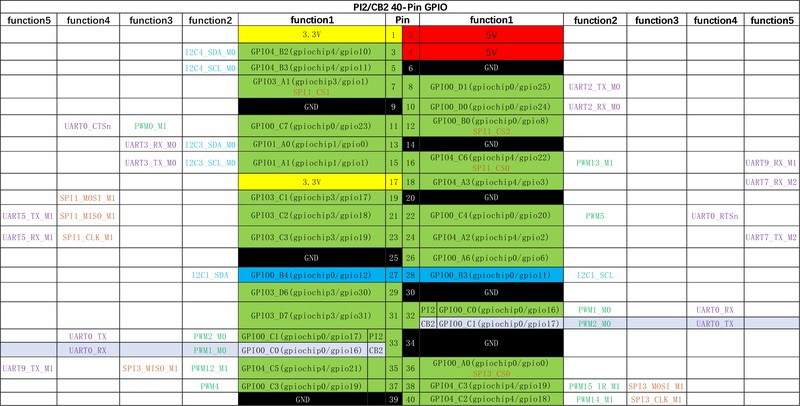
The BTT CB2 upgrades the CB1 with a Rockchip RK3566 quad-core Cortex-A55 at 1.8GHz, 2GB RAM, 16GB onboard eMMC, and Gigabit Ethernet in the same CM4 form factor. At $45, it doubles the RAM and adds onboard storage, making it the better choice for Klipper hosts running webcam streaming or multiple services.
The CB1's faster successor — worth the extra $10 for 2GB RAM and Gigabit Ethernet.
Where to Buy
Pros
- 2GB RAM provides comfortable headroom for Klipper + webcam + timelapse processing
- Rockchip RK3566 Cortex-A55 at 1.8GHz is 20% faster per-core than the CB1's H616
- 16GB onboard eMMC eliminates microSD card reliability issues
- Gigabit Ethernet for fast G-code file uploads and webcam streaming
Cons
- At $45, it costs $10 more than the CB1 — meaningful on tight budgets
- Still requires a CM4-compatible carrier board — no standalone use
- 2GB RAM is half of a Raspberry Pi 4 4GB — not enough for heavy multitasking
Performance Upgrade Over CB1
The Rockchip RK3566's Cortex-A55 cores at 1.8GHz offer approximately 20% higher single-threaded performance compared to the CB1's Allwinner H616 Cortex-A53 at 1.5GHz. The Cortex-A55 microarchitecture is also more power-efficient per instruction than the A53, meaning the CB2 does more work per watt while running cooler under sustained load. While Klipper itself is not CPU-bound on either chip, the difference shows up during input shaper analysis (15-20% faster FFT computation), timelapse rendering (encoding a 1-hour print timelapse takes minutes fewer), and web interface responsiveness under load.
The 2GB RAM is the more meaningful upgrade. Klipper + Moonraker + Mainsail consumes about 600-700MB, leaving 1.3GB free on the CB2 versus only 300-400MB on the CB1. This headroom matters when adding crowsnest for webcam streaming (100-200MB depending on resolution), timelapse plugins that buffer frames in memory, or running multiple printer instances from one host. With 2GB RAM, the CB2 can realistically handle two Klipper printer instances plus Mainsail with webcam — a setup that would regularly OOM-kill processes on the CB1.
The GPU on the RK3566 (Mali-G52) is also significantly more capable than the H616's Mali-G31, though this mainly matters for KlipperScreen rendering smoothness and hardware-accelerated video decode for webcam feeds. Most users will notice this as snappier touchscreen response if they add a display via the carrier board's HDMI output.
eMMC Storage and Reliability
The 16GB onboard eMMC is a significant reliability improvement over the CB1's microSD-only storage. MicroSD cards in always-on printer hosts are prone to write-wear corruption, especially during unexpected power loss — and in 3D printing, "unexpected power loss" happens every time you flip the printer's PSU switch instead of running a shutdown command. eMMC has better wear leveling algorithms, higher write endurance (typically 10× the write cycles of consumer microSD), and faster random write performance (important for Klipper's continuous log writes and Moonraker's state database).
The practical impact: CB1 users regularly report microSD corruption after 6-12 months of daily printing, requiring reflashing the OS and reconfiguring Klipper. CB2 users with eMMC storage report no such issues over the same timeframe. The eMMC is soldered to the board, so unlike a microSD card it cannot be accidentally ejected by vibration — a real concern on a running 3D printer.
The 16GB capacity stores the MainsailOS installation (~4GB), hundreds of G-code files, and weeks of timelapse footage. For users with large G-code libraries or extensive timelapse archives, adding a USB flash drive or mounting NFS network storage extends capacity without stressing the eMMC. The CB2 also supports booting from microSD as a fallback, useful for recovery if the eMMC becomes corrupted (unlikely but possible).
Connectivity and Networking
Gigabit Ethernet replaces the CB1's 100Mbit Fast Ethernet, providing 10× the theoretical bandwidth. For uploading large G-code files (some complex prints with high polygon counts exceed 200MB), Gigabit reduces transfer time from 16+ seconds to under 2 seconds. Webcam streaming at 720p or 1080p also benefits — a 720p MJPEG stream at 15fps uses roughly 30Mbps, which consumes 30% of a 100Mbit link but only 3% of a Gigabit link, leaving ample bandwidth for simultaneous web interface access, file uploads, and API calls.
Onboard WiFi is available on the CB2, unlike the CB1 which requires a USB dongle. However, wired Ethernet is strongly recommended for Klipper reliability, especially inside metal printer enclosures (common in Voron builds) that act as Faraday cages and degrade WiFi signals. The onboard WiFi is useful for initial setup (connect via WiFi, configure the wired Ethernet IP, then switch to wired) or for printers in locations where running an Ethernet cable is impractical.
The CB2 inherits the carrier board's USB ports for webcam, WiFi dongle (if not using onboard WiFi), and other peripherals. When plugged into the Manta M8P, the CB2 has access to 2-3 USB ports depending on the carrier board revision — typically enough for a webcam and one additional USB device without a hub.
Multi-Printer Hosting and Advanced Workloads
The CB2's 2GB RAM opens up workloads that are impractical on the CB1's 1GB. The most compelling is running two Klipper instances simultaneously — one per printer — from a single host. Each Klipper instance with its own Moonraker and Mainsail frontend consumes roughly 400-500MB of RAM. On the CB2, two instances plus the OS leave approximately 600-800MB free, enough for crowsnest webcam monitoring on both printers and basic system headroom. The CB1 would OOM-kill processes within minutes of starting the second instance.
For small print farms with two printers, this is a significant cost saving. Instead of two separate Raspberry Pis or two CB1s on two carrier boards, a single CB2 on one Manta M8P can manage both printers via USB. The second printer connects over USB through the carrier board's USB header while the first uses the direct UART connection. Mainsail's multi-printer mode lets you switch between both dashboards in a single browser tab.
Another advanced workload is running Obico (formerly The Spaghetti Detective) alongside Klipper. Obico uses a lightweight AI model to detect print failures — spaghetti, layer shifts, adhesion loss — via webcam feed analysis and can automatically pause the print. The Obico agent consumes 150-250MB of RAM depending on detection frequency and camera resolution. On the CB1, Obico plus Klipper plus webcam streaming would consume the entire 1GB and then some. On the CB2, the combination runs comfortably with the detection interval set to every 10-15 seconds at 640x480 resolution.
The practical ceiling for the CB2 is two printers with basic monitoring. Pushing to three printers, or running two printers with Obico AI detection on both webcam feeds simultaneously, begins to exhaust the 2GB RAM. For three or more printers, or for running Home Assistant alongside Klipper, a Raspberry Pi 4 with 4GB or 8GB RAM is the appropriate host. The CB2 fills the sweet spot between the CB1's bare-minimum single-printer hosting and the Pi 4's full multi-service capability.
Full Specifications
Processor
| Specification | Value |
|---|---|
| Architecture | ARM Cortex-A55 [1] |
| CPU Cores | 4 [1] |
| Clock Speed | 1800 MHz [1] |
Memory
| Specification | Value |
|---|---|
| ram_gb | 2 GB [1] |
| storage | MicroSD + 16GB eMMC [1] |
Connectivity
| Specification | Value |
|---|---|
| WiFi | 802.11 b/g/n/ac [1] |
| ethernet | Gigabit Ethernet [1] |
I/O & Interfaces
| Specification | Value |
|---|---|
| USB | 2x USB 2.0 + 1x USB 3.0 [2] |
| display_port | HDMI [2] |
Physical
| Specification | Value |
|---|---|
| Dimensions | 40 x 55 mm [2] |
| Form Factor | CM4-compatible SBC module [2] |
Who Should Buy This
The 2GB RAM handles Klipper, Mainsail, Moonraker, and crowsnest webcam streaming simultaneously without swapping. The CB1's 1GB RAM leaves only 300MB free after the Klipper stack, which is tight with a webcam.
The CB1 at $35 runs Klipper + Mainsail just fine if you skip webcam streaming. Save the $10 if you do not plan to add a camera or timelapse plugin.
Better alternative: BIGTREETECH CB1
2GB RAM is workable for light Home Assistant add-ons but not a full HA installation. For running Home Assistant alongside Klipper, a Raspberry Pi 4 with 4GB+ RAM is recommended.
The CB2 requires a CM4-compatible socket. For standalone use with USB and HDMI, the BTT Pi V1.2 at $30 works with any mainboard via USB.
Better alternative: BIGTREETECH Pi V1.2
If configuring firmware and wiring stepper drivers feels like a lot, the Bambu Lab A1 Mini prints out of the box for under $200.
Better alternative: Bambu Lab A1 Mini
Ecosystem & Community
The CB2 improves on the CB1 with 2GB RAM, Gigabit Ethernet, and onboard eMMC — making it capable of running Klipper plus webcam streaming and OctoPrint simultaneously. Same CM4 form factor, plugs into Manta M8P or any CM4 carrier.
Compatible Software
What to Build First
Insert the CB2 into the Manta M8P's socket, flash MainsailOS to the onboard eMMC (faster than microSD), and run Klipper with webcam streaming. The 2GB RAM handles multiple services without swap thrashing.
View tutorial →Must-Have Accessories
Tutorials & Resources
- BTT CB2 WikiOfficial setup guide, eMMC flashing instructions, and OS imagesdocs
- MainsailOSPre-built OS with Klipper + Moonraker + Mainsail for the CB2github
- Klipper FirmwareOpen-source firmware managed by the CB2 hostgithub
Frequently Asked Questions
Is the CB2 worth $10 more than the CB1?
Yes, if you plan to use a webcam or timelapse plugin. The 2GB RAM and Gigabit Ethernet handle these workloads comfortably. If you are running Klipper only with no webcam, the CB1 at $35 is sufficient.
Does the CB2 have onboard WiFi?
Yes. The CB2 includes onboard WiFi, unlike the CB1 which requires a USB dongle. However, wired Ethernet is recommended for Klipper reliability, especially in metal printer enclosures that can interfere with WiFi signals.
Can the CB2 replace a Raspberry Pi CM4?
Physically yes — it uses the same CM4 connector. Software compatibility depends on the carrier board. BTT officially supports it on the Manta M8P and M5P. Raspberry Pi OS does not run on the CB2; use BTT's MainsailOS image instead.
What operating system does the CB2 run?
BTT provides a Debian-based MainsailOS image with Klipper, Moonraker, and Mainsail pre-installed. You can also install Armbian for more flexibility, though you will need to install the Klipper stack manually.
Is 16GB eMMC enough for Klipper?
Yes. MainsailOS with Klipper uses about 4GB. The remaining 12GB stores G-code files and timelapse videos. For users with large G-code libraries, add a USB flash drive or network-attached storage.
Should I get the CB2 or a Raspberry Pi 5?
Get the CB2 if you have a Manta M8P and want clean integration at $45. Get a Raspberry Pi 5 if you want 4-8GB RAM, better GPIO support, standalone operation, and the ability to use it beyond 3D printing. The Pi 5 costs $60-$80.
Can I run two printers from one CB2?
Yes. Klipper supports multiple printer instances on one host. With 2GB RAM, two printer instances plus Mainsail is feasible. Three or more printers may cause memory pressure depending on the plugins you run.
Compared In
BIGTREETECH CB2 appears in 3 buying guides on PAM Finds. These weigh it directly against the alternatives.