BIGTREETECH Manta M8P V2.0
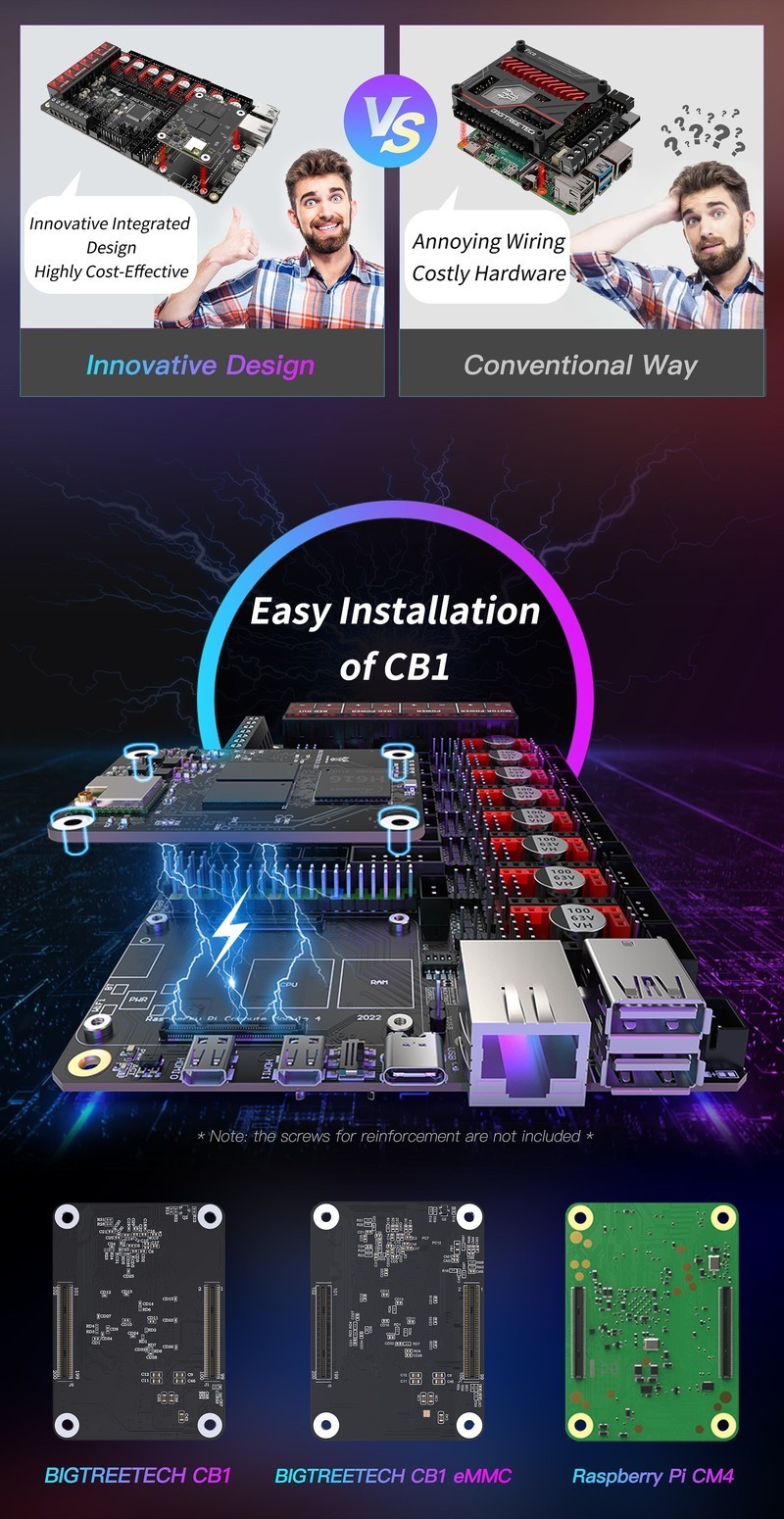
The BTT Manta M8P V2 combines an STM32H723 running at 550MHz with 8 stepper driver slots and an onboard CM4-compatible SBC socket in a single board. Supporting CANFD, high-voltage drivers up to 60V, and direct CB1/CB2/CM4 mounting, it eliminates the need for a separate Raspberry Pi in Klipper setups.
The modern integrated choice for Voron builds — pay more upfront, save on a separate SBC.
Where to Buy
Pros
- STM32H723 at 550MHz is 3× faster than the Octopus V1.1's STM32F446 at 180MHz
- Onboard CM4/CB1/CB2 socket eliminates a separate Raspberry Pi and USB cable
- CANFD support at up to 5Mbit/s — 5× faster than standard CAN bus
- High-voltage driver support up to 60V enables TMC5160 with 48V steppers
- Integrated 5V/3A regulator powers the SBC directly from the main 24V supply
Cons
- At $99, it costs $34 more than the Octopus V1.1 (before adding an SBC)
- CM4/CB1/CB2 sold separately — the SBC socket adds $35-$45 to total cost
- Newer design means fewer community configs compared to the Octopus V1.1
- Similar footprint to the Octopus (170x102mm vs 160x100mm) — no meaningful space savings
Processing Power and SBC Integration
The STM32H723 Cortex-M7 at 550MHz makes the Manta M8P V2 the fastest 3D printer mainboard in its class. For context, the Octopus V1.1's STM32F446 runs at 180MHz — the Manta has over 3× the clock speed and a significantly more capable instruction pipeline. This matters for Klipper's input shaping calculations, which run on the MCU and benefit from faster floating-point performance. At 550MHz, the STM32H723 processes resonance compensation in real time even at print speeds exceeding 500mm/s with complex path geometry.
The CM4-compatible SBC socket accepts a Raspberry Pi CM4, BTT CB1, or BTT CB2 directly on the board. The CB1 at $35 is the cheapest option, providing an Allwinner H616 quad-core running MainsailOS. The CB2 at $45 upgrades to a Rockchip RK3566 with 2GB RAM, Gigabit Ethernet, and onboard eMMC for improved reliability. Power for the SBC comes from an integrated 5V/3A regulator fed by the main 24V PSU, so no separate USB power supply is needed. This integration eliminates the USB cable between host and MCU that is a common failure point on Octopus-based setups — the SBC communicates with the STM32H723 via GPIO UART directly through the CM4 socket.
The single-board approach also simplifies the electronics bay layout. Instead of mounting a mainboard, a Raspberry Pi, and routing USB and power cables between them, you mount one board with a compute module snapped on top. For printer builds where electronics bay space is tight (Voron 0.2, smaller custom designs), this consolidation can be the deciding factor.
CANFD and High-Voltage Support
CANFD support distinguishes the Manta M8P from the Octopus V1.1's standard CAN bus. CANFD (CAN with Flexible Data rate) runs at up to 5Mbit/s in the data phase versus standard CAN's 1Mbit/s maximum. This 5× bandwidth increase matters during two specific operations: streaming accelerometer data from an ADXL345 mounted on the toolhead during input shaper calibration, and running high-frequency sensor polling from CAN-connected endstops or filament sensors. During normal printing, standard CAN's 1Mbit/s is more than sufficient for stepper commands and temperature readings.
The practical scenario where CANFD pays off is during input shaper tuning. The ADXL345 accelerometer generates data at 3.2KHz across three axes, producing roughly 20KB/s of raw data. On a 1Mbit/s CAN link sharing bandwidth with stepper commands and temperature polling, this can cause packet drops that corrupt the frequency analysis. CANFD's 5Mbit/s data phase provides comfortable headroom for the accelerometer stream alongside normal CAN traffic. Once calibration is complete (a one-time 10-minute process), the extra bandwidth is unused during normal printing.
High-voltage driver support up to 60V opens the door to 48V stepper systems. Running TMC5160 drivers at 48V instead of 24V doubles the voltage headroom, allowing higher stepper speeds before back-EMF causes missed steps. This is relevant for high-speed printing above 300mm/s where standard 24V systems hit their limits on heavy direct-drive toolheads. The 48V upgrade requires a separate 48V PSU and TMC5160 drivers rated for the voltage — the standard TMC2209 is limited to 28V and will be destroyed by 48V input.
Octopus vs Manta: Which to Choose
The decision between the Octopus V1.1 and Manta M8P V2 comes down to three factors: budget, integration preference, and CAN requirements. The total system cost comparison is revealing. An Octopus V1.1 ($65) plus a BTT Pi V1.2 ($30) plus a USB cable ($3) totals roughly $98. A Manta M8P V2 ($99) plus a CB1 ($35) totals $134. The Manta costs $36 more for a faster MCU, CANFD, high-voltage support, and cleaner integration. Whether that premium is worth it depends on whether you plan to push print speeds beyond 300mm/s or use CAN toolheads.
For first-time Voron builders, the Octopus V1.1 remains the safer choice purely because of documentation density. When you encounter a configuration issue at midnight, the odds of finding an Octopus-specific answer on Discord, Reddit, or GitHub are substantially higher than finding a Manta M8P answer. The Manta's community is growing — BTT increasingly references it as the recommended board for new Voron builds — but it has not yet reached the Octopus's documentation critical mass.
For builders who already own a Raspberry Pi 4 or 5, the Octopus becomes even more cost-effective: $65 for the mainboard, and the Pi you already have serves as the Klipper host. The Manta's SBC socket provides no benefit if you have a perfectly good Pi sitting in a drawer. Conversely, if you are buying everything new and want the cleanest possible build, the Manta's integrated approach saves cable routing time and produces a tidier electronics bay.
Thermal Design and Power Delivery
The Manta M8P V2's integrated 5V/3A regulator is a design convenience that eliminates a separate USB power supply for the SBC module. The main 24V printer PSU feeds the regulator, which steps down to 5V and delivers up to 3A to the CM4 socket. This means one fewer wall adapter and one fewer cable in the electronics bay. But the 3A rating has implications that are easy to overlook during planning.
A Raspberry Pi CM4 under heavy load — running Klipper, Moonraker, a webcam stream, and OctoPrint plugins — can draw up to 2.5A. That leaves only 0.5A of headroom for USB peripherals connected to the CM4 (webcams, ADXL345 accelerometers, USB storage). Plugging in a USB webcam that draws 0.3A pushes the regulator to 2.8A out of 3A capacity, leaving virtually no margin. Under sustained load in a heated chamber, this can cause voltage droop and random CM4 reboots that look like software bugs but are actually power delivery failures.
The BTT CB1 is the safer pairing from a power perspective. The Allwinner H616 draws 1.0-1.5A under typical Klipper workloads, leaving 1.5-2.0A of headroom for peripherals. The CB2's Rockchip RK3566 falls between the two at roughly 1.5-2.0A. If you plan to run a CM4 with multiple USB devices, consider powering the CM4 from a separate 5V/3A USB-C supply instead of relying on the onboard regulator.
The STM32H723 MCU itself runs warm at 550MHz. BTT includes thermal pads between the MCU and the PCB ground plane for heat spreading, but in enclosed printers with heated chambers — particularly Voron 2.4 builds running a 60°C chamber for ABS — the electronics bay temperature can reach 45-50°C ambient. At those temperatures, the STM32H723's junction temperature approaches its rated maximum. An active 40mm fan blowing across the mainboard is recommended for any enclosed printer build. Most Voron electronics bay designs already include this fan, but builders converting from an Octopus (which runs cooler with the STM32F446 at 180MHz) should verify their cooling is adequate for the Manta's higher thermal output.
Full Specifications
Processor
| Specification | Value |
|---|---|
| Architecture | ARM Cortex-M7 [1] |
| CPU Cores | 1 [1] |
| Clock Speed | 550 MHz [1] |
I/O & Interfaces
| Specification | Value |
|---|---|
| Stepper Drivers | 8 (plug-in) [2] |
| Driver Type | TMC2209, TMC5160 compatible (HV up to 60V) [2] |
| Thermistor Inputs | 4 [2] |
| Heater Outputs | 4 (hotend) + 1 (bed) [2] |
| Fan Ports | 7 (PWM controllable) [2] |
| Probe Port | BLTouch, Klicky, inductive [2] |
| CAN Bus | Yes (CANFD) [2] |
| USB | USB-C [2] |
| SD Card | MicroSD [2] |
| SBC Socket | CM4/CB1/CB2 BTB connector [2] |
Power
| Specification | Value |
|---|---|
| Input Voltage | 12-24 V [1] |
| MOSFET Current | 10 A [1] |
| Bed MOSFET Current | 15 A [1] |
Physical
| Specification | Value |
|---|---|
| Dimensions | 170 x 102 mm [2] |
| Form Factor | Printer mainboard with SBC socket [2] |
Who Should Buy This
The integrated SBC socket means one fewer board, one fewer USB cable, and cleaner wiring inside the electronics bay. The STM32H723 handles input shaping calculations with headroom to spare.
CANFD at 5Mbit/s handles accelerometer data from toolhead boards like the EBB36 without bottlenecking during input shaper calibration. Standard CAN at 1Mbit/s can drop packets during ADXL345 streaming.
The Manta M8P at $99 plus a CB1 at $35 totals $134. An Octopus V1.1 at $65 plus a BTT Pi at $30 totals $95. The Manta is better hardware but costs $39 more for the integrated approach.
Better alternative: BIGTREETECH Octopus V1.1
The Ender 3 needs 4 drivers and a simple host. The SKR Mini E3 V3 at $45 is a drop-in replacement. The Manta's 8 drivers and SBC socket are wasted on a bed-slinger with 4 steppers.
Better alternative: BIGTREETECH SKR Mini E3 V3.0
If configuring firmware and wiring stepper drivers feels like a lot, the Bambu Lab A1 Mini prints out of the box for under $200.
Better alternative: Bambu Lab A1 Mini
Ecosystem & Community
The Manta M8P V2 integrates mainboard and SBC socket into one board, simplifying Voron builds. Supports CM4, CB1, and CB2 compute modules. CANFD support future-proofs toolhead communication. Growing community adoption as Octopus successor.
What to Build First
Plug a CB1 or CB2 compute module directly into the Manta M8P's SBC socket, flash Klipper, and have a complete Klipper-controlled printer with no external Raspberry Pi or USB cables.
View tutorial →Must-Have Accessories
Video Reviews & Tutorials
Tutorials & Resources
- BTT Manta M8P V2 WikiOfficial pinout, wiring diagrams, and firmware flashing guidedocs
- Klipper FirmwareOpen-source firmware with STM32H723 board definitionsgithub
- Voron DesignOfficial printer designs increasingly referencing the Manta M8P as primary board optiongithub
Frequently Asked Questions
What SBC modules work with the BTT Manta M8P V2?
The Manta M8P V2 accepts any CM4-compatible module: Raspberry Pi CM4 (any RAM/eMMC variant), BTT CB1 ($35, Allwinner H616), and BTT CB2 ($45, Rockchip RK3566). The CB1 is the most popular budget choice for Klipper.
Is the Manta M8P V2 compatible with Klipper?
Yes. BTT provides pre-built Klipper firmware for the STM32H723 MCU, and the Voron community maintains reference configs. Flash via SD card or DFU. The SBC module runs MainsailOS or FluiddOS for the Klipper web interface.
What is CANFD and why does it matter for 3D printing?
CANFD (CAN with Flexible Data rate) runs at up to 5Mbit/s versus standard CAN's 1Mbit/s. This extra bandwidth prevents data loss when streaming accelerometer data from toolhead boards during input shaper calibration. For normal printing, standard CAN is sufficient.
Should I get the Manta M8P or the Octopus V1.1?
Get the Manta M8P if you want integrated SBC, CANFD, and the fastest MCU. Get the Octopus V1.1 if you already own a Raspberry Pi, want proven community documentation, or are on a tighter budget. Both have 8 driver slots.
Can I use 48V stepper motors with the Manta M8P?
Yes. The high-voltage driver inputs support up to 60V, making it compatible with 48V stepper systems using TMC5160 drivers. This enables higher print speeds by preventing back-EMF-induced missed steps at velocities above 300mm/s.
Does the Manta M8P V2 work without an SBC module?
The MCU runs standalone for motor control, but Klipper requires a Linux host. You can either plug a CB1/CB2/CM4 into the onboard socket or connect an external Raspberry Pi via USB. The onboard socket is the cleaner option.
What stepper drivers does the Manta M8P V2 support?
Any Pololu-form-factor STEP/DIR driver: TMC2209, TMC2226, TMC5160, DRV8825, and more. All 8 slots support UART and SPI configuration. TMC5160 drivers are recommended for 48V high-voltage setups.
Compared In
BIGTREETECH Manta M8P V2.0 appears in 3 buying guides on PAM Finds. These weigh it directly against the alternatives.