Arduino Mega 2560 Rev3
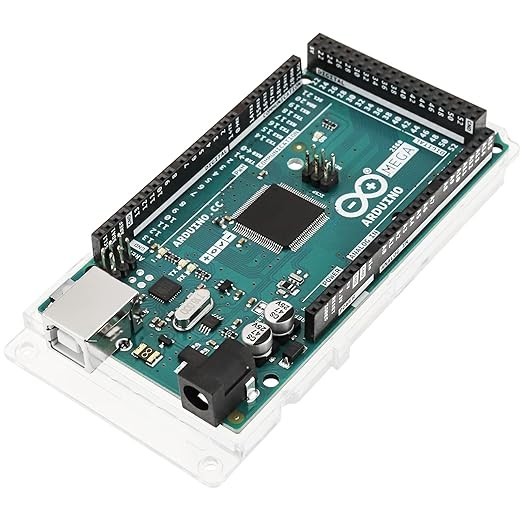
The Arduino Mega 2560 Rev3 is the I/O king of the Arduino family with 54 digital GPIO pins, 16 analog inputs, 4 UARTs, and 15 PWM channels on an ATMega2560 AVR at 16MHz. It is the go-to board when you need to connect many peripherals simultaneously and raw pin count matters more than processing speed.
Best when you need maximum GPIO pins in the Arduino ecosystem, skip if you need wireless or modern processing power.
Where to Buy
Pros
- 54 digital I/O pins — the most of any board in this comparison
- 16 analog input channels for extensive sensor arrays
- 4 hardware UARTs for simultaneous serial communication
- 15 PWM channels for multi-servo and motor control
- Full Mega shield compatibility (3D printer boards, CNC shields)
Cons
- 16MHz 8-bit AVR is the slowest processor in this comparison
- No WiFi or Bluetooth — completely wired
- USB-B connector — the oldest USB standard in the lineup
- 101.52 x 53.3mm is the largest board in this comparison
- 8KB SRAM limits complex data structures despite the GPIO abundance
The I/O Advantage
54 digital I/O pins and 16 analog inputs give the Mega 2560 more raw connectivity than any other board in this comparison. For context, the ESP32-S3-DevKitC has 45 GPIO (but some are reserved), the original ESP32-DevKitC has 34, and compact boards like the XIAO have just 11.
The 4 hardware UARTs are particularly valuable for projects connecting multiple serial devices — a GPS module, a GSM modem, and a serial display can all communicate simultaneously without software serial hacks. The 15 PWM channels drive servos and motors without external PWM controllers. The 16 analog inputs with 10-bit resolution (0-1023) accept 0-5V signals directly, which matters for industrial sensor arrays where multiple thermocouples, pressure transducers, or strain gauges feed data simultaneously. On an ESP32 with 18 ADC channels, the WiFi radio disables ADC2 during operation, effectively halving available analog inputs. The Mega has no such conflict because it has no wireless radio to interfere.
The 5V logic level is another practical advantage for specific applications. Industrial relay modules, stepper motor drivers like the A4988 and DRV8825, and many LCD displays expect 5V signals. The Mega drives these directly. ESP32 boards at 3.3V often need level shifters or buffer ICs to interface with 5V peripherals, adding cost, board space, and potential failure points in electrically noisy environments like CNC machines or 3D printers.
CNC, GRBL, and 3D Printer Use
The Mega 2560 owes much of its continued relevance to 3D printing. The RAMPS 1.4 controller shield, designed for the Mega's pinout, powers millions of 3D printers worldwide. Marlin firmware, the most popular 3D printer firmware, was written for the Mega. RAMPS + Mega drives up to 5 stepper motors (X, Y, Z, and two extruders), reads thermistors for hotend and heated bed temperature control, handles endstop switches on all axes, and manages a cooling fan — all simultaneously. The 256KB flash is sufficient for Marlin with standard features enabled, though advanced features like mesh bed leveling and filament runout detection push flash usage to 90%+.
For CNC routers and laser engravers, GRBL firmware runs on the Mega via the CNC Shield V3. GRBL interprets G-code commands and drives 3-4 stepper motors with real-time step pulse generation. The Mega's 16MHz clock limits maximum step rates to roughly 30kHz, which is adequate for hobby CNC but insufficient for high-speed industrial applications where 32-bit boards like the Duet or SKR achieve 100kHz+ step rates. Modern 3D printers from Creality, Prusa, and Bambu Lab have moved to 32-bit ARM processors (STM32, LPC1768) for faster kinematics, quieter TMC stepper drivers, and touchscreen interfaces. But for DIY builds, repairs of older printers, and educational CNC projects, the Mega + RAMPS combination remains the most thoroughly documented platform with thousands of build guides, troubleshooting threads, and configuration tutorials.
Memory Constraints and When to Choose ESP32 Instead
The Mega's 8KB SRAM and 256KB flash are its most significant limitations. While 256KB flash comfortably holds most Arduino sketches, complex firmware like Marlin with all features enabled can exceed 200KB, leaving little room for additional custom code. The 8KB SRAM constrains runtime data: large arrays, string buffers, and data structures compete for the same small memory pool. A project parsing JSON data from a serial device, for example, will struggle with documents larger than 2-3KB after accounting for stack, global variables, and library overhead.
The question of when to choose an ESP32 over the Mega comes down to a simple decision tree. If the project needs WiFi or Bluetooth, choose the ESP32 — the Mega has no wireless. If the project needs more than 34 GPIO pins or more than 16 analog inputs, choose the Mega — no ESP32 board matches its pin count. If the project needs both many pins and wireless, the best approach is an ESP32 as the network controller paired with a Mega as the I/O expander, communicating over UART or SPI. This architecture is common in large automation projects where the Mega handles dozens of sensors and actuators while the ESP32 provides the WiFi dashboard and cloud connectivity. For greenfield projects without legacy shield requirements, the ESP32-DevKitC's 34 GPIO, WiFi, BLE, 520KB SRAM, and 160MHz clock make the Mega's 16MHz 8-bit AVR difficult to justify unless you specifically need RAMPS/GRBL shield compatibility.
54 Digital Pins: When You Need Maximum I/O
The Mega 2560's 54 digital I/O pins and 16 analog inputs total 70 I/O connections — roughly double the Uno's 14 digital + 6 analog and more than twice the ESP32-DevKitC's 34 GPIO. This raw pin count is not a theoretical advantage; it is the reason the Mega exists and the reason it remains in production 15+ years after its debut. Specific project categories simply cannot fit within smaller pin budgets.
CNC controllers are the clearest example. A 4-axis CNC router needs 8 pins for stepper motor step/direction signals (2 per axis), 4 pins for limit switches, 1 pin for spindle PWM, 1 pin for spindle direction, and 1 pin for coolant control — 15 pins minimum before adding probe inputs, emergency stop, or a display. Scale to 5 axes with tool changer and you need 25+ dedicated I/O pins. LED matrix projects consume pins voraciously: an 8x8x8 LED cube requires either 64 direct drive pins (possible on the Mega, impossible on an Uno) or multiplexing with shift registers. The Mega's pin count lets you prototype with direct wiring before optimizing with multiplexing hardware.
The 4 hardware UARTs (Serial, Serial1, Serial2, Serial3) deserve particular attention. Each UART is an independent hardware peripheral with its own interrupt, buffer, and baud rate configuration. A robotics project can simultaneously communicate with a GPS module at 9600 baud on Serial1, a LiDAR sensor at 115200 baud on Serial2, a Bluetooth module at 38400 on Serial3, and maintain a debug console on Serial (USB) — all without software serial timing conflicts. On the Uno with its single hardware UART, any serial peripheral beyond the USB connection requires SoftwareSerial, which is interrupt-driven, CPU-intensive, and limited to 57600 baud reliably.
The 256KB flash memory is 8x the Uno's 32KB, which matters for complex sketches. Marlin firmware for 3D printing routinely compiles to 180-220KB with mesh bed leveling, thermal runaway protection, and LCD menu systems enabled. GRBL for CNC with full G-code support and homing cycles uses 30-40KB. A multi-sensor robotics sketch with PID control, path planning, and serial parsing easily exceeds 50KB. On the Uno, you would hit flash limits long before running out of project ideas.
However, for new projects without legacy shield requirements, the ESP32-DevKitC often makes more sense despite having fewer pins. The ESP32's 34 GPIO pins satisfy most projects, and it adds WiFi, BLE, 520KB SRAM (versus 8KB), and a 240MHz dual-core processor (versus 16MHz single-core) — all at a lower price point. Choose the Mega when you need its specific I/O count, 5V logic levels for industrial peripherals, RAMPS/GRBL shield compatibility, or the four hardware UARTs. Choose the ESP32 for everything else.
Full Specifications
Processor
| Specification | Value |
|---|---|
| Architecture | AVR [1] |
| CPU Cores | 1 [1] |
| Clock Speed | 16 MHz [1] |
Memory
| Specification | Value |
|---|---|
| Flash | 0.256 MB [1] |
| SRAM | 8 KB [1] |
| eeprom | 4 KB [1] |
I/O & Interfaces
| Specification | Value |
|---|---|
| GPIO Pins | 54 [2] |
| ADC Channels | 16 [2] |
| pwm_channels | 15 [2] |
| SPI | 1 [2] |
| I2C | 1 [2] |
| UART | 4 [2] |
| USB | USB-B (UART bridge) [2] |
Power
| Specification | Value |
|---|---|
| Input Voltage | 7-12 V [1] |
| operating_voltage | 5 V [1] |
Physical
| Specification | Value |
|---|---|
| Dimensions | 101.52 x 53.3 mm [2] |
| Form Factor | Arduino Mega (extended shield-compatible) [2] |
Who Should Buy This
RAMPS 1.4 and similar 3D printer controller shields are designed for the Mega's pinout. 54 GPIO handles 5 stepper motors, heated bed, thermistors, and endstops simultaneously.
15 PWM channels drive 15 servos directly without an external PWM driver. 4 UARTs connect to sensor modules, GPS, and debug serial simultaneously.
No wireless. The ESP32-DevKitC has 34 GPIO (enough for irrigation valves) plus WiFi for scheduling and monitoring.
Better alternative: ESP32-DevKitC V4
Ecosystem & Community
The Mega 2560 has the deepest shield ecosystem of any Arduino board — particularly for 3D printing (RAMPS), CNC (GRBL shields), and robotics (motor driver shields). Marlin firmware alone has 16,000+ GitHub stars. The board's longevity since 2010 means unmatched community support for high-pin-count projects.
Compatible Software
What to Build First
Build a 512-LED cube controlled by the Mega's 54 GPIO pins — a classic maker showpiece project that requires the pin count only the Mega can provide.
View tutorial →Must-Have Accessories
Tutorials & Resources
- Arduino Mega 2560 Official DocumentationPinout diagram, specifications, and getting started guidetutorial
- Instructables Arduino Mega ProjectsThousands of community projects including LED cubes, CNC builds, and roboticstutorial
- Marlin Firmware DocumentationComplete setup guide for 3D printer firmware on the Mega 2560 + RAMPStutorial
Frequently Asked Questions
Is the Arduino Mega 2560 still relevant?
Yes, for pin-heavy projects like 3D printers, CNC machines, and multi-servo robots. Its 54 GPIO and 4 UARTs remain unmatched. For new projects without extreme I/O needs, modern ARM and ESP32 boards offer better value.
Arduino Mega 2560 vs ESP32-DevKitC: which has more pins?
The Mega has 54 digital + 16 analog = 70 I/O pins. The ESP32-DevKitC has 34 GPIO with 18 ADC channels. The Mega wins on raw pin count, but the ESP32 adds WiFi, BLE, and 15x the clock speed.
Can I use the Mega 2560 for a 3D printer?
Yes, the Mega is the classic 3D printer controller. Pair it with a RAMPS 1.4 shield and Marlin firmware. The combination drives up to 5 stepper motors, heated bed, thermistors, and endstops.
Why does the Mega still use USB-B?
The Rev3 design dates from 2012. Arduino has not released an updated Mega with USB-C. If USB-C matters, the Uno R4 WiFi has it — but with only 20 GPIO versus the Mega's 54.
Can I add WiFi to the Mega 2560?
Yes, via an ESP8266 WiFi shield or an ESP32 connected via serial. This adds cost, complexity, and uses one of your 4 UARTs. For WiFi projects, starting with an ESP32 board is simpler.
Compared In
Arduino Mega 2560 Rev3 appears in 2 buying guides on PAM Finds. These weigh it directly against the alternatives.