Arduino Nano Every
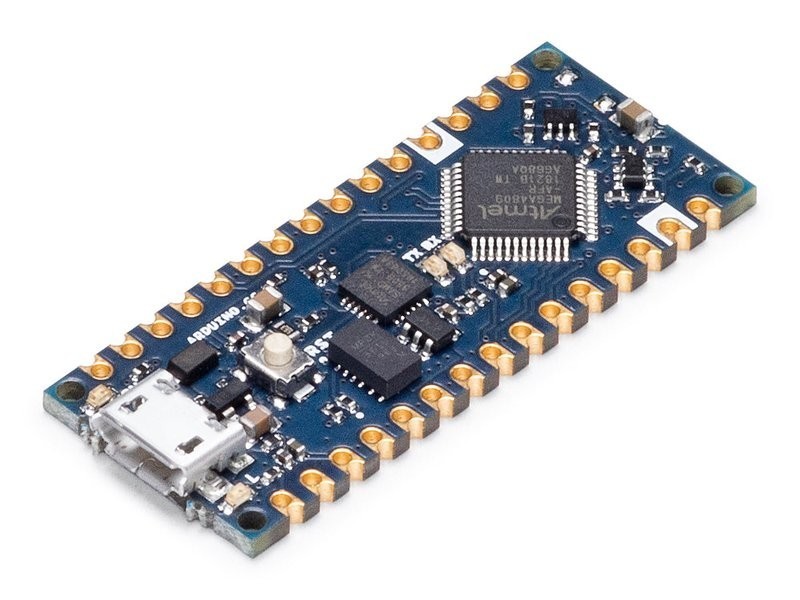
The Arduino Nano Every is a budget classic Arduino in the Nano form factor, running an ATMega4809 AVR at 20MHz with 48KB flash and 6KB SRAM. It is the simplest and cheapest Arduino Nano available, ideal for learning basic electronics and programming without the complexity of modern ARM or ESP32 boards.
Best as the cheapest Arduino Nano for absolute beginners, skip for any project needing wireless, speed, or significant memory.
Where to Buy
Pros
- Cheapest official Arduino Nano — lowest entry point into the Arduino ecosystem
- Simple 8-bit AVR architecture is easiest to learn and debug
- 5V logic level compatible with most hobby sensors and modules
- Extensive tutorial library — every beginner Arduino course works with AVR
Cons
- 20MHz 8-bit AVR is extremely slow by modern standards
- Only 6KB SRAM and 48KB flash — severely limiting for anything beyond basic projects
- No WiFi, no Bluetooth, no USB-OTG — completely wired with Micro-USB
- Micro-USB instead of USB-C — already outdated at launch
The Simplicity Argument
The Nano Every exists because sometimes simpler is better. The 8-bit AVR architecture has one core, one clock, no DMA, no RTOS, and no peripheral complexity. Code runs line by line, exactly as written. For a first-time programmer blinking an LED or reading a button, this predictability is valuable.
Compare this to an ESP32-S3 where the WiFi stack runs on a separate core, interrupts fire from multiple peripherals, and memory management includes both SRAM and PSRAM. The Nano Every has none of that complexity — it is a direct path from code to hardware. Every Arduino tutorial written in the last 15 years works unmodified on this board. The millis() function behaves exactly as documented, analogRead() returns a clean 10-bit value, and Serial.print() outputs at the baud rate you set. For educators who need a board that never surprises students with background task interference or memory corruption from WiFi stack conflicts, this predictability is the product.
megaAVR vs the Old ATmega328P
The ATMega4809 on the Nano Every is a meaningful upgrade over the ATmega328P that powered the classic Arduino Nano and Uno R3 for over a decade. The 4809 runs at 20MHz versus 16MHz, provides 48KB flash versus 32KB, and doubles the SRAM from 2KB to 6KB. It also adds a configurable custom logic (CCL) peripheral that can perform simple Boolean operations in hardware without CPU intervention, and an Event System that routes peripheral signals internally without software overhead.
In practice, the 6KB SRAM makes a real difference for string-heavy projects. The classic ATmega328P's 2KB SRAM was notorious for crashing when programs used multiple String objects or large arrays. The 4809's 6KB provides enough headroom for moderate sensor data buffering and formatted serial output. However, 6KB is still tiny by modern standards. The ESP32-C3's 400KB SRAM is 66x larger, and even the Raspberry Pi Pico's 264KB dwarfs the Nano Every. Any project involving JSON parsing, web responses, or image data will exceed the 4809's memory immediately.
Where It Fits vs Nano ESP32 and in Education
The Nano Every and the Nano ESP32 share the same 45x18mm form factor and Nano pin header layout, but they target completely different users. The Nano Every's ATMega4809 is an 8-bit AVR running at 20MHz with 48KB flash, no wireless, and 5V logic. The Nano ESP32's ESP32-S3 is a 32-bit dual-core running at 240MHz with 16MB flash, WiFi, BLE 5.0, and 3.3V logic. The Nano ESP32 is 12x faster, has 333x more flash, and includes wireless connectivity. For any new project with even modest ambitions, the Nano ESP32 is the better investment.
Where the Nano Every still holds value is in education and 5V compatibility. Many classroom sensor kits, motor shields, and relay modules expect 5V logic signals. The Nano Every works with these directly, while the Nano ESP32's 3.3V logic requires level shifters. School curricula built around AVR-based Arduino courses with existing lesson plans, assessment rubrics, and pre-wired breadboard kits can continue using the Nano Every without rewriting anything. The board is also effectively unbrickable — there are no fuse bits to misconfigure, no bootloader partition to corrupt, and no OTA update to fail halfway through. For a classroom of 30 students, that reliability matters more than raw specs.
ATmega4809 Architecture
The ATmega4809 on the Nano Every belongs to Microchip's megaAVR 0-series — a ground-up redesign of the classic AVR architecture that powered Arduinos for over a decade. The 20MHz clock (25% faster than the ATmega328P's 16MHz) and the modern AVRxt core bring genuine architectural improvements beyond raw speed. The Event System allows peripherals to trigger each other without CPU intervention: a timer overflow can start an ADC conversion, which on completion triggers a DMA-like data move, all while the CPU executes unrelated code. The Configurable Custom Logic (CCL) block provides two lookup tables that perform Boolean logic in hardware — useful for signal conditioning, debouncing, or generating complex PWM patterns without burning CPU cycles.
The 48KB flash and 6KB SRAM represent a 50% and 200% increase over the ATmega328P's 32KB and 2KB respectively. In practice, 6KB SRAM eliminates the most common crash scenario in classic Arduino projects: heap fragmentation from String concatenation. The ATmega328P's 2KB made String operations a minefield — three or four String concatenations in a loop could exhaust memory and trigger undefined behavior. The 4809's 6KB provides enough breathing room for moderate string handling, serial buffers, and sensor data arrays without resorting to manual memory management. That said, 6KB remains tiny by any modern standard — the ESP32-C3 offers 400KB SRAM (66x more), and even the RP2040 on the Raspberry Pi Pico provides 264KB.
The ATmega4809 also introduces UPDI (Unified Program and Debug Interface) as its programming protocol, replacing the ISP and debugWIRE interfaces of older AVRs. UPDI uses a single wire for both programming and debugging, simplifying the hardware interface. The Nano Every includes an onboard ATSAMD11 as a USB-to-UPDI bridge, so programming happens seamlessly through the Micro-USB port in the Arduino IDE. For users upgrading from an Uno or classic Nano, this transition is invisible — the IDE abstracts the protocol change entirely. Where UPDI matters is in production and education: the single-wire interface means a classroom of 30 boards can be programmed with simpler tooling, and custom PCBs incorporating the ATmega4809 need only one programming pin instead of the six-pin ISP header.
Full Specifications
Processor
| Specification | Value |
|---|---|
| Architecture | AVR [1] |
| CPU Cores | 1 [1] |
| Clock Speed | 20 MHz [1] |
Memory
| Specification | Value |
|---|---|
| Flash | 0.048 MB [1] |
| SRAM | 6 KB [1] |
| eeprom | 256 bytes [1] |
I/O & Interfaces
| Specification | Value |
|---|---|
| GPIO Pins | 22 [2] |
| ADC Channels | 8 [2] |
| SPI | 1 [2] |
| I2C | 1 [2] |
| UART | 1 [2] |
| USB | Micro-USB (UART bridge) [2] |
Power
| Specification | Value |
|---|---|
| Input Voltage | 7-21 V [1] |
| operating_voltage | 5 V [1] |
Physical
| Specification | Value |
|---|---|
| Dimensions | 45 x 18 mm [2] |
| Form Factor | Arduino Nano [2] |
Who Should Buy This
Simplest possible Arduino. 5V logic works with all beginner sensor kits. AVR architecture has the most beginner tutorials. Cannot be bricked by incorrect configuration.
No wireless capability. The ESP32-C3 offers WiFi, BLE 5.0, and 8x the processing power at a similar price point.
Better alternative: ESP32-C3-DevKitM-1
Simple PWM output, 5V logic, and the Arduino Servo library handle this perfectly. No need for a more powerful board.
Ecosystem & Community
The Nano Every benefits from the massive Arduino tutorial library — virtually every beginner Arduino tutorial works unmodified on this board. The ATMega4809 AVR architecture has decades of community support. Best documentation-to-hardware ratio in the hobby electronics space.
Compatible Software
What to Build First
Read a temperature sensor and display the value on a serial monitor or small LCD — the classic first electronics project for STEM classrooms.
View tutorial →Must-Have Accessories
Video Reviews & Tutorials
Tutorials & Resources
- Arduino Nano Every Getting StartedOfficial pinout, setup guide, and beginner example sketchestutorial
- Arduino Built-In ExamplesOfficial beginner tutorials — Blink, AnalogRead, Serial communicationtutorial
Frequently Asked Questions
Is the Arduino Nano Every still worth buying?
Only for absolute beginners or projects that specifically need 5V AVR simplicity. For any new project with even modest requirements, the ESP32-C3 or Arduino Nano ESP32 are better investments at similar prices.
Arduino Nano Every vs Nano ESP32: what is the difference?
The Nano ESP32 has a dual-core 240MHz ESP32-S3 with WiFi, BLE, 16MB flash, and 8MB PSRAM. The Nano Every has a single 20MHz AVR with no wireless and 48KB flash. They share the Nano form factor but the ESP32 is vastly more capable.
Can the Nano Every connect to WiFi?
Not natively. You would need an external WiFi module like an ESP-01 connected via serial, which adds cost and complexity. For WiFi projects, use a board with built-in wireless.
Why does the Nano Every use Micro-USB instead of USB-C?
The Nano Every was designed as a budget board with older components. The USB-UART bridge chip uses Micro-USB. The newer Arduino Nano ESP32 and Uno R4 both use USB-C.
How much code can the Nano Every hold?
48KB of flash holds roughly 1,500-2,000 lines of typical Arduino code. Complex libraries can fill this quickly — the WiFi library alone would exceed the flash capacity, which is why it has no wireless.