Arduino Uno R4 WiFi
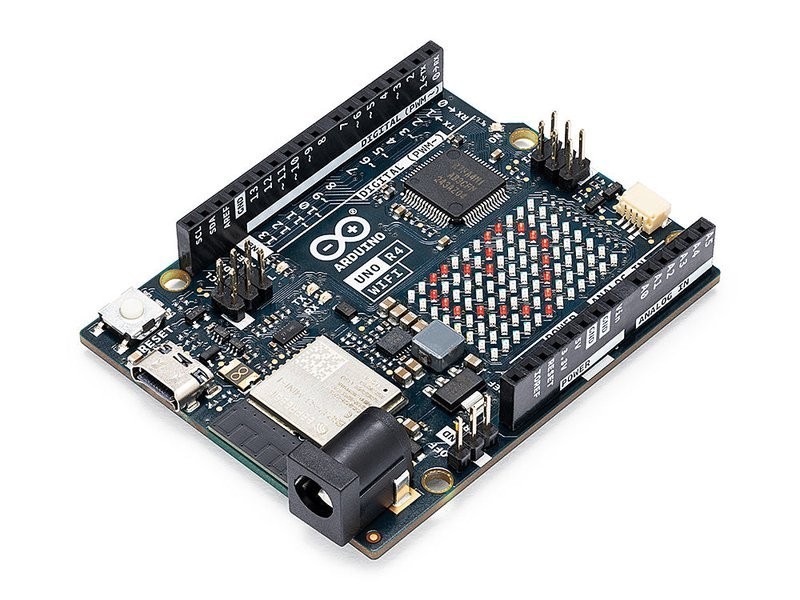
The Arduino Uno R4 WiFi pairs a Renesas RA4M1 ARM Cortex-M4 at 48MHz with an onboard ESP32-S3 for WiFi and BLE 5.0, plus a 12x8 LED matrix and CAN bus support. It is the first official Arduino Uno with wireless connectivity, bridging Arduino's beginner-friendly ecosystem with modern IoT capabilities.
Best for Arduino loyalists who want WiFi without leaving the Uno ecosystem, skip if you need raw ESP32-S3 performance.
Where to Buy
Pros
- WiFi and BLE 5.0 via onboard ESP32-S3 — first official Uno with wireless
- 12x8 red LED matrix built into the board for visual output without wiring
- CAN bus support — rare in hobby boards, valuable for automotive and industrial projects
- Full Arduino Uno shield compatibility — thousands of existing shields work directly
- USB-C with native USB for HID device emulation
Cons
- 48MHz ARM Cortex-M4 main processor is far slower than the ESP32-S3 it carries as a coprocessor
- Only 32KB SRAM and 256KB flash — severely limiting compared to ESP32 boards
- The ESP32-S3 coprocessor is not directly programmable — it handles WiFi/BLE only
- 68.85 x 53.34mm is large compared to Nano-format alternatives
The Dual-Processor Architecture
The Uno R4 WiFi has an unusual design: a Renesas RA4M1 (ARM Cortex-M4 at 48MHz) runs your Arduino sketch, while a separate ESP32-S3 handles WiFi and BLE communication. Your code runs on the M4 and talks to the ESP32-S3 through an internal serial bridge.
This means you cannot directly access the ESP32-S3's dual-core 240MHz processor, 8MB PSRAM, or camera interface. If you want the full ESP32-S3, the Arduino Nano ESP32 gives you direct access to the S3 in a smaller form factor.
The RA4M1's Cortex-M4 includes a hardware floating-point unit (FPU), which is an upgrade over the original Uno's ATmega328P 8-bit AVR. Sensor math, PID control loops, and signal processing run significantly faster with hardware FPU support. The 48MHz clock and 32KB SRAM are modest by modern standards but adequate for the sensor-reading, actuator-driving, and display-updating workflows that define most Arduino projects. The 256KB flash holds larger sketches than the ATmega328P's 32KB, removing a frequent pain point from the original Uno.
Arduino Ecosystem Compatibility
The R4 WiFi maintains the classic Uno form factor and pinout, so the thousands of Arduino shields designed over the past decade remain compatible. This backward compatibility is the board's strongest advantage — no other WiFi-enabled board offers this depth of accessory ecosystem.
The Arduino IDE, Arduino Cloud, and the massive library repository all support the R4 WiFi natively. For beginners and educators, this means every Arduino tutorial and course works with minor adaptations. The 12x8 LED matrix adds a visual output that beginners can program without any wiring.
Library compatibility deserves a caveat: while physical shield compatibility is near-universal, some libraries written specifically for the ATmega328P's registers will need updates for the RA4M1's ARM architecture. The core Arduino API functions (digitalRead, analogWrite, Serial, Wire, SPI) work identically, but libraries that use direct AVR register manipulation require porting. The Arduino core team and community have ported the most popular libraries, but check compatibility before committing to a niche shield.
Connectivity and I/O
WiFi 802.11 b/g/n and BLE 5.0 are handled by the ESP32-S3 coprocessor. The Arduino WiFiS3 library provides a familiar API. CAN bus support via a dedicated peripheral is notable — most hobby boards require an external MCP2515 module for CAN communication.
The 20 GPIO pins, 6 ADC channels, and 1 DAC channel are adequate for typical Arduino projects. USB-C with native USB support enables HID device emulation for keyboard and mouse projects. The 6-24V input voltage range makes it easy to power from various sources.
WiFi and IoT Capabilities
The Uno R4 WiFi's onboard ESP32-S3 handles WiFi 802.11 b/g/n and BLE 5.0 through a serial bridge to the main RA4M1 processor. The Arduino WiFiS3 library wraps this into the familiar Arduino networking API — WiFi.begin(), WiFiClient, WiFiServer — so existing Arduino networking code ports with minimal changes. For cloud connectivity, Arduino IoT Cloud integration is first-class: register the board, define properties, and push sensor data to dashboards without writing server code.
The 12x8 red LED matrix on the board is a genuinely useful feature for IoT projects. It displays status codes, scrolling text, simple icons, or sensor readings without wiring an external display. For a temperature logger, the matrix can show the current reading while WiFi pushes data to the cloud. The Arduino_LED_Matrix library provides frame-based animation at up to 60 FPS.
The key comparison is against ESP32 boards for IoT work. An ESP32-S3-DevKitC-1 runs your application code at 240MHz dual-core with 512KB SRAM and 8MB PSRAM — versus the Uno R4 WiFi's 48MHz single-core with 32KB SRAM. The ESP32-S3 gives you direct access to WiFi, BLE, camera peripherals, and deep sleep at 7 microamps. The Uno R4 WiFi's ESP32-S3 is locked behind the serial bridge, running WiFi firmware only. For pure IoT performance, the ESP32-S3 wins decisively. The Uno R4 WiFi wins when you need Arduino shield compatibility, the CAN bus peripheral, Arduino IDE simplicity for classrooms, or the LED matrix for quick visual output. If your project starts with 'I have an Arduino shield that...' the R4 WiFi is the right board. If your project starts with 'I need maximum IoT performance,' an ESP32-S3 board costs less and does more.
CAN Bus and Industrial Applications
The Uno R4 WiFi includes a dedicated CAN FD peripheral on the Renesas RA4M1 processor — a feature almost never found on hobbyist boards at this price point. Most Arduino projects requiring CAN bus communication rely on an external MCP2515 SPI module, which adds wiring complexity, board space, and potential signal integrity issues. The R4 WiFi's integrated CAN controller connects directly to an external CAN transceiver chip (like the SN65HVD230) with just two wires, TXD and RXD.
This makes the R4 WiFi uniquely suited for automotive OBD-II projects. Connect a CAN transceiver and an OBD-II breakout cable, and you can read engine RPM, coolant temperature, vehicle speed, and diagnostic trouble codes using Arduino's CAN library. Combined with WiFi, the board can log vehicle data to a cloud dashboard in real time or push alerts to a phone when a fault code appears.
Beyond automotive, CAN bus is the standard communication protocol for industrial automation, robotics, and agricultural equipment. The R4 WiFi can serve as a gateway between CAN-connected industrial sensors and WiFi-based monitoring systems. A factory floor sensor node might read temperature and vibration data over CAN from industrial equipment and push it to an MQTT broker over WiFi for predictive maintenance dashboards. No other Arduino Uno variant offers this combination of CAN bus and wireless connectivity without external modules. For makers building vehicle telemetry or industrial monitoring systems, the R4 WiFi eliminates an entire module from the bill of materials.
Common Gotchas
The WiFiS3 library is NOT compatible with the classic WiFi library used by the Uno R3 and ESP8266. Many existing Arduino IoT sketches will not compile without porting. The API is similar but method signatures differ — budget 1-2 hours to port each project.
The ESP32-S3 coprocessor runs its own firmware that occasionally needs updating separately from the main sketch. If WiFi stops working after an Arduino IDE update, reflash the ESP32-S3 firmware via the Firmware Updater tool in Arduino IDE.
The 12x8 LED matrix is dim in daylight — it is useful for status indicators and simple animations indoors, but do not design a project that relies on it being visible in bright environments.
5V operating voltage means it is not directly compatible with 3.3V I2C sensors without a level shifter. Many modern sensors (BME280, MPU6050) are 3.3V — you need a bidirectional level shifter or buy 5V-tolerant breakout boards.
Full Specifications
Processor
| Specification | Value |
|---|---|
| Architecture | ARM Cortex-M4 [1] |
| CPU Cores | 1 [1] |
| Clock Speed | 48 MHz [1] |
| coprocessor | ESP32-S3 (WiFi/BLE) [1] |
Memory
| Specification | Value |
|---|---|
| Flash | 0.256 MB [1] |
| SRAM | 32 KB [1] |
| eeprom | 8 KB [1] |
Connectivity
| Specification | Value |
|---|---|
| WiFi | 802.11 b/g/n [1] |
| Bluetooth | 5.0 [1] |
I/O & Interfaces
| Specification | Value |
|---|---|
| GPIO Pins | 20 [2] |
| ADC Channels | 6 [2] |
| dac_channels | 1 [2] |
| SPI | 1 [2] |
| I2C | 1 [2] |
| UART | 2 [2] |
| USB | USB-C (native) [2] |
| can_bus | 1x CAN bus [2] |
| led_matrix | 12x8 red LED matrix [2] |
Power
| Specification | Value |
|---|---|
| Input Voltage | 6-24 V [1] |
| operating_voltage | 5 V [1] |
Physical
| Specification | Value |
|---|---|
| Dimensions | 68.85 x 53.34 mm [2] |
| Form Factor | Arduino Uno (shield-compatible) [2] |
Who Should Buy This
Arduino IDE is the standard for education. WiFi enables cloud projects. The LED matrix provides instant visual feedback. Shield compatibility means existing lab kits work.
Built-in CAN bus is rare in hobby boards. WiFi sends diagnostic data to a phone app. Arduino libraries for OBD-II are mature.
The 48MHz M4 is the bottleneck — the ESP32-S3 coprocessor only handles WiFi/BLE, not your application code. An ESP32-S3-DevKitC gives you the full 240MHz dual-core for your logic.
Better alternative: ESP32-S3-DevKitC-1
Works well with Arduino shield displays and WiFi. But 32KB SRAM limits complex web dashboards. An ESP32-S3 with 512KB SRAM handles this more comfortably.
Better alternative: ESP32-S3-DevKitC-1
Ecosystem & Community
The Arduino ecosystem is the largest hobbyist electronics community in the world. Over a decade of shield designs, library contributions, and educational content make this the most documented development platform available. The R4 WiFi inherits full backward compatibility with this ecosystem while adding wireless capability.
Compatible Software
What to Build First
Stream real-time data to the onboard 12x8 LED matrix over WiFi — display weather, stock tickers, notifications, or custom animations controlled from a phone app.
View tutorial →Must-Have Accessories
Tutorials & Resources
- Arduino Project Hub — Uno R4 WiFi ProjectsCommunity-contributed projects specifically for the Uno R4 WiFi including LED matrix demos and IoT dashboardstutorial
- Arduino Uno R4 WiFi Official DocumentationOfficial getting started guide, pinout diagrams, and library referencestutorial
- Arduino Uno R4 WiFi ReviewIn-depth hardware review with benchmarks and comparison to previous Uno generationsreview
Frequently Asked Questions
Can I program the ESP32-S3 on the Uno R4 WiFi directly?
Not in the standard Arduino workflow. The ESP32-S3 runs WiFi/BLE firmware and communicates with the RA4M1 via a serial bridge. For direct ESP32-S3 programming, use the Arduino Nano ESP32 instead.
Arduino Uno R4 WiFi vs ESP32-S3: which should I choose?
Choose the Uno R4 WiFi for shield compatibility, Arduino ecosystem, education, and CAN bus. Choose the ESP32-S3-DevKitC for raw performance (5x faster CPU), camera support, 8MB PSRAM, and direct access to all ESP32-S3 features.
Does the Uno R4 WiFi work with existing Arduino shields?
Yes. It maintains the classic Uno R3 pin layout and 5V logic level. Most shields designed for any Arduino Uno will work physically and electrically. Check individual shield library compatibility with the RA4M1 processor.
What is the LED matrix for?
The 12x8 red LED matrix is built into the board and controlled via the Arduino LED_Matrix library. It can display scrolling text, simple animations, icons, and sensor readings without any external display or wiring.
Can the Uno R4 WiFi do Bluetooth?
Yes. The ESP32-S3 coprocessor provides BLE 5.0. Use the ArduinoBLE library for BLE peripheral and central roles. Bluetooth Classic is not supported — only BLE.
Compared In
Arduino Uno R4 WiFi appears in 4 buying guides on PAM Finds. These weigh it directly against the alternatives.