Arduino Nano ESP32
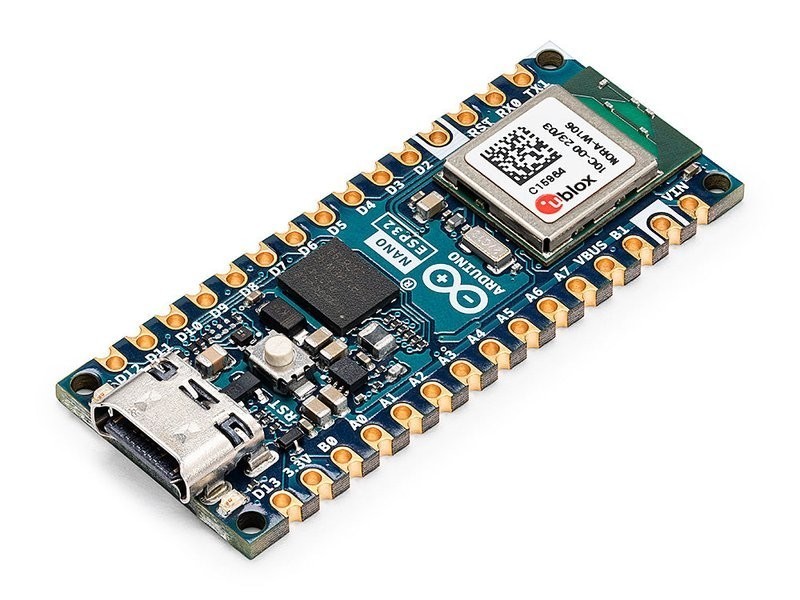
The Arduino Nano ESP32 puts a full ESP32-S3 with dual-core Xtensa LX7, 16MB flash, 8MB PSRAM, WiFi, and BLE 5.0 into the classic Arduino Nano form factor with USB-C. Unlike the Uno R4 WiFi, the S3 is the main processor — you get direct access to all ESP32-S3 capabilities through the Arduino IDE.
Best for getting full ESP32-S3 power in an Arduino-native package, skip if you need more GPIO pins or lower cost.
Where to Buy
Pros
- Full ESP32-S3 as main processor — dual-core LX7 at 240MHz with AI vector instructions
- 16MB flash and 8MB PSRAM — highest flash of any Nano-format board
- Arduino IDE native support with ESP32 Arduino Core
- USB-C with native USB-OTG for HID devices
Cons
- Only 14 GPIO pins exposed — fewer than the XIAO ESP32S3's comparable spec
- Higher price than third-party ESP32-S3 boards like the XIAO
- Arduino Nano form factor is not breadboard-friendly on both sides simultaneously
Dual Ecosystem Advantage
Unlike the Uno R4 WiFi where the ESP32-S3 is a locked-down coprocessor, the Nano ESP32 gives you the full ESP32-S3 as your main processor. Your Arduino sketch runs directly on the dual-core Xtensa LX7 at 240MHz. You get access to the AI vector instructions, 8MB PSRAM, USB-OTG, and all ESP32-S3 peripherals.
This makes the Nano ESP32 functionally equivalent to the ESP32-S3-DevKitC or XIAO ESP32S3 in terms of processing capability. The difference is the Arduino Nano pinout and the Arduino brand's IDE integration and documentation. But the real advantage is ecosystem bridging: you can start with Arduino IDE and its 5,000+ libraries, then switch to ESP-IDF for production firmware without changing hardware. PlatformIO supports both frameworks on this board. A typical development workflow starts with Arduino IDE for rapid prototyping — WiFiClientSecure for HTTPS, ArduinoJson for API parsing, Adafruit libraries for sensors — then migrates to ESP-IDF when you need FreeRTOS task control, OTA partition management, or optimized power modes. No other Nano-format board offers this dual-framework flexibility.
Nano Form Factor Trade-offs
The 45x18mm Nano form factor is compact but exposes only 14 GPIO pins — the ESP32-S3 chip has 45 GPIO, but most are consumed by the WiFi/BLE radio and internal peripherals. The XIAO ESP32S3 is even smaller at 21x17.5mm but exposes 11 GPIO. The full DevKitC exposes 45 GPIO at 69x25.4mm.
For projects with 1-2 SPI devices and an I2C bus, 14 GPIO is sufficient. For projects connecting many independent peripherals, you will need the DevKitC's full pin breakout. The Nano form factor also presents a breadboard challenge: the 2.54mm pin headers span the full width of a standard breadboard, leaving zero accessible rows on one side. Using two breadboards or a Nano screw terminal adapter solves this, but it is an ergonomic friction point during prototyping that the wider DevKitC format avoids.
WiFi/BLE Performance and Upgrade Path
The ESP32-S3's WiFi radio supports 802.11 b/g/n on 2.4GHz with throughput up to 20Mbps in real-world conditions. BLE 5.0 provides simultaneous connections to multiple peripherals, long-range mode for extended coverage, and 2Mbps PHY for faster data transfer. Both radios operate concurrently, so a project can serve a web dashboard over WiFi while communicating with BLE sensors simultaneously. The onboard PCB antenna delivers adequate range for indoor projects — typically 15-30m through walls — but cannot match the external antenna options available on the DevKitC.
For Arduino users upgrading from a classic Nano (ATmega328P at 16MHz, 2KB SRAM, no wireless), the Nano ESP32 is the most natural step up. The pin header is physically compatible, the Arduino IDE workflow is identical, and 90% of Arduino libraries compile without modification. The main gotcha is voltage: the classic Nano runs at 5V logic, the Nano ESP32 at 3.3V. Shields and sensors designed for 5V need level shifting, or you need to verify they tolerate 3.3V input. Most modern I2C and SPI sensors operate at 3.3V natively, but older relay modules, certain LCD shields, and 5V servo signals may require adaptation. Budget 30 minutes for pin voltage auditing when migrating an existing Nano project.
Memory and Storage: Where the Nano ESP32 Excels
With 16MB flash and 8MB PSRAM, the Nano ESP32 has the highest storage density of any Nano-format board. The 16MB flash is double what the XIAO ESP32S3 offers and provides enough space for OTA update partitions (two 6MB app slots plus filesystem), large web assets served from SPIFFS or LittleFS, and pre-trained TFLite models for on-device inference. The 8MB PSRAM is accessible via standard malloc calls in Arduino IDE, enabling buffers large enough for image processing, audio streaming, or JSON parsing of large API responses without stack overflow.
For comparison, the classic Arduino Nano runs on 32KB flash and 2KB SRAM — the Nano ESP32 has 500 times the flash and 4,000 times the working memory. This is not an incremental upgrade; it is a generational leap that enables entirely different classes of applications. HTTPS requests with TLS, real-time audio processing, display frame buffers for 320x240 TFT screens — all impossible on classic Arduino hardware, all routine on the Nano ESP32.
Arduino IDE + ESP32-S3: Best of Both Worlds
The Nano ESP32 answers a question that thousands of Arduino forum posts have asked: how do I add WiFi and Bluetooth to my Arduino project without learning an entirely new toolchain? The answer is this board — drop an ESP32-S3 into the Arduino ecosystem and program it exactly like you would an Uno or a classic Nano.
The Arduino IDE with the ESP32 Arduino Core installed treats the Nano ESP32 as a first-class citizen. Board selection, serial monitor, library manager, and one-click upload all work identically to programming an ATmega328P. But under the hood, you are running a 240MHz dual-core processor with 8MB PSRAM, WiFi 802.11 b/g/n, and BLE 5.0. Libraries like WiFiClientSecure, AsyncWebServer, and ESPAsyncTCP give you HTTPS connections, REST APIs, and WebSocket servers — capabilities that were impossible on classic Arduino hardware. MicroPython support adds a second programming path for rapid prototyping and education.
Compared to the plain ESP32-S3-DevKitC-1 at roughly half the price, the Nano ESP32 trades cost for convenience. The DevKitC exposes 45 GPIO pins versus the Nano's 14, comes in a wider breadboard-friendly form factor, and costs $8-12 from Espressif-authorized distributors. The Nano ESP32 justifies its premium through Arduino's brand trust (guaranteed quality control versus variable clone quality), curated documentation with step-by-step tutorials on docs.arduino.cc, and the smaller 45x18mm footprint that fits in tighter enclosures. For production deployments of 10+ units, the DevKitC's lower cost wins. For a one-off IoT sensor, a classroom kit, or a project where you value documentation over pin count, the Nano ESP32 reduces time-to-working-prototype by hours. The honest recommendation: if you are comfortable with ESP-IDF or PlatformIO and do not need Arduino library compatibility, buy the DevKitC and save the difference for sensors.
Full Specifications
Processor
| Specification | Value |
|---|---|
| Architecture | Xtensa LX7 [1] |
| CPU Cores | 2 [1] |
| Clock Speed | 240 MHz [1] |
Memory
| Specification | Value |
|---|---|
| Flash | 16 MB [1] |
| SRAM | 512 KB [1] |
| PSRAM | 8 MB [1] |
Connectivity
| Specification | Value |
|---|---|
| WiFi | 802.11 b/g/n [1] |
| Bluetooth | 5.0 [1] |
I/O & Interfaces
| Specification | Value |
|---|---|
| GPIO Pins | 14 [2] |
| ADC Channels | 8 [2] |
| SPI | 1 [2] |
| I2C | 1 [2] |
| UART | 1 [2] |
| USB | USB-C (native) [2] |
Power
| Specification | Value |
|---|---|
| Input Voltage | 5-18 V [1] |
| operating_voltage | 3.3 V [1] |
Physical
| Specification | Value |
|---|---|
| Dimensions | 45 x 18 mm [2] |
| Form Factor | Arduino Nano [2] |
Who Should Buy This
The only official Arduino with the full ESP32-S3 as main processor. 240MHz dual-core, 8MB PSRAM, AI vectors — all programmable through Arduino IDE with full library support.
16MB flash stores models. 8MB PSRAM holds inference buffers. Arduino IDE simplifies deployment. 45x18mm fits in small enclosures.
The XIAO ESP32S3 has the same chip and PSRAM in a smaller package at a lower price, plus battery charging. Choose the Nano ESP32 for Arduino brand support and wider pin header.
Better alternative: Seeed Studio XIAO ESP32S3
Ecosystem & Community
Bridges two massive ecosystems: Arduino's library and tutorial ecosystem plus Espressif's ESP32 community. You can use Arduino IDE for familiar development or switch to ESP-IDF for full ESP32-S3 access. The Nano form factor has its own accessory line of grove-style carrier boards and breakout shields.
Compatible Software
What to Build First
Build a compact WiFi-connected sensor hub in the Nano form factor — reads temperature, humidity, and air quality, then publishes to MQTT or Arduino Cloud in a tiny enclosure.
View tutorial →Must-Have Accessories
Tutorials & Resources
- Arduino Nano ESP32 Official DocsPinout diagram, WiFi/BLE setup, and ESP32-S3 feature access guidestutorial
- ESP32-S3 Programming GuideFull ESP-IDF documentation for direct S3 programming beyond Arduino IDEtutorial
- Arduino Nano ESP32 Deep DiveBenchmarks, WiFi performance testing, and comparison to other Nano-form boardsreview
Frequently Asked Questions
Arduino Nano ESP32 vs XIAO ESP32S3: which is better?
Same chip, same PSRAM. The XIAO is smaller (21mm vs 45mm) and cheaper with battery charging. The Nano ESP32 has 16MB flash (vs 8MB), wider pin headers, and official Arduino brand support. Choose based on size needs and ecosystem preference.
Can the Nano ESP32 run ESP-IDF code?
Yes. Since it uses the ESP32-S3 as its main processor, you can flash ESP-IDF firmware directly. You are not locked into the Arduino IDE — PlatformIO and ESP-IDF toolchains both work.
Does the Nano ESP32 have camera support?
The ESP32-S3 chip supports cameras, but the Nano ESP32 does not break out the DVP camera pins. For camera projects, use the ESP32-S3-DevKitC or XIAO ESP32S3 Sense.
Is the Nano ESP32 compatible with Nano shields?
Yes, if the shield works with 3.3V logic. The Nano ESP32 runs at 3.3V, while older Arduino Nanos run at 5V. Shields designed for 5V logic may not work correctly without level shifting.
Why choose the Nano ESP32 over the regular DevKitC?
The Arduino brand, Arduino IDE integration, and Nano form factor. If you are already in the Arduino ecosystem and want an easy upgrade to ESP32-S3 performance, the Nano ESP32 reduces friction. The DevKitC offers more GPIO and lower cost.
Compared In
Arduino Nano ESP32 appears in 11 buying guides on PAM Finds. These weigh it directly against the alternatives.
- Arduino Nano ESP32 vs XIAO ESP32S3: Size vs Pins
- Best PCB Assembly Services for Small Batch Orders in 2026
- Best PCB Design Software for Beginners in 2026
- From Breadboard to Custom PCB: Complete Beginner Guide
- Design a Custom ESP32 Board in KiCad + Order from JLCPCB
- Design a Custom ESPHome Sensor Board: Idea to Production
- ESP32 Module vs Bare Chip: When to Use Each
- JLCPCB vs PCBWay vs OSH Park: Best PCB Service in 2026