Arduino Uno R4 Minima
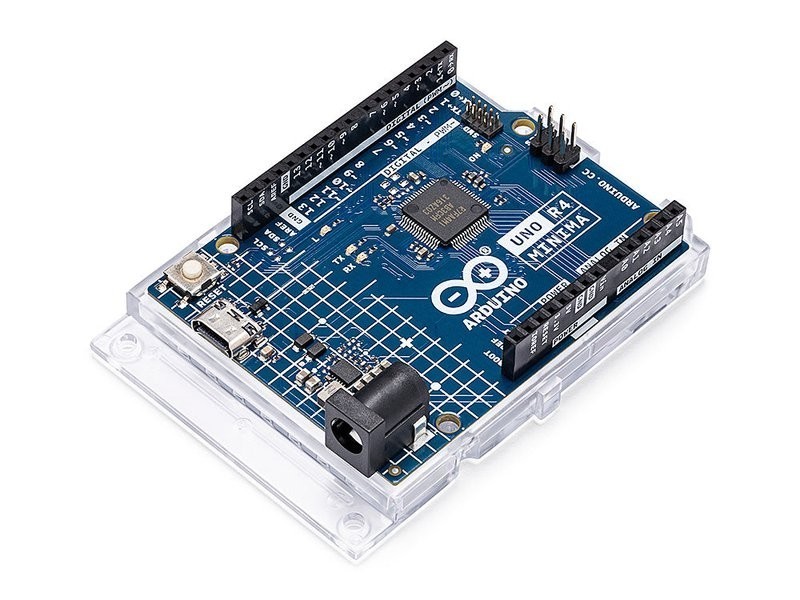
The Arduino Uno R4 Minima is the stripped-down sibling of the R4 WiFi, running the same Renesas RA4M1 ARM Cortex-M4 at 48MHz but without WiFi, BLE, or the LED matrix. It is the cheapest official Arduino board with USB-C and CAN bus, ideal for wired projects that need shield compatibility without wireless overhead.
Best as the cheapest modern Arduino for wired projects, skip if you need any wireless connectivity.
Where to Buy
Pros
- Cheapest official Arduino Uno with USB-C and CAN bus
- Full Uno shield compatibility — same pinout as every Uno since 2010
- CAN bus for automotive and industrial communication
- USB-C with native USB support for HID device emulation
Cons
- No WiFi, no Bluetooth — completely wired-only
- 48MHz ARM Cortex-M4 with 32KB SRAM is underpowered by modern standards
- No LED matrix — that feature is WiFi-only
- For the same price range, the ESP32-C3 offers WiFi + BLE + faster processor
RA4M1 Processor: The Real Upgrade
The Minima is Arduino's answer to the question: what if you want the R4's ARM Cortex-M4 upgrade without paying for WiFi? It runs the same Renesas RA4M1 at 48MHz with 256KB flash and 32KB SRAM, maintains the same pinout and shield compatibility, and adds CAN bus and USB-C.
The RA4M1 represents a generational leap over the ATmega328P that powered every Uno from 2010 through 2023. The 48MHz ARM Cortex-M4 is roughly 6x faster than the 16MHz ATmega328P in raw throughput, and the M4's hardware floating-point unit (FPU) makes math-heavy code dramatically faster — floating-point operations that took hundreds of clock cycles in software on the AVR execute in 1-2 cycles on the M4 FPU. The 256KB flash versus 32KB means sketches can be 8x larger before hitting limits. The 32KB SRAM versus 2KB eliminates the constant memory management headaches that plagued complex ATmega328P projects. In practice, this means the Minima can handle sensor fusion calculations, PID control loops with floating-point coefficients, and larger data buffers without the careful memory optimization that the old Uno R3 demanded.
CAN Bus and DAC: Hidden Capabilities
The Minima's most underappreciated feature is its built-in CAN bus controller. CAN (Controller Area Network) is the standard communication protocol in automotive systems, industrial automation, and robotics. The RA4M1's CAN peripheral connects to an OBD-II port with just a CAN transceiver chip (MCP2551 or SN65HVD230, roughly $2), enabling the Minima to read engine RPM, coolant temperature, vehicle speed, and diagnostic trouble codes from any OBD-II compliant vehicle. Previous Arduino Unos required an external MCP2515 CAN controller shield ($15+) plus a transceiver, making the Minima significantly cheaper for automotive projects.
The RA4M1 also includes a 12-bit DAC (digital-to-analog converter) that the ATmega328P completely lacked. The DAC outputs true analog voltages from 0 to 3.3V with 4096 steps of resolution, enabling waveform generation, audio output, and analog voltage control without an external DAC module. The old Uno R3 could only fake analog output via PWM, which requires external filtering to produce a clean voltage. The Minima's DAC directly drives analog inputs on other devices, generates audio tones without a speaker driver, and provides precision voltage references for calibration setups. For industrial and automotive hobbyists, these two features alone justify choosing the Minima over the old Uno R3.
Shield Compatibility and When to Choose Minima
The Minima occupies a narrow but defensible niche. It makes sense when you specifically need Arduino shield compatibility and CAN bus but not wireless. Automotive hobbyists reading OBD-II data through a CAN transceiver, students in courses with existing Uno curriculum, and makers with shield-based projects are the target audience. Every Uno shield manufactured since 2010 fits the Minima's headers: motor driver shields, LCD shields, relay shields, sensor shields, and prototyping shields all work without modification.
The critical compatibility caveat is voltage. The Minima runs at 5V logic on its digital pins, maintaining backward compatibility with the vast majority of Uno shields designed for 5V. This is an advantage over the ESP32-C3-DevKitM, which runs at 3.3V and cannot directly drive 5V shields without level shifting. However, the Minima's analog reference is 3.3V on the DAC output, and some analog shields expect a 5V reference. Test analog-dependent shields before committing to a project.
For everyone else, the ESP32-C3-DevKitM provides WiFi, BLE 5.0, a faster 160MHz RISC-V core, and more SRAM at a comparable price. The Minima's value proposition is backward compatibility with the Arduino ecosystem, not raw capability. If you are starting fresh with no existing shields and any chance of needing wireless connectivity, the ESP32-C3 or the Uno R4 WiFi (same processor, adds WiFi/BLE via ESP32-S3 coprocessor) are better investments.
Renesas RA4M1: The New Uno Architecture
The move from Microchip's ATmega328P to the Renesas RA4M1 is the most significant architecture change in the Uno's 16-year history. The ATmega328P ran an 8-bit AVR core at 16MHz with 32KB flash and 2KB SRAM — specs that were modest even in 2005 when the original Arduino shipped. The RA4M1 brings a 32-bit Arm Cortex-M4 at 48MHz, delivering roughly 6x the raw throughput and access to the Arm ecosystem's mature toolchain, CMSIS libraries, and RTOS support.
The memory upgrade is dramatic: 256KB flash (8x more than the ATmega328P's 32KB) means sketches can include multiple libraries, OTA update partitions, and data tables without hitting the wall that forced careful code optimization on the old Uno. The 32KB SRAM (16x more than 2KB) eliminates the chronic memory fragmentation issues that plagued complex ATmega328P projects — string concatenation, JSON parsing, and buffering serial data no longer require obsessive memory management. Projects that previously needed an Arduino Mega 2560 just for its 8KB SRAM now fit comfortably on the Minima.
The Cortex-M4's hardware floating-point unit (FPU) deserves special attention. The ATmega328P had no FPU — every floating-point operation was emulated in software, consuming hundreds of clock cycles per multiply or divide. The M4's single-precision FPU executes float operations in 1-2 cycles, making PID control loops, sensor calibration with polynomial correction, FFT-based audio analysis, and trigonometric calculations for servo kinematics run 50-100x faster at the math level. For robotics projects computing inverse kinematics or sensor fusion algorithms using complementary or Kalman filters, the FPU transforms the Uno from barely adequate to genuinely capable.
The RA4M1 also introduces a 12-bit DAC output on pin A0, enabling true analog voltage generation from 0V to 3.3V with 4096 discrete steps. The ATmega328P could only approximate analog output via PWM, which requires external RC filtering to smooth into a clean DC voltage. The Minima's DAC directly drives audio waveforms — generating sine, square, and sawtooth tones at up to 44.1kHz sample rate for simple audio projects. Combined with the CAN bus controller for automotive data and native USB for HID device emulation, the RA4M1 makes the Minima a fundamentally more versatile platform while maintaining the exact Uno R3 shield pinout that 16 years of accessories were designed for.
Full Specifications
Processor
| Specification | Value |
|---|---|
| Architecture | ARM Cortex-M4 [1] |
| CPU Cores | 1 [1] |
| Clock Speed | 48 MHz [1] |
Memory
| Specification | Value |
|---|---|
| Flash | 0.256 MB [1] |
| SRAM | 32 KB [1] |
| eeprom | 8 KB [1] |
I/O & Interfaces
| Specification | Value |
|---|---|
| GPIO Pins | 20 [2] |
| ADC Channels | 6 [2] |
| dac_channels | 1 [2] |
| SPI | 1 [2] |
| I2C | 1 [2] |
| UART | 2 [2] |
| USB | USB-C (native) [2] |
| can_bus | 1x CAN bus [2] |
Power
| Specification | Value |
|---|---|
| Input Voltage | 6-24 V [1] |
| operating_voltage | 5 V [1] |
Physical
| Specification | Value |
|---|---|
| Dimensions | 68.85 x 53.34 mm [2] |
| Form Factor | Arduino Uno (shield-compatible) [2] |
Who Should Buy This
Cheapest official Arduino with modern USB-C. If the course doesn't need WiFi, this saves money over the R4 WiFi while maintaining full compatibility.
Built-in CAN bus plus shield compatibility for display shields. If data stays on the CAN network and doesn't need WiFi upload, the Minima is sufficient.
No wireless connectivity at all. The ESP32-C3-DevKitM gives you WiFi + BLE 5.0 at a similar price point with a faster processor.
Better alternative: ESP32-C3-DevKitM-1
Ecosystem & Community
Shares the full Arduino Uno shield ecosystem with the R4 WiFi. Every shield, sensor module, and tutorial designed for any Arduino Uno works with the Minima. The only difference is the absence of WiFi-specific libraries and LED matrix code.
Compatible Software
What to Build First
The quintessential Arduino starter project — blink an LED at variable rates based on a potentiometer or light sensor reading. The simplest possible intro to analog input and digital output.
View tutorial →Must-Have Accessories
Video Reviews & Tutorials
Tutorials & Resources
- Arduino Uno R4 Minima Getting StartedOfficial documentation with pinout, setup guide, and example sketchestutorial
- Arduino Built-In ExamplesDozens of beginner-friendly tutorials that work with any Uno-compatible boardtutorial
Frequently Asked Questions
Arduino Uno R4 Minima vs WiFi: what is the difference?
The WiFi adds an ESP32-S3 coprocessor for WiFi and BLE 5.0, plus a 12x8 LED matrix. The Minima has neither — it is wired-only. Both share the same RA4M1 processor, pinout, and CAN bus support.
Is the Minima a good first Arduino?
Yes, if your projects don't need WiFi. It is the cheapest official Arduino with USB-C. For courses and tutorials, it works with every Arduino Uno example. If you think you might want WiFi later, buy the R4 WiFi instead.
Can I add WiFi to the Minima later?
Yes, via an ESP8266 or ESP32 WiFi shield, but this adds cost and complexity. If WiFi is a possibility, the R4 WiFi with built-in WiFi is simpler and often cheaper than Minima plus a WiFi shield.
Why buy the Minima over a cheap ESP32 board?
Shield compatibility. If you have existing Arduino Uno shields (displays, motor drivers, sensor shields), the Minima works with all of them. ESP32 boards have different pin layouts and 3.3V logic that may not work with 5V shields.
Does the Minima have USB-C?
Yes. Both the R4 Minima and R4 WiFi upgraded from the Uno R3's USB-B to USB-C. The USB port supports native USB for HID device emulation in addition to programming and serial communication.
Compared In
Arduino Uno R4 Minima appears in 1 buying guide on PAM Finds. These weigh it directly against the alternatives.