Bambu Lab A1
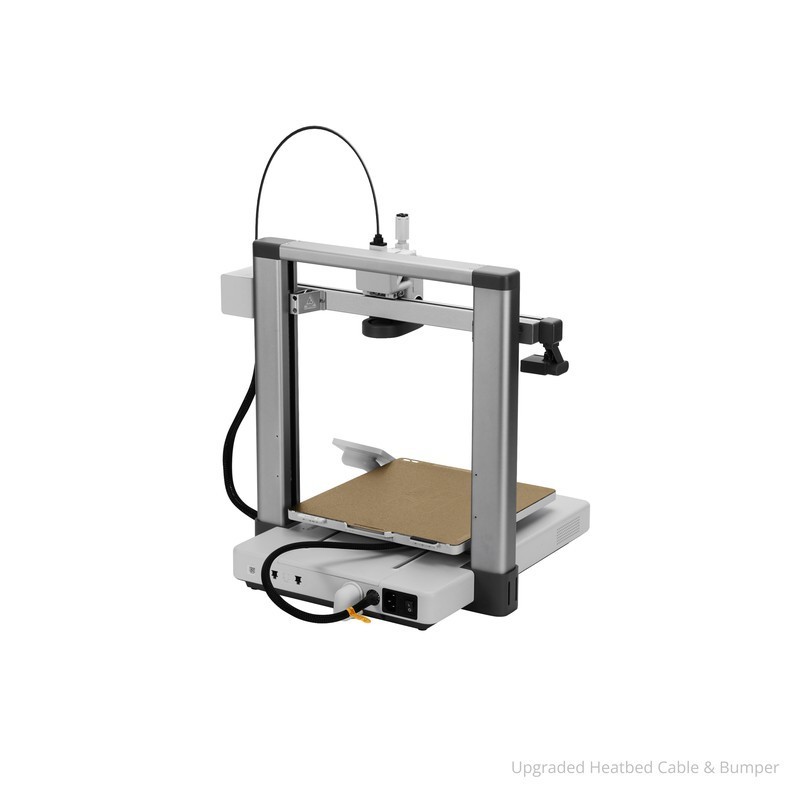
The Bambu Lab A1 is an open-frame bed-slinger 3D printer with a 256x256x256mm build volume, 500mm/s print speed, full auto-calibration, quick-change nozzle system, and AMS Lite support for 4-color printing. At $299, it delivers Bambu's signature plug-and-play reliability in the most competitive price segment of the market.
Best value all-rounder for PLA and PETG daily printing — skip if you need an enclosure for ABS or a build volume larger than 256mm.
Where to Buy
Pros
- 500mm/s print speed with auto-calibration — Bambu quality at $299
- Quick-change nozzle system swaps in seconds with no tools — switch between 0.2mm and 0.6mm nozzles instantly
- AMS Lite compatible for 4-color multi-material printing at a fraction of the full AMS cost
- 49dB noise level — quieter than a refrigerator, suitable for living spaces and dorm rooms
- Full auto-calibration including vibration compensation, flow rate, and first-layer detection
Cons
- Open frame — no enclosure means ABS and ASA will warp without a DIY enclosure
- Bed-slinger design moves the entire bed on the Y axis, limiting practical speed on tall prints
- AMS Lite maxes out at 4 colors vs the full AMS's 16 colors on the P1S
- No built-in enclosure option from Bambu — third-party enclosures compromise the open-frame accessibility that makes maintenance easy
The $299 Sweet Spot
The A1 occupies the most competitive price point in consumer 3D printing: $300 buys either a fully calibrated Bambu or a partially assembled Creality that needs tuning. The A1 wins that comparison decisively. Auto-vibration compensation, auto-flow calibration, and automatic first-layer inspection mean you get consistent results from the first print without manual bed leveling or flow tuning.
The quick-change nozzle system is the A1's unique mechanical advantage. A magnetic coupling lets you swap nozzles in under 10 seconds — no heat-up, no tools, no re-calibration. Keep a 0.2mm nozzle for detailed miniatures and a 0.6mm nozzle for fast prototypes. This alone saves hours of re-tuning that other printers require after nozzle changes.
At 49dB, the A1 is also remarkably quiet. Most bed-slingers at 500mm/s produce 55-65dB — the A1 achieves its noise floor through vibration damping and optimized stepper driver tuning. It is comfortable to run on a desk in a shared workspace.
Open Frame Trade-offs
The A1's open frame is both its main advantage and primary limitation. Without enclosure panels, the printer stays cool during PLA printing, is easy to access for maintenance, and has a smaller desktop footprint than the enclosed P1S. But it means high-temp materials like ABS, ASA, and nylon are impractical without a third-party enclosure.
For PLA and PETG — which represent 80% of consumer filament use — the open frame is a non-issue. PLA prints best at room temperature, and PETG only needs a 70-80°C bed, which the A1's textured PEI plate handles. The limitation matters only if you plan to print engineering materials for heat-resistant functional parts.
The bed-slinger kinematics (stationary head on X, moving bed on Y) also matter at the edges. On tall, narrow prints, bed movement at 500mm/s can cause ringing artifacts. CoreXY printers like the P1S avoid this by moving only the lightweight toolhead. For most prints, the A1's input shaping compensates well, but physics favors CoreXY for extreme cases.
AMS Lite: Multi-Color on a Budget
The AMS Lite is a stripped-down version of Bambu's Automatic Material System, designed specifically for the A1. It holds four spools and handles automatic loading, unloading, and switching between materials. At roughly $80, it brings multi-color capability to the $299 A1 for a total system cost under $400.
The key difference from the full AMS: no humidity control, no RFID tag reading, and no daisy-chaining. You get exactly four slots, period. The full AMS on the P1S includes desiccant chambers, auto-detects filament type via RFID, and chains up to 16 colors. For most multi-color projects — two-tone logos, multi-colored figurines, contrasting text on functional parts — four colors is sufficient.
Reliability is high for PLA and PETG. TPU requires careful retraction tuning. The system generates purge waste (1-2g per swap), which is inherent to any single-nozzle multi-material system. For lower waste, consider a dual-nozzle printer, but those come with their own alignment challenges.
Quick-Change Nozzle: The Underrated Feature
The A1's magnetic quick-change nozzle system is its most underappreciated mechanical advantage over both the A1 Mini and competing printers. A twist-and-pull motion swaps nozzles in under 10 seconds — no heat-up cycle, no wrench, no re-calibration. Keep a 0.2mm nozzle mounted for detailed miniatures and text, a 0.4mm for everyday printing, and a 0.6mm for fast draft prototypes.
On traditional printers, nozzle changes take 10-15 minutes: heat the hotend to 250°C, hold the heater block with a wrench, unscrew the nozzle, install the new one at temperature, re-tighten, then run a first-layer calibration. Most users never bother, which means they compromise on either detail or speed for every print. The A1's system removes this trade-off entirely. Bambu sells hardened steel nozzles in every size for abrasive filaments like carbon-fiber PLA and glass-filled nylon, and the magnetic coupling ensures consistent seating every time.
A1 vs A1 Mini vs P1S: Which Bambu to Buy
Bambu's lineup is deliberately tiered: A1 Mini ($199) for budget and small prints, A1 ($299) for bigger builds on an open frame, and P1S ($699) for enclosed high-temp multi-material work. Understanding the differences saves you from buying twice.
Build volume is the first decision. The A1 Mini prints up to 180x180x180mm — sufficient for phone cases, ESP32 enclosures, keycaps, and figurines under 7 inches. The A1 jumps to 256x256x256mm, which opens up full-size helmets (in 2-3 pieces instead of 6-8), larger drone frames, and enclosures for full-size Raspberry Pi stacks. The P1S matches the A1's 256mm XY dimensions but adds a fully sealed chamber with activated carbon filtration. The volume difference between Mini and A1 is 61% more printable space per axis — if your designs regularly exceed 150mm in any dimension, the A1 pays for itself in avoided part-splitting.
The second decision is materials. All three handle PLA and PETG identically. The open-frame A1 Mini and A1 cannot reliably print ABS, ASA, or polycarbonate — these materials warp without stable chamber temperatures above 40°C. The P1S's enclosed chamber reaches 60°C passively during printing, making ABS and ASA reliable. If you never plan to print engineering thermoplastics, the enclosure premium is wasted money.
The third decision is multi-material. The A1 Mini and A1 use the AMS Lite, which holds 4 spools with no humidity control and no daisy-chaining. The P1S uses the full AMS with desiccant chambers, RFID filament identification, and support for chaining up to 4 units (16 colors total). Most hobby multi-color projects use 2-4 colors, making the AMS Lite sufficient. Only cosplay painters, multi-material functional parts (TPU gaskets in PLA housings), and commercial product prototyping consistently need more than 4 materials per print.
Full Specifications
Connectivity
| Specification | Value |
|---|---|
| WiFi | 802.11 b/g/n [1] |
I/O & Interfaces
| Specification | Value |
|---|---|
| Extruder | Direct drive [1] |
| Hotend | All-metal, quick-change nozzle [1] |
| Auto Leveling | Eddy current + force sensor [1] |
| Build Plate | Textured PEI spring steel [1] |
| Camera | Built-in (remote monitoring) [1] |
| Display | 2.8" monochrome LCD [1] |
Physical
| Specification | Value |
|---|---|
| Enclosure | Open frame [1] |
| Multi-Color | AMS Lite compatible (up to 4 colors) [1] |
| Noise Level | 49 dB [1] |
| Dimensions | 475 x 374 x 475 mm [1] |
Who Should Buy This
The A1 is the best value printer on the market for everyday PLA and PETG work. 500mm/s speed, full auto-calibration, and Bambu Studio slicing produce consistent results print after print. At $299, nothing else combines this speed and reliability.
Auto-calibration handles everything: vibration compensation, flow rate, Z-offset, and first-layer adhesion. Load filament, select a model in Bambu Studio, hit print. The A1 is the closest thing to an appliance in consumer 3D printing.
The AMS Lite adds 4-color printing for about $80, which handles most multi-color projects. But if you regularly need 8-16 colors or dissolvable supports, the P1S with full AMS is the better platform — its 4x AMS daisy chain has no AMS Lite equivalent.
Better alternative: Bambu Lab P1S
The open frame makes ABS printing unreliable. Temperature fluctuations cause warping and layer splitting. A DIY enclosure helps but voids aesthetics and complicates maintenance. The P1S includes a proper enclosure with carbon filter for $400 more.
Better alternative: Bambu Lab P1S
The A1 at $299 is a sweet spot — capable enough to never feel limiting, reliable enough to avoid frustration. But if budget is the primary concern and you just want to test the waters, the A1 Mini at $199 does 90% of what the A1 does in a smaller footprint.
Better alternative: Bambu Lab A1 Mini
Ecosystem & Community
Bambu Lab's closed ecosystem centers on BambuStudio slicer, Bambu Handy app, and cloud printing. OrcaSlicer offers open-source alternative with identical compatibility. r/BambuLab is one of the fastest-growing 3D printing communities.
Compatible Software
What to Build First
Print the classic 3DBenchy calibration boat in under 20 minutes to verify setup, then move to functional prints like cable organizers, phone stands, and custom enclosures for ESP32 projects.
View tutorial →Must-Have Accessories
Video Reviews & Tutorials
Tutorials & Resources
- Bambu Lab WikiOfficial documentation, maintenance guides, and troubleshootingdocs
- Bambu Lab A1 Review: Best Mid-Range 3D PrinterComprehensive review covering speed tests, noise measurements, and print quality comparisonsreview
- OrcaSlicerOpen-source slicer with full Bambu Lab printer support and advanced featuresgithub
Frequently Asked Questions
Bambu Lab A1 vs A1 Mini: which should I buy?
The A1 has a 256mm³ build volume vs the Mini's 180mm³, plus a quick-change nozzle system. Choose the A1 if you print anything larger than 180mm or want easy nozzle swaps. Choose the A1 Mini if budget is the priority and you mostly print small parts and gifts.
Can the A1 print ABS without an enclosure?
Not reliably. ABS requires stable 40-60°C chamber temperatures to avoid warping and layer splitting. The open-frame A1 loses heat to the room. Third-party enclosures exist but compromise the A1's accessibility. For ABS, buy the enclosed P1S instead.
Does the Bambu Lab A1 need WiFi to work?
No. You can print via the SD card slot without any network connection. WiFi enables remote monitoring, cloud slicing, and firmware updates. LAN-only mode keeps the printer on your local network without Bambu Cloud access.
How loud is the A1 during printing?
49dB — roughly the noise level of a quiet refrigerator. It is comfortable in a bedroom, dorm room, or shared workspace. Significantly quieter than the Creality K1 Max (45dB rated, louder in practice) and most other printers at comparable speeds.
Is the A1 better than the Creality Ender 3 V3?
For most users, yes. The A1 has superior auto-calibration, a quieter operation at 49dB, and the AMS Lite option for multi-color. The Ender 3 V3 costs slightly less at $289 and runs open-source Klipper firmware. Choose the Ender 3 V3 only if you value Klipper customization over plug-and-play reliability.
What nozzle sizes does the A1 support?
0.2mm, 0.4mm (default), 0.6mm, and 0.8mm via the quick-change magnetic coupling. Swaps take under 10 seconds with no tools and no re-calibration. Bambu sells hardened steel nozzles for abrasive filaments like carbon-fiber PLA.
Can I upgrade the A1 to print like a P1S?
Partially. Third-party enclosures help with ABS, and the AMS Lite adds multi-color. But the A1 cannot match the P1S's 16-color AMS daisy chain, enclosed chamber for high-temp materials like ABS and PC, or integrated activated carbon filter. If you know you need those features, buy the P1S from the start.
Compared In
Bambu Lab A1 appears in 5 buying guides on PAM Finds. These weigh it directly against the alternatives.