Creality K1 Max
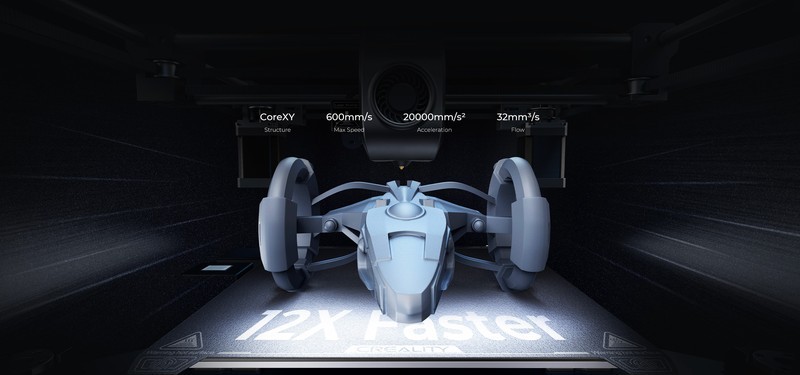
The Creality K1 Max is a large-format CoreXY 3D printer with a 300x300x300mm build volume, 600mm/s print speed, 20000mm/s² acceleration, AI camera with failure detection, and LiDAR + strain sensor auto-leveling. Running Klipper firmware on a quad-core ARM board, it targets users who need CoreXY speed in a bigger build envelope than Bambu offers.
Best large-format fast printer under $700 — skip if you need quiet operation or true plug-and-play simplicity.
Where to Buy
Pros
- 300mm³ build volume — 61% more total volume than the P1S's 256mm³
- 600mm/s max speed with 20000mm/s² acceleration — fastest consumer CoreXY in its size class
- AI camera detects spaghetti failures and pauses the print automatically — saves filament and time
- LiDAR + strain sensor dual leveling system — redundant probing for consistent first layers
- Klipper firmware on quad-core ARM — full macro support, input shaping, and community tuning
Cons
- 45dB manufacturer-rated (reviewers measure 55-60dB at full speed) — noticeably louder than Bambu printers at 49dB
- Semi-enclosed with gaps — not a sealed chamber like the P1S, ABS performance is inconsistent
- Out-of-box calibration needs manual refinement — pressure advance and input shaping benefit from tuning
- Creality's slicer (Creality Print) is weaker than Bambu Studio — most users switch to OrcaSlicer
- Build quality and QC inconsistency — some units need belt tensioning and eccentric nut adjustment on arrival
Large Format at CoreXY Speed
The K1 Max solves a specific problem: you need prints bigger than 256mm and you need them fast. The 300x300x300mm build volume is 60% larger than the Bambu P1S by total volume (27 liters vs 16.8 liters), and the CoreXY kinematics maintain quality at 600mm/s because only the lightweight toolhead moves — not the bed.
This matters for cosplay, drone frames, architectural models, and any project where splitting a print into multiple pieces adds assembly time and visible seams. A 280mm helmet section that requires cutting and gluing on a 256mm printer comes off the K1 Max in one continuous piece.
The 20000mm/s² acceleration matches the Bambu P1S and exceeds most other printers in this size class. On short-segment geometries like infill and small features, acceleration matters more than top speed. The K1 Max does not just claim 600mm/s — it actually reaches those speeds on straight segments and handles direction changes at 20000mm/s² without visible ringing artifacts.
AI Camera and LiDAR: Smart Features That Actually Work
The K1 Max includes an AI-powered camera that monitors prints in real time and detects spaghetti failures — the tangled mess of filament that results when a print detaches from the bed mid-print. When detected, the printer pauses automatically and sends a notification. This is genuinely useful on long prints where a failure at hour 2 of a 12-hour print wastes 10 hours of filament and time.
The dual leveling system combines a LiDAR scanner and a strain-gauge sensor. LiDAR maps the bed surface at 50+ points to generate a mesh compensation matrix. The strain sensor measures nozzle-to-bed distance during probing for first-layer calibration. The combination is more reliable than single-probe systems, though it does not match the Prusa MK4S's loadcell precision for exotic bed surfaces.
Both features represent Creality's attempt to match Bambu's smart-printer experience. They work, but with caveats — users report generally reliable detection with occasional false positives on stringy prints, and the LiDAR occasionally needs re-calibration after bed removal. These are not deal-breakers, but they are not as seamless as Bambu's implementation.
Klipper: Power and Responsibility
The K1 Max runs Klipper firmware on a quad-core ARM SoC with full root access via SSH. This is simultaneously its greatest strength and the reason it is not a beginner printer. Klipper provides pressure advance tuning, input shaping calibration, custom macro scripting, and integration with web interfaces like Fluidd and Mainsail.
For experienced users, Klipper means you can tune the K1 Max beyond its stock calibration. Custom pressure advance curves per material eliminate oozing. Input shaping profiles tuned with an accelerometer remove resonance artifacts at specific speeds. Temperature-triggered macros automate enclosure fans, chamber heating, and filament drying sequences.
For beginners, Klipper means editing config files instead of clicking buttons. Creality Print (their slicer) is functional but lacks Bambu Studio's polish. Most K1 Max users switch to OrcaSlicer within the first week, which is free and excellent but requires learning a new tool. The learning curve is real — budget 2-3 evenings of tuning before the K1 Max matches the out-of-box quality of a Bambu printer.
Build Quality and Long-Term Reliability
The K1 Max ships in a semi-assembled state that requires attaching the top frame, connecting cables, and running the initial calibration sequence — roughly 30 minutes of setup. Build quality is adequate but not exceptional. The steel frame is rigid, the CoreXY belt path is well-routed, and the dual Z-axis linear rails provide consistent gantry motion. However, QC reports vary: some units arrive with loose eccentric nuts, undertensioned belts, or minor gantry misalignment that requires manual correction.
Long-term reliability is a mixed picture based on community reports. The LiDAR module is the most failure-prone component, with some users reporting calibration drift after 6-12 months. The hotend and heatbreak are proprietary Creality designs, not standard E3D V6 compatible, which limits aftermarket replacement options. Firmware updates from Creality have been inconsistent — the community-maintained Klipper configurations often outperform Creality's stock settings. For users comfortable with SSH and config file editing, this is a feature. For users expecting manufacturer-supported updates like Bambu delivers, it is a gap.
K1 Max vs Bambu Lab P1S: The Direct Competitor Showdown
The K1 Max and P1S are the two printers most often cross-shopped by serious hobbyists, and they represent fundamentally different philosophies. The K1 Max bets on volume and openness: 300x300x300mm build space (27 liters) and Klipper with full root SSH access. The P1S bets on reliability and enclosure: 256x256x256mm (16.8 liters) with a fully sealed chamber, activated carbon filter, and Bambu's polished auto-calibration stack.
On raw build volume, the K1 Max wins by 61%. That matters for cosplay armor, architectural models, and drone frames where part-splitting adds hours of post-processing. A 280mm helmet half prints as one continuous piece on the K1 Max but requires cutting and gluing on the P1S. For users who routinely print parts over 256mm, the K1 Max is the only option under $700.
On everything else, the P1S has the edge. Bambu's auto-calibration is more reliable out of the box — users report the P1S produces excellent prints from the first power-on, while the K1 Max typically needs 2-3 evenings of pressure advance and input shaping tuning to match. The P1S's sealed enclosure enables reliable ABS, ASA, and nylon printing at stable 55-60°C chamber temperatures. The K1 Max's semi-enclosed design leaks heat through gaps, making ABS inconsistent on large flat surfaces. Noise is another clear P1S advantage: 49dB rated and quiet in practice versus the K1 Max's 45dB rating that reviewers consistently measure at 55-60dB under load.
The software gap is real. Bambu Studio is the most polished consumer 3D printing slicer — one-click profiles, integrated cloud printing, and seamless AMS control. Creality Print is functional but crude, and most K1 Max users switch to OrcaSlicer within the first week. The open-source Klipper advantage is genuine for power users who write macros, integrate with home automation, or need firmware-level control — but for the 80% of users who just want reliable prints, Bambu's closed firmware delivers better results with less effort.
Common Gotchas
Auto-calibration is less reliable than Bambu's implementation. Community reports indicate the K1 Max's auto-bed-leveling occasionally produces bad mesh data that results in first-layer adhesion issues. Running the calibration twice and comparing results is a common workaround.
Creality's slicer (Creality Print) is less polished than Bambu Studio or OrcaSlicer. Most experienced users switch to OrcaSlicer (which has K1 Max profiles) within the first week. Creality Print works but produces slightly worse results with default settings.
The enclosure is not fully sealed — there are gaps around the door and top panel. For ABS, this still reduces warping significantly vs open-frame, but it's not as thermally stable as the Bambu P1S's enclosure. In cold rooms (below 15°C), ABS prints may still warp on the K1 Max.
Fan noise during high-speed printing is noticeable. At 500mm/s, the part cooling fans and electronics fans ramp up. It's louder than a Bambu printer at equivalent speeds. Users report 55-60dB during fast prints vs 49dB on the P1S.
Full Specifications
Connectivity
| Specification | Value |
|---|---|
| WiFi | 802.11 b/g/n [1] |
I/O & Interfaces
| Specification | Value |
|---|---|
| Extruder | Direct drive [1] |
| Hotend | Titanium alloy heatbreak, hardened steel nozzle [1] |
| Auto Leveling | Strain sensor + LiDAR [1] |
| Build Plate | Flexible PEI spring steel [1] |
| Camera | AI camera (failure detection + timelapse) [1] |
| Display | 4.3" color touchscreen [1] |
Physical
| Specification | Value |
|---|---|
| Enclosure | Semi-enclosed (removable top) [1] |
| Noise Level | 45 dB [1] |
| Dimensions | 435 x 462 x 526 mm [1] |
Who Should Buy This
The 300mm³ build volume prints full-size helmets in one piece or two pieces instead of the 6-8 pieces required on a 256mm printer. At 600mm/s, a helmet half prints in 4-5 hours instead of 12. No other printer under $700 matches this combination of size and speed.
The K1 Max runs stock Klipper on a quad-core ARM SoC with full SSH access. You can write custom macros, tune pressure advance curves, configure input shaping profiles, and integrate with Moonraker/Fluidd. The Bambu printers lock you out of firmware-level control entirely.
Out-of-box calibration is good but not Bambu-level. You will likely need to tune pressure advance, adjust belt tension, and possibly re-level the gantry within the first few weeks. The A1 Mini at $199 prints perfectly from minute one with zero tuning.
Better alternative: Bambu Lab A1 Mini
At 45dB manufacturer-rated (reviewers measure 55-60dB at full speed), the K1 Max is roughly as loud as a conversation at full tilt. The Bambu A1 and A1 Mini run at 49dB — noticeably quieter. If noise matters, the K1 Max is not the right choice.
Better alternative: Bambu Lab A1
You already know Creality's ecosystem, slicer, and community. The K1 Max is what the Ender 3 should have evolved into — CoreXY, Klipper, auto-leveling, and 10x the speed. Your Ender 3 profiles and material knowledge transfer directly.
Ecosystem & Community
Creality's Klipper-based printers benefit from the open-source Klipper ecosystem including Moonraker API, Fluidd/Mainsail web UIs, and OrcaSlicer. The K1 Max has full SSH root access for custom firmware development.
Compatible Software
What to Build First
Print a 280mm helmet section that would require splitting into 6+ pieces on smaller printers. The 300mm build volume and 600mm/s speed mean a complete helmet half in 4-5 hours.
View tutorial →Must-Have Accessories
Video Reviews & Tutorials
Tutorials & Resources
- Creality K1 Max WikiOfficial firmware downloads, setup guides, and calibration instructionsdocs
- Klipper FirmwareOpen-source firmware powering the K1 Max — full macro system and real-time motion planninggithub
- OrcaSlicerRecommended slicer with K1 Max profiles and Klipper-specific featuresgithub
Frequently Asked Questions
K1 Max vs Bambu Lab P1S: which is better?
The K1 Max has a larger build volume (300mm vs 256mm) and runs open Klipper firmware. The P1S has a fully sealed enclosure, quieter operation (49dB vs 45dB rated, louder in practice), and better out-of-box calibration. Choose the K1 Max for large prints and Klipper tinkering; choose the P1S for multi-material and high-temp materials.
How loud is the K1 Max?
45dB manufacturer-rated, but reviewers measure 55-60dB at full speed — about the volume of a normal conversation. Noticeably louder than Bambu printers (49dB) in practice. Not recommended for bedrooms or shared quiet spaces. An enclosure with sound-damping foam helps but adds cost.
Can the K1 Max print ABS reliably?
Partially. The semi-enclosed design retains some heat but has gaps that allow drafts. Small ABS parts print acceptably; large flat ABS parts may warp. For reliable ABS, you need the fully enclosed Bambu P1S. Third-party enclosure panels improve but do not fully resolve the issue.
Does the AI camera actually work?
Yes, with caveats. Users report generally reliable spaghetti failure detection that saves hours of wasted printing. It occasionally pauses prints that are actually fine — especially on stringy materials — but is still net positive for long unattended prints.
Is the K1 Max good for beginners?
Not ideal. It runs Klipper, which requires config file editing for optimal results. Creality's slicer is weaker than Bambu Studio. Belt tension and gantry alignment may need adjustment out of box. Beginners should start with the Bambu A1 Mini ($199) and graduate to the K1 Max when they need the volume.
Can I run OrcaSlicer with the K1 Max?
Yes, and most users recommend it over Creality Print. OrcaSlicer has excellent K1 Max profiles with pre-tuned pressure advance and input shaping settings. It supports LAN printing, camera monitoring, and all Klipper-specific features.
K1 Max vs K1: is the bigger build volume worth it?
If you ever print parts over 220mm, yes. The K1 Max's 300mm³ volume is 2.5x the K1's 220mm³ by total volume. The price difference is modest, and you cannot make a small printer bigger later. Buy the K1 Max unless desk space is a hard constraint.
Compared In
Creality K1 Max appears in 2 buying guides on PAM Finds. These weigh it directly against the alternatives.