Bambu Lab P1S
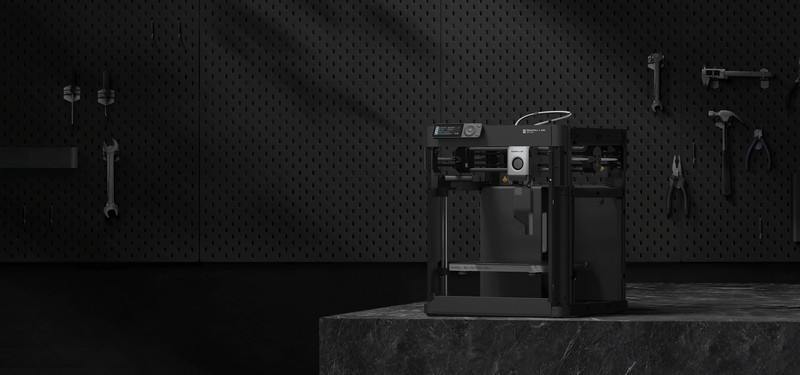
The Bambu Lab P1S is a fully enclosed CoreXY 3D printer with a 256x256x256mm build volume, 500mm/s print speeds at 20000mm/s² acceleration, all-metal hotend rated to 300°C, and AMS support for up to 16-color multi-material printing. Built-in camera, WiFi, and an activated carbon filter make it the most capable sub-$700 enclosed printer available.
Best enclosed all-rounder for multi-material and high-temp printing — skip if you want open-source firmware or a sub-$300 budget.
Where to Buy
Pros
- CoreXY kinematics with 500mm/s speed and 20000mm/s² acceleration — reviewers report Benchy prints in under 18 minutes
- Fully enclosed with activated carbon filter — prints ABS, ASA, and PC without warping or fumes
- AMS system supports up to 16 colors/materials in a single print with automatic filament switching
- All-metal hotend reaches 300°C — handles nylon, polycarbonate, and carbon-fiber composites
- Built-in camera for remote monitoring and timelapse recording via Bambu Handy app
Cons
- MSRP $699 (frequently discounted) — still a significant investment over the $199 A1 Mini
- Closed-source firmware with cloud dependency — no Klipper, no community mods
- Bed-leveling uses software compensation rather than a strain gauge or load cell
- AMS is a separate $249 purchase — multi-material capability is not included at base price
Enclosed CoreXY: Speed Without Compromise
The P1S combines CoreXY kinematics with a fully sealed enclosure, solving the fundamental tension in consumer 3D printing: you can print fast AND print high-temp materials. CoreXY moves only the toolhead, not the bed, enabling 500mm/s print speeds at 20000mm/s² acceleration without the ringing artifacts that plague bed-slingers at high speeds.
The enclosure maintains a stable 40-60°C chamber temperature, which is critical for ABS, ASA, nylon, and polycarbonate. These materials warp violently on open-frame printers because the temperature differential between the heated bed and ambient air creates internal stress. The P1S eliminates this with passive heat retention and an activated carbon filter that scrubs VOC emissions. You can print ABS in a bedroom without ventilation concerns.
The trade-off is build volume. At 256x256x256mm, you're limited compared to the Creality K1 Max's 300mm³ or the Prusa XL's 360x360x360mm. But for 90% of prints, 256mm is sufficient, and the enclosure benefit outweighs the size limitation.
AMS Multi-Material: The Killer Feature
Bambu's Automatic Material System is the P1S's defining advantage. A single AMS unit holds four spools and automatically loads, unloads, and switches between them mid-print. Daisy-chain up to four AMS units for 16 materials in one print. No other consumer printer matches this capability at this price point.
The system works reliably with PLA, PETG, and TPU. ABS and nylon require careful tuning of purge volumes and transition settings. Each material switch generates a purge block — roughly 1-2g of waste per swap. On a 16-color print, waste material can add 30-50g, which is significant but acceptable for the capability.
The AMS also enables dissolvable support interfaces using PVA with PLA or HIPS with ABS. This transforms complex overhanging geometry from a post-processing nightmare into a soak-and-done workflow. For functional assemblies with tight tolerances, dissolvable supports are transformative.
Cloud Ecosystem: Convenience vs Control
Bambu Studio (the slicer) and the Bambu Handy mobile app provide a seamless workflow: slice on desktop, send to printer via WiFi, monitor via the built-in camera, get push notifications when the print finishes. The experience feels closer to a consumer appliance than a hobby tool.
The downside is lock-in. Bambu's firmware is proprietary. You cannot flash Klipper, add custom macros, or modify acceleration curves beyond what Bambu exposes. OrcaSlicer (open-source fork of Bambu Studio) adds some flexibility, but the printer itself remains a black box. For users who want to tune input shaping parameters or write custom G-code macros, the Prusa MK4S with its open-source firmware is a better fit.
The camera streams at 1080p over WiFi and records automatic timelapses. Bambu Cloud stores prints and settings, but LAN-only mode is available for users who prefer to keep their printer off the internet.
P1S vs Building a Klipper Voron
The P1S and a Voron 2.4 represent fundamentally different philosophies: turnkey appliance versus DIY project. Understanding which camp you fall into saves hundreds of dollars and dozens of hours.
On cost, the P1S at $699 looks straightforward. A Voron 2.4 kit runs $500-800 depending on the sourcing kit (Formbot, LDO, or self-sourced), but add 40-60 hours of build time at any reasonable value of your time and the Voron is significantly more expensive. The Voron also requires purchasing a Klipper host separately — a Raspberry Pi 4 or BTT Pi adds $30-75.
On print quality, the P1S achieves excellent results immediately out of the box. A well-tuned Voron 2.4 matches or exceeds the P1S in quality — but "well-tuned" is doing heavy lifting in that sentence. Getting a Voron dialed in requires input shaper calibration, pressure advance tuning, Z-offset adjustment, and potentially weeks of iterative improvement. The P1S ships pre-calibrated.
The P1S has one feature the Voron ecosystem simply cannot match: the AMS. Automatic 16-color material switching with dissolvable support capability has no equivalent in the open-source printer world. Multi-material on a Voron means an ERCF (Enraged Rabbit Carrot Feeder), which is another 20-hour build project with its own tuning requirements.
Where the Voron wins decisively is control and repairability. Every component is off-the-shelf — stepper motors, rails, hotends, and mainboards can be sourced from multiple vendors. Klipper gives full firmware access with custom macros, community mods, and no dependency on a single company's cloud infrastructure. When Bambu Lab changes their firmware policies or discontinues a part, P1S owners have no recourse. Voron owners shrug and keep printing.
Choose the P1S if you want results — reliable prints, multi-material capability, and zero build time. Choose the Voron if you want understanding — full control over every parameter, the satisfaction of building your own machine, and independence from any single manufacturer.
Maintenance and Long-Term Ownership
What P1S ownership looks like after 6-12 months of regular use is a question prospective buyers rarely ask but should. The good news: routine maintenance is straightforward and inexpensive. The concern: long-term parts availability depends on a single manufacturer.
Nozzle replacement is the most frequent maintenance item. The P1S uses the same nozzle system as the Bambu A1 series — a quick-swap design that takes under 2 minutes with no tools. Genuine Bambu nozzles cost $3-8 depending on material (brass for PLA/PETG, hardened steel for CF filaments). Third-party nozzles from vendors like Bozzle and Phaetus work fine and often cost less. Expect to replace nozzles every 500-1000 hours of printing with standard filaments, or every 100-200 hours with abrasive carbon-fiber or glass-filled materials.
Belt tensioning is accessible via the side panels without disassembling the enclosure. Bambu's documentation includes tension frequency targets, and the community has developed phone-app-based frequency meters to verify correct tension. Most users report needing belt adjustment every 3-6 months of heavy use. The linear rails are pre-greased from the factory and should be re-lubricated every 6-12 months with a light machine oil.
The PTFE tube inside the hotend should be inspected and greased every 500 print hours. Heat creep — where the melt zone gradually migrates upward — can cause clogs if the PTFE tube degrades. Replacement tubes cost under $5. The enclosed design means the HEPA and activated carbon filters need replacement every 200 hours of ABS/ASA printing, or roughly every 2-3 months for heavy users. Genuine filter replacements run $8-12; third-party alternatives exist but vary in carbon quality.
The proprietary concern is real but often overstated. Bambu Lab is a well-funded company with a growing installed base, making near-term discontinuation unlikely. However, the P1S uses Bambu-specific components — the toolhead assembly, the AMS hub connector, and the mainboard are not standard parts you can source from McMaster-Carr or AliExpress. If Bambu discontinues the P1S line in 3-5 years, replacement parts may become scarce. Compare this to a Voron 2.4, where every component — NEMA17 steppers, MGN12 rails, E3D-compatible hotends, BTT mainboards — can be sourced from dozens of vendors indefinitely because the entire BOM is off-the-shelf.
For most users printing 10-20 hours per week, the P1S's maintenance burden is minimal: a nozzle swap every few months, belt check twice a year, and filter replacement quarterly if printing ABS. The total annual maintenance cost runs $30-50 in consumables — trivial compared to the filament budget.
Common Gotchas
The chamber temperature is NOT controllable — it is passively heated by the bed and hotend. For ABS you get roughly 40-50°C chamber temp which is adequate. For polycarbonate (needs 60°C+), the passive heating may not be sufficient in cold rooms. Some users add a chamber heater mod, which voids the warranty.
AMS filament switching generates 1-2g of purge waste per swap. On a multi-color print with hundreds of swaps, this adds up to 30-50g of wasted filament. The purge block also adds 5-10 minutes to total print time. Plan for this in material cost estimates.
Bambu Cloud sends printer telemetry by default. LAN-only mode disables cloud features (remote monitoring, cloud slicing) but keeps the printer fully functional locally. Privacy-conscious users should enable LAN-only mode during initial setup.
The proprietary hotend nozzle uses a quick-change mechanism that is convenient but means you cannot use standard V6 nozzles. Bambu nozzles cost $3-8 each (similar to V6) but can only be bought from Bambu or authorized resellers. Third-party Bambu-compatible nozzles exist but quality varies.
Full Specifications
Connectivity
| Specification | Value |
|---|---|
| WiFi | 802.11 b/g/n [1] |
I/O & Interfaces
| Specification | Value |
|---|---|
| Extruder | Direct drive [1] |
| Hotend | All-metal [1] |
| Auto Leveling | Eddy current [1] |
| Build Plate | Textured PEI spring steel [1] |
| Camera | Built-in 1080p (remote monitoring + timelapse) [1] |
| Display | 2.8" monochrome LCD [1] |
Physical
| Specification | Value |
|---|---|
| Enclosure | Fully enclosed with activated carbon filter [1] |
| Multi-Color | AMS compatible (up to 16 colors) [1] |
| Noise Level | 49 dB [1] |
| Dimensions | 386 x 389 x 458 mm [1] |
Who Should Buy This
The AMS system handles up to 16 colors automatically, and the enclosed chamber keeps ABS and ASA warp-free. 300°C hotend prints tough, paintable materials. No other printer under $1000 matches this multi-material workflow.
The enclosed build chamber maintains stable temps for nylon and polycarbonate. CoreXY delivers dimensional accuracy across all axes. The 256mm³ volume fits most functional parts. This is the prototyping workhorse.
Auto-calibration, cloud slicing via Bambu Studio, and a built-in camera make this the most hands-off printing experience available. Unbox, load filament, hit print. The trade-off is zero firmware customization.
At $699 MSRP (frequently discounted), this is overkill for learning. The Bambu Lab A1 Mini at $199 delivers the same Bambu ecosystem, same app, same reliability — just smaller and without the enclosure.
Better alternative: Bambu Lab A1 Mini
Bambu's firmware is closed-source with no Klipper support. You cannot flash custom firmware, add macros, or modify the motion system. The Prusa MK4S is fully open-source and mod-friendly.
Better alternative: Prusa MK4S
Ecosystem & Community
The P1S is supported by OrcaSlicer and Bambu Studio slicers, with millions of printable models on MakerWorld and Printables, and a fast-growing Reddit community of 200K+ members.
Compatible Software
What to Build First
Print the 3DBenchy calibration model as your first print to validate printer setup, bed adhesion, bridging, overhangs, and dimensional accuracy. The P1S prints a Benchy in under 18 minutes at default speed settings — a benchmark that took older printers over an hour.
View tutorial →Must-Have Accessories
Video Reviews & Tutorials
Tutorials & Resources
- Bambu Lab P1S ReviewFull review with print quality tests, noise measurements, and comparisons to P1P and X1Creview
- Best 3D Printers 2026Roundup of top 3D printers with the P1S frequently featured as the best enclosed all-rounderreview
Frequently Asked Questions
Is the Bambu Lab P1S worth it over the A1?
Yes, if you need an enclosure for ABS/ASA/nylon or want 16-color AMS support. The P1S's sealed chamber eliminates warping on high-temp materials. If you only print PLA and PETG, the A1 at $299 delivers identical speed and print quality without the enclosure premium.
Can the P1S print without an internet connection?
Yes. LAN-only mode lets you send prints over your local network without Bambu Cloud. You can also print from an SD card. The camera and remote monitoring require WiFi, but the printer itself operates fully offline.
How loud is the Bambu Lab P1S?
Both the P1S and A1 are rated at 49dB. The P1S enclosure dampens motor noise but the enclosed fans can be slightly more audible at full cooling. It is noticeably quieter than the Creality K1 Max. Both are comfortable for living spaces.
Does the P1S come with the AMS?
No. The base P1S is $699 without AMS. The AMS (4-spool unit) is $249 separately. Bambu sells a P1S Combo bundle with one AMS included at a discount. You can add up to four AMS units for 16 colors total.
P1S vs Prusa MK4S: which should I buy?
The P1S wins on speed (500mm/s vs ~200mm/s), enclosure, and multi-material via AMS. The MK4S wins on open-source firmware, print quality at lower speeds, and community mod support. Choose the P1S for production volume and high-temp materials; choose the MK4S for maximum control and customization.
What filaments can the P1S print?
PLA, PETG, ABS, ASA, TPU, nylon (PA6/PA12), polycarbonate, PVA, and carbon-fiber composites. The all-metal hotend handles up to 300°C, and the enclosed chamber prevents warping on high-temp materials. A hardened steel nozzle is recommended for abrasive filaments like CF-PLA.
Is the P1S good for a beginner?
It is excellent for beginners who want reliable results without tinkering. Auto-calibration, cloud slicing, and the Bambu app simplify the workflow. However, at $699, the A1 Mini at $199 is a less risky entry point to learn whether 3D printing suits your needs.
Compared In
Bambu Lab P1S appears in 4 buying guides on PAM Finds. These weigh it directly against the alternatives.