BIGTREETECH U2C V2.1
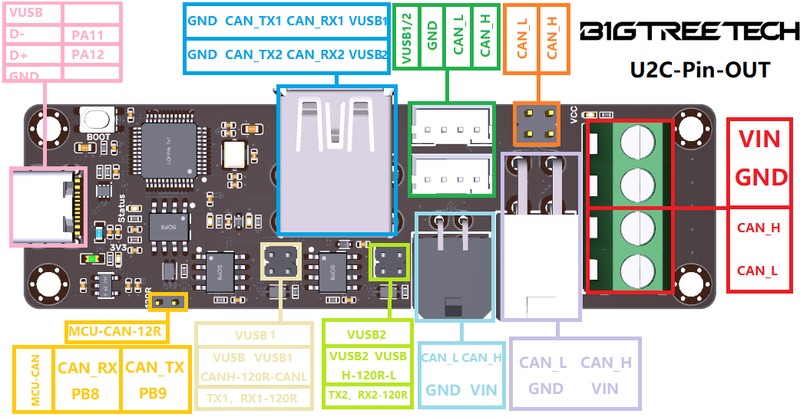
The BTT U2C V2.1 is a USB-to-CAN bridge board built on the STM32F072, providing the critical link between a mainboard's USB port and a CAN bus network of toolhead boards like the EBB36. At $15, it is the cheapest way to add CAN bus capability to any 3D printer mainboard that lacks a native CAN transceiver.
Essential glue hardware for CAN bus setups — simple, cheap, and reliable.
Where to Buy
Pros
- At $15, the cheapest path to adding CAN bus to any mainboard
- Simple USB-in, CAN-out bridge — no complex configuration beyond Klipper's canbus setup
- STM32F072 with hardware CAN peripheral — reliable signal conversion
- Compact form factor fits anywhere in the electronics bay
Cons
- Unnecessary if your mainboard already has CAN bus (Octopus V1.1, Manta M8P)
- Adds another board and USB connection to the system — one more potential failure point
- Standard CAN at 1Mbit/s — does not support CANFD's 5Mbit/s data phase
- It is a bridge only — does not control any motors, heaters, or fans
What the U2C Does
The U2C V2.1 solves one specific problem: your mainboard does not have CAN bus, but your toolhead board (EBB36, EBB42) communicates via CAN. The U2C sits between the two, receiving CAN frames from the toolhead and forwarding them as USB serial data to the Klipper host, and vice versa.
The STM32F072's hardware CAN peripheral handles the protocol conversion at the silicon level. From Klipper's perspective, the EBB36 toolhead board appears as a CAN device on a bus interface provided by the U2C. Configuration requires setting the CAN bus speed (typically 500kbit/s or 1Mbit/s) and finding the toolhead's CAN UUID via Klipper's canbus_query command. Once configured, the bridge is invisible to the user.
When You Need It (and When You Don't)
The U2C is required when pairing a CAN toolhead board with a mainboard that lacks CAN bus. This includes the BTT SKR Mini E3 V3, older SKR boards, MKS boards without CAN, and any mainboard from before 2022 when CAN became common in 3D printing.
The U2C is unnecessary — and potentially counterproductive — with mainboards that have native CAN transceivers. The Octopus V1.1 and Manta M8P both have CAN headers. Using a U2C with these boards adds an extra USB connection and an extra point of failure without benefit. With the Manta M8P specifically, the U2C bottlenecks CANFD down to standard CAN speeds, losing the 5Mbit/s data throughput advantage.
Installation and Klipper Configuration
Physical installation is straightforward and forgiving. The U2C V2.1's compact 40×30mm PCB mounts anywhere in the electronics bay — most builders attach it to a DIN rail with a printed clip or use VHB tape near the mainboard. Unlike the mainboard or toolhead board, the U2C has no thermal requirements and generates negligible heat, so placement is purely about cable routing convenience. Mount it close to the mainboard to keep the USB cable short, and route the CAN cable toward the cable chain entry point.
Wiring requires three connections. First, a USB cable from the U2C to the Klipper host — Raspberry Pi, BTT Pi, CB1 on a Manta, or Pad 7. This carries the bridged CAN data to Klipper. Second, a 4-wire cable from the U2C's CAN connector to the EBB36 toolhead: 24V power, ground, CAN-H, and CAN-L. Use twisted-pair wire for the CAN-H and CAN-L lines to maximize noise immunity — standard Ethernet cable with two pairs works well and is readily available. Third, 24V power input from the printer's PSU to the U2C, which the U2C passes through to power the EBB36 and its connected components (heater, fans, stepper) via the CAN cable.
Termination resistors are critical and the single most common source of CAN bus problems. The CAN specification requires a 120-ohm termination resistor at each end of the bus — one on the U2C and one on the EBB36. The U2C V2.1 has a termination resistor enabled by default. The EBB36 has a solder jumper that must be bridged to enable its termination. Missing or asymmetric termination causes signal reflections that produce intermittent communication failures — maddening to debug because they appear random, temperature-dependent, and sometimes only manifest during fast printing moves that increase CAN bus traffic. Always verify termination with a multimeter: measure resistance between CAN-H and CAN-L with power off. You should read approximately 60 ohms (two 120-ohm resistors in parallel).
Klipper configuration starts with finding the toolhead's CAN UUID. After connecting and powering everything, run ~/klippy-env/bin/python ~/klipper/scripts/canbus_query.py can0 on the Klipper host. This scans the CAN bus and returns the unique identifier for each connected device. Add the returned UUID to your printer.cfg under a new MCU section: [mcu EBBCan] with canbus_uuid and canbus_interface = can0 parameters. All EBB36 pin references in the config use the EBBCan: prefix to distinguish them from the mainboard MCU.
Common troubleshooting issues follow predictable patterns. Mismatched baud rates between the U2C firmware and the Klipper CAN interface configuration (both must use 1000000 for 1Mbit/s) cause complete communication failure — no devices appear in canbus_query. CAN cables exceeding 2 meters without shielding or additional termination nodes experience signal degradation, especially in enclosed printers with high ambient temperatures. Forgetting to flash the U2C with the correct candlelight firmware variant for your hardware revision produces a USB device that enumerates but cannot bridge CAN traffic. Firmware updates use DFU mode: hold the boot button while plugging in USB, and flash the binary via dfu-util from the command line.
One detail that trips up first-time builders is the CAN network interface setup on the Linux host. The U2C appears as a USB device that needs to be configured as a CAN network interface using the ip link command. On MainsailOS and most Klipper OS images, this is handled by a systemd service or udev rule, but manual installations require adding a network interface configuration file. The interface must be set to the same bitrate as the U2C and EBB36 firmware — typically 1000000 for 1Mbit/s. Once the can0 interface is up, the canbus_query script discovers devices immediately. If the query returns nothing, check three things in order: verify the can0 interface exists with ip link show can0, confirm the bitrate matches across all three layers (Linux interface, U2C firmware, EBB36 firmware), and measure the termination resistance between CAN-H and CAN-L. Nine out of ten CAN setup failures trace back to one of these three configuration mismatches. Once the initial configuration is verified and working, the U2C requires zero ongoing maintenance — it silently bridges traffic between USB and CAN with no user interaction, no log monitoring, and no periodic restarts needed.
Full Specifications
Processor
| Specification | Value |
|---|---|
| Architecture | ARM Cortex-M0 [1] |
| CPU Cores | 1 [1] |
| Clock Speed | 48 MHz [1] |
I/O & Interfaces
| Specification | Value |
|---|---|
| CAN Bus | USB to CAN bus bridge (1Mbps) [1] |
| USB | USB-C (host connection) [1] |
Power
| Specification | Value |
|---|---|
| Input Voltage | 12-24 V [1] |
Physical
| Specification | Value |
|---|---|
| Dimensions | 37 x 22 mm [1] |
| Form Factor | USB-to-CAN bus bridge [1] |
Who Should Buy This
The SKR Mini E3 has no CAN bus transceiver. The U2C bridges USB to CAN, enabling an EBB36 toolhead board. Total cost: $15 U2C + $28 EBB36 = $43 for CAN toolhead capability on a budget mainboard.
The Octopus V1.1 has a native CAN bus header, so the U2C is not strictly required. However, some builders prefer using the U2C via USB to keep the Octopus's CAN header free or to simplify the Klipper network topology.
The Manta M8P has native CANFD support with a dedicated transceiver. The U2C adds unnecessary complexity and bottlenecks CANFD down to standard CAN speeds. Connect the EBB36 directly to the Manta's CAN header.
The U2C supports multiple CAN devices on a single bus. You can connect two EBB36 boards (e.g., for an IDEX dual-toolhead setup) to one U2C. Each device gets a unique CAN ID in the Klipper config.
If configuring firmware and wiring stepper drivers feels like a lot, the Bambu Lab A1 Mini prints out of the box for under $200.
Better alternative: Bambu Lab A1 Mini
Ecosystem & Community
The U2C V2.1 is the essential bridge that enables CAN bus on any 3D printer mainboard. It converts USB to CAN, allowing mainboards without native CAN transceivers to communicate with EBB36/42 toolhead boards. Simple, passive, reliable.
Compatible Software
What to Build First
Connect the U2C to your mainboard's USB port, wire it to an EBB36 toolhead, and enable CAN bus communication on a printer that was never designed for it. The cheapest path to single-cable toolhead wiring.
View tutorial →Must-Have Accessories
Video Reviews & Tutorials
Tutorials & Resources
- BTT U2C WikiOfficial setup guide, firmware, and wiring diagramsdocs
- Klipper CAN Bus DocumentationOfficial Klipper CAN bus setup and troubleshooting referencegithub
Frequently Asked Questions
Do I need a U2C if my mainboard has CAN bus?
No. If your mainboard (Octopus V1.1, Manta M8P) has a native CAN bus header, connect the EBB36 directly. The U2C is only needed for mainboards without CAN bus capability.
How do I wire the U2C to the EBB36?
Four wires: 24V power, ground, CAN-H, and CAN-L from the U2C to the EBB36. The U2C connects to the Klipper host via USB. Add 120-ohm termination resistors at both ends of the CAN bus.
Can I connect multiple toolhead boards to one U2C?
Yes. CAN bus supports multiple devices on a single bus. Each toolhead board gets a unique CAN UUID. This works for IDEX (dual independent toolhead) setups with two EBB36 boards sharing one U2C.
Does the U2C V2.1 support CANFD?
No. The STM32F072's CAN peripheral supports standard CAN only, maxing out at 1Mbit/s. For CANFD at 5Mbit/s, you need a mainboard with native CANFD support like the BTT Manta M8P.
What firmware does the U2C run?
The U2C runs candlelight firmware, an open-source USB-to-CAN bridge firmware. BTT provides pre-flashed boards. Re-flashing is possible via DFU mode if needed. The U2C does not run Klipper — it is a pure protocol bridge.
Is the U2C reliable for long-term printing?
Yes. CAN bus was designed for automotive reliability. The U2C adds one USB connection and one CAN transceiver to the signal path. Failure rates are comparable to a direct USB connection between host and mainboard.
What is the U2C's CAN bus speed?
Up to 1Mbit/s standard CAN. Most Klipper CAN setups use 500kbit/s or 1Mbit/s. At 1Mbit/s, the bus handles all stepper commands, thermistor readings, and fan control for a single toolhead with bandwidth to spare.
Compared In
BIGTREETECH U2C V2.1 appears in 1 buying guide on PAM Finds. These weigh it directly against the alternatives.