BIGTREETECH Octopus V1.1
The BTT Octopus V1.1 is a feature-rich 3D printer mainboard built on the STM32F446 at 180MHz, supporting 8 plug-in stepper drivers, 4 hotend heaters, 1 heated bed, 6 PWM fans, and CAN bus. At $65 it has become the de facto standard for Voron 2.4 and custom CoreXY builds running Klipper firmware.
The Voron community standard — overkill for an Ender 3, perfect for custom multi-stepper builds.
Where to Buy
Pros
- 8 plug-in stepper driver slots support TMC2209, TMC5160, or any STEP/DIR driver
- 4 hotend heater outputs + 1 heated bed output handle multi-material setups
- CAN bus header enables toolhead boards like the EBB36 for cleaner wiring
- 6 PWM fan headers with voltage selection (5V/12V/24V) per header
- Mature Klipper support with extensive Voron community documentation
Cons
- STM32F446 at 180MHz is slower than the Manta M8P's STM32H723 at 550MHz
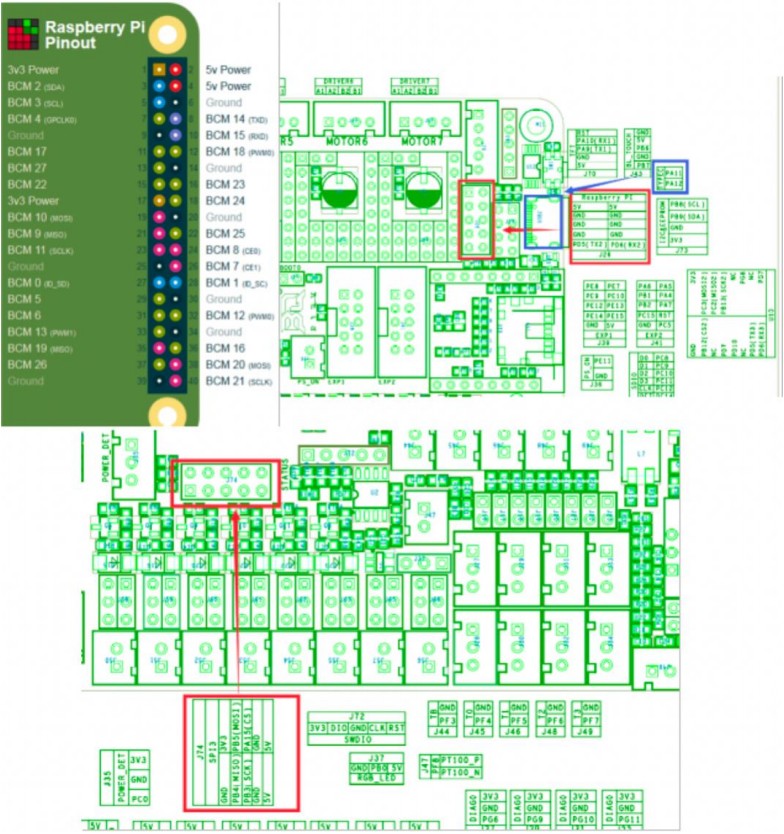
- No onboard SBC socket — requires separate Raspberry Pi or CB1/CB2 for Klipper host
- Large 160×100mm footprint may not fit smaller printer enclosures
Driver Flexibility and Stepper Support
The Octopus V1.1's defining feature is its 8 plug-in stepper driver slots. Each accepts any STEP/DIR driver in the standard Pololu form factor — TMC2209 for quiet operation with sensorless homing, TMC5160 for high-voltage 48V steppers, TMC2226 for improved thermal performance, or budget DRV8825 for builds where noise is not a concern. This flexibility matters because a Voron 2.4 uses 6 steppers minimum (2 AB, 4 Z), and adding a second extruder or filament runout sensor consumes a seventh. The eighth slot is your safety margin.
All 8 slots support sensorless homing via StallGuard when using TMC drivers. The board provides independent UART/SPI configuration per driver, so you can mix driver types — for example, TMC5160s on the AB motors for high-speed moves and TMC2209s on the Z axis for silent operation. Each driver slot includes its own heatsink mounting point and the board ships with thermal pads. Current sense resistors on each slot allow Klipper to monitor real-time motor current, enabling stall detection and overcurrent protection without external hardware.
The practical impact is future-proofing. Start with TMC2209s for a quiet Voron 2.4, then swap individual slots to TMC5160 when you upgrade to a high-flow hotend and need faster acceleration. No resoldering, no new mainboard — just pull the old driver module and insert the new one. This plug-and-play upgradeability is why the Octopus dominates the Voron community despite newer boards being available.
Thermal Management and Heater Outputs
Four independent hotend heater outputs and one heated bed output make the Octopus suitable for multi-material printing configurations that other boards cannot support. Each hotend output handles up to 5A at 24V (120W) through individual MOSFETs, and the bed output manages up to 15A at 24V (360W) through a dedicated power MOSFET with flyback diode protection. These ratings are conservative — the Octopus handles sustained operation at these currents without auxiliary cooling on the MOSFETs, though adding airflow to the electronics bay is always recommended.
The 6 PWM fan headers each support per-header voltage selection between 5V, 12V, and 24V via jumpers. This eliminates the need for external buck converters when mixing fan voltages — run a 5V part-cooling fan alongside a 24V hotend fan and a 12V electronics bay fan from the same board. Each fan header is independently PWM-controllable from Klipper, enabling temperature-reactive fan curves that ramp up part cooling during bridging and reduce it during first-layer adhesion.
Temperature monitoring uses 4 thermistor inputs with 4.7K pullup resistors, compatible with standard NTC 100K, PT1000, and thermocouple boards via SPI. The four inputs mean you can monitor hotend temperature, heated bed temperature, chamber temperature, and a spare sensor (stepper driver heatsink, PSU intake, or ambient) simultaneously. Klipper's temperature_sensor module exposes all four readings in the Mainsail dashboard for at-a-glance thermal monitoring.
CAN Bus and Toolhead Integration
CAN bus support via a dedicated 2-pin header is the Octopus's most forward-looking feature. Paired with a BTT U2C USB-to-CAN bridge and an EBB36 toolhead board, the entire printhead wiring reduces to a single 4-wire cable carrying power, ground, CAN-H, and CAN-L. This eliminates the thick cable bundle (typically 12+ wires for hotend heater, thermistor, fan, probe, and extruder stepper) that causes drag and wear on CoreXY machines running at 300+ mm/s. The reduced cable mass also improves input shaper performance by lowering the toolhead's effective weight.
The CAN bus runs at up to 1Mbit/s, which is sufficient for real-time stepper control, temperature monitoring, and fan PWM. During input shaper calibration with an ADXL345 accelerometer mounted on the toolhead, the 1Mbit/s bandwidth handles the accelerometer data stream without packet loss at standard sample rates. For higher sample rates or multiple simultaneous sensors, the Manta M8P's CANFD at 5Mbit/s provides more headroom — but for the vast majority of Voron builds, the Octopus's standard CAN is sufficient.
The alternative to CAN bus is running all wiring directly from the Octopus to the toolhead. This works and is how most Ender 3 and similar bed-slinger printers are wired, but CoreXY machines with fast-moving toolheads benefit enormously from the reduced cable drag. If you are building a Voron or any high-speed CoreXY, plan your CAN toolhead setup from the start — retrofitting later means re-routing cable chains and reprinting toolhead mounts.
Community Documentation and Ecosystem
The Octopus V1.1's greatest competitive advantage is not a spec — it is the community. As the de facto Voron mainboard since 2022, it has accumulated more Klipper configuration examples, wiring diagrams, troubleshooting threads, and video tutorials than any other 3D printer mainboard. The Voron Design GitHub repository includes reference pinout configurations specifically for the Octopus. The r/klippers subreddit (50K+ members) and the Voron Discord (100K+ members) have answered virtually every wiring and configuration question already.
This documentation advantage matters most for first-time builders. When you follow a Voron 2.4 build guide, the wiring photos show an Octopus. When you search for "Voron Klipper config," the top results reference the Octopus. When your stepper driver overheats at 3 AM during a build, the Discord search results show Octopus-specific solutions. The Manta M8P and MKS SKIPR are both capable boards, but their documentation ecosystems are years behind the Octopus.
BTT's own GitHub repository for the Octopus includes full schematics, Klipper firmware binaries, pinout diagrams, and sample configurations. Firmware updates are straightforward: download the binary, copy to SD card, power cycle. The V1.1 revision specifically fixed several pain points from the V1.0 — improved driver socket spacing to prevent heat migration between adjacent drivers, better thermal management on the bed MOSFET, and corrected pinouts for fan voltage selection jumpers.
Common Gotchas
The V1.0 had a known issue where fan voltage selection jumpers were mislabeled on the silkscreen. The V1.1 fixes this, but if you bought a used board, verify you have the V1.1 revision (printed on the PCB near the USB port). V1.0 boards with incorrect fan voltages can damage 5V fans by supplying 24V.
TMC2209 drivers run HOT without proper heatsinking. At 1.0A RMS drive current, the drivers reach 100°C+ within minutes without heatsinks and airflow. Every driver socket needs a heatsink with thermal pad. Add a 40mm fan blowing across the drivers in the electronics bay — this is not optional.
The CAN bus header does not include a 120-ohm termination resistor. You need termination at BOTH ends of the CAN bus (one on the Octopus, one on the EBB36 toolhead). Missing termination causes intermittent CAN communication errors that are maddening to debug — the printer works 90% of the time but randomly loses toolhead communication.
The SD card slot is physically blocked by some TMC5160 drivers in slot 8 due to the driver's heatsink height. If you use TMC5160s, insert the SD card before installing the driver in slot 8, or use a low-profile heatsink.
Full Specifications
Processor
| Specification | Value |
|---|---|
| Architecture | ARM Cortex-M4 [1] |
| CPU Cores | 1 [1] |
| Clock Speed | 180 MHz [1] |
I/O & Interfaces
| Specification | Value |
|---|---|
| Stepper Drivers | 8 (plug-in) [1] |
| Driver Type | TMC2209, TMC5160 compatible [1] |
| Thermistor Inputs | 4 [1] |
| Heater Outputs | 4 (hotend) + 1 (bed) [1] |
| Fan Ports | 6 (PWM controllable) [1] |
| Probe Port | BLTouch, Klicky, inductive [1] |
| CAN Bus | Yes (via expansion) [1] |
| USB | USB-C [1] |
| SD Card | MicroSD [1] |
Power
| Specification | Value |
|---|---|
| Input Voltage | 12-24 V [1] |
| MOSFET Current | 10 A [1] |
| Bed MOSFET Current | 15 A [1] |
Physical
| Specification | Value |
|---|---|
| Dimensions | 160 x 100 mm [1] |
| Form Factor | Printer mainboard (BTT standard) [1] |
Who Should Buy This
The Octopus V1.1 is the most documented mainboard for Voron 2.4. Every Voron config guide and wiring diagram references it. 8 driver slots cover A/B steppers, Z×4, extruder, plus a spare.
The Ender 3 uses 4 steppers. The Octopus has 8 driver slots, 4 hotend outputs, and costs $20 more than the SKR Mini E3 V3 which drops in without rewiring.
Better alternative: BIGTREETECH SKR Mini E3 V3.0
The onboard CAN bus header connects directly to an EBB36 toolhead board via a U2C bridge or direct wiring, reducing the cable bundle to the printhead to just 4 wires.
At $65, the Octopus is mid-range. The MKS SKIPR at $55 offers 7 drivers with an onboard RPi header, but the Octopus has stronger community support and more documentation.
Better alternative: Makerbase MKS SKIPR
If configuring firmware and wiring stepper drivers feels like a lot, the Bambu Lab A1 Mini prints out of the box for under $200.
Better alternative: Bambu Lab A1 Mini
Ecosystem & Community
The BTT Octopus is the Voron community standard mainboard. Every Voron 2.4 wiring diagram and Klipper config guide references it. The Klipper + Moonraker + Mainsail/Fluidd stack provides a complete web-controlled 3D printing platform.
What to Build First
Flash Klipper firmware via SD card, connect to a Raspberry Pi host, run input shaper calibration with an ADXL345 accelerometer, and tune pressure advance. The Octopus transforms from bare PCB to precision motion controller.
View tutorial →Must-Have Accessories
Tutorials & Resources
- BTT Octopus Complete GuideComprehensive wiring guide, Klipper configuration, and pin reference for the Octopus V1.1tutorial
- BTT Octopus WikiOfficial pinout, schematic, and firmware binariesdocs
- Voron DesignOfficial Voron printer designs with Octopus-specific wiring diagrams and configsgithub
- Klipper FirmwareOpen-source firmware with dedicated Octopus board definition and reference configsgithub
Frequently Asked Questions
Does the BTT Octopus V1.1 work with Klipper?
Yes. The Octopus V1.1 is one of the most widely used Klipper mainboards. The Voron community maintains reference Klipper configurations for it, and BTT provides a pre-built Klipper firmware binary. Flash via SD card or DFU over USB.
What is the difference between the Octopus V1.1 and the Manta M8P?
The Manta M8P uses a faster STM32H723 (550MHz vs 180MHz), has an onboard SBC socket for CB1/CB2/CM4, and supports CANFD. The Octopus V1.1 has more community documentation, a proven track record, and costs $34 less. Both have 8 driver slots.
Can I use the Octopus V1.1 in an Ender 3?
Physically yes, but it is overkill. The Ender 3 uses 4 steppers and 1 hotend. The BTT SKR Mini E3 V3 at $45 is a drop-in replacement with 4 pre-soldered TMC2209 drivers and a matching form factor.
What stepper drivers does the Octopus V1.1 support?
Any STEP/DIR stepper driver in the standard Pololu form factor. Popular choices include TMC2209 (quiet, sensorless homing), TMC5160 (high voltage up to 60V, high current), and TMC2226. Drivers are plug-in, not soldered.
Does the Octopus V1.1 support CAN bus?
Yes. It has a dedicated CAN bus header that connects to toolhead boards like the BTT EBB36 via a U2C bridge. This reduces printhead wiring to 4 wires. CAN bus runs at up to 1Mbit/s.
Do I need a Raspberry Pi with the Octopus V1.1?
For Klipper, yes — you need a separate host computer. A Raspberry Pi 3B+ or newer, BTT CB1 ($35), BTT Pi ($30), or any Linux SBC works. The host connects via USB. For Marlin firmware, no host is needed.
Is the Octopus V1.1 still worth buying over the V1.0?
Yes. The V1.1 fixes several known issues from V1.0 including improved driver socket spacing, better thermal management on the bed MOSFET, and corrected pinouts for fan voltage selection. The price is the same.
Compared In
BIGTREETECH Octopus V1.1 appears in 3 buying guides on PAM Finds. These weigh it directly against the alternatives.